
Amazon Brand Analytics: Reports and Metrics Guide
Learn how Amazon Brand Analytics reports reveal search terms, click share, and competitor data, and how to use these insights to grow sales in 2026.
Amazon Brand Analytics is a gated Seller Central capability for Brand Registry brands, organized around five reports that measure search-funnel events by query, ASIN, basket, and repeat behavior. Agent Central keeps those reports synced so agents can query them alongside ads and catalog data.
Brand Analytics is what a brand owner reaches for when Seller Central exports get messy and the question is no longer “what sold?” but “what happened in search before the sale?” The tool matters because it ties visibility, engagement, and conversion to specific Amazon search and catalog events, not to guesses.
Table of Contents
- What Amazon Brand Analytics Actually Measures
- The Five Brand Analytics Reports Explained
- Using Brand Analytics for Ads and Catalog Decisions
- Connecting Brand Analytics Data to Agent Central
- Interpreting Brand Analytics Without Overclaiming
- Best Practices for Brand Analytics Workflows
What Amazon Brand Analytics Actually Measures
Amazon Brand Analytics is not a general marketplace report. It's a gated Seller Central capability for brands enrolled in Amazon Brand Registry, and access depends on a Brand Representative role assigned to someone internal to the brand and responsible for selling it in the Amazon store. That eligibility model makes it more useful for private-label operators and brand owners than for unregistered resellers or generic third-party sellers, because the data is framed around the brand's own catalog and customer demand.
The practical value is simple. Amazon aggregates customer search and purchase behavior at the brand and ASIN levels, while withholding personally identifiable customer information. That means the numbers are meant for diagnosis, planning, and workflow checks, not customer-level profiling. For operators who live in ad console exports and catalog reports, that distinction matters because Brand Analytics is a measurement system, not just a keyword list.
What the core reports actually represent
The search-funnel reports map different questions to different fields. Search Query Performance covers the path from query to purchase, Search Catalog Performance tracks ASIN exposure and conversion from search results, Market Basket Analysis shows co-purchase patterns, and Repeat Purchase Behavior captures customer return behavior for branded items. Search Terms remains the demand-discovery view.
Practical rule: treat each report as evidence about one slice of behavior, then reconcile it with ads, sales, and inventory before changing anything material.
A compact way to think about the measurement surface is below.
| Report | Core events measured | Primary seller question |
|---|---|---|
| Search Terms | Popular queries and clicked products | What demand is showing up in search? |
| Search Query Performance | Query volume, impressions, clicks, add-to-cart, purchases | Where does the search funnel leak? |
| Search Catalog Performance | Impressions, clicks, carts, purchases by ASIN | Which ASINs win visibility and conversion from search results? |
| Market Basket Analysis | Products bought together | What bundles, variations, or cross-sells are implied by basket behavior? |
| Repeat Purchase Behavior | Repeat ordering patterns | Which branded items bring customers back? |
For teams building dashboards and agent workflows, it helps to compare Brand Analytics against broader sales views. A useful external reference for that mindset is sales dashboard examples for 2026, because the core issue is always the same, choosing the right metric for the right decision.
The best way to use Brand Analytics in an MCP workflow is as a governed evidence source. That lines up cleanly with Agent Central's analytics approach for Amazon, where the point is to keep structured facts available to the agent without turning the dashboard into a guessing engine.
The Five Brand Analytics Reports Explained
Search Terms and Search Query Performance
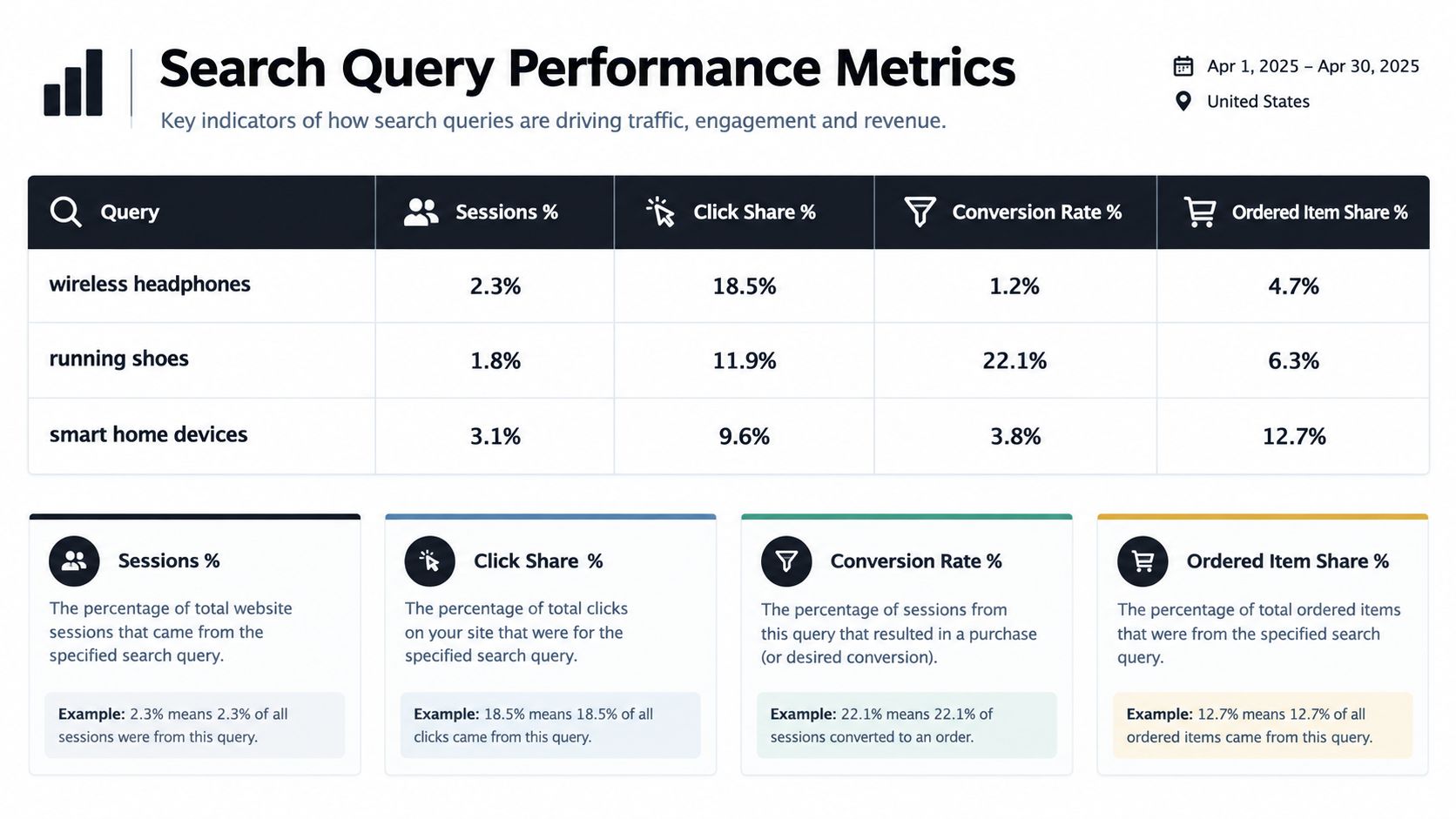
Search Terms is the discovery layer. It shows the terms shoppers use and the products that get clicked for those terms, which makes it useful for spotting where demand is concentrated and which ASINs are getting attention. Search Query Performance goes one level deeper and turns that demand into a funnel, with query volume, impressions, clicks, add-to-cart events, and purchases.
Two questions usually matter most. Which high-volume terms are attracting attention but not converting, and which queries are bringing efficient traffic into the brand's catalog? Those answers are useful before touching bids, titles, or images.
Search Catalog Performance
Search Catalog Performance shifts the unit of analysis from query to ASIN. Amazon defines each row as one ASIN in the brand's catalog, aggregated across all search queries in the selected period, with impressions, clicks, add-to-cart actions, and purchases reported for that ASIN. Because it includes search-results exposure, not the entire detail-page universe, it's best for understanding how a product performs once it enters search visibility.
This report answers questions like whether one ASIN is getting shown but not clicked, whether another is earning clicks but losing at cart stage, and whether a listing update changed search-result behavior. It's a useful check when catalog changes need validation, because it shows whether search exposure and purchase behavior moved together.
A weak ASIN result isn't always a listing problem. It can also be a positioning problem, a competition problem, or a traffic mix problem.
Market Basket Analysis and Repeat Purchase Behavior
Market Basket Analysis shows what customers buy with a product or brand item. The report is most useful for variation strategy, bundle ideas, and accessory planning, because it reveals what shoppers naturally group together. Sellers usually ask whether a complementary item keeps appearing in the basket, whether two ASINs belong in the same buying journey, and whether a bundle would reduce friction.
Repeat Purchase Behavior is the retention report. It focuses on whether branded products attract returning customers and how repeat ordering behaves across the catalog. That makes it useful for replenishment goods, consumables, and any brand that wants to understand whether first-order demand turns into repeat demand.
The reporting periods matter too. Amazon's Brand Analytics reporting supports week, month, and quarter views, and monthly requests can cover up to 17 months of history, which is enough for trend work without pretending the data is endless. The API also expects valid first and last days for the selected period, so a workflow has to respect the reporting boundary instead of stitching periods together incorrectly. Amazon's documentation also says Brand Analytics data is generally available within 72 hours after period close, so the operational rhythm needs a delay buffer rather than same-day assumptions. Amazon announced downloadable Brand Analytics data in March 2023, which made repeatable historical analysis easier to govern.
| Report group | Supported periods | Typical use case |
|---|---|---|
| Search Terms and Search Query Performance | Week, month, quarter | Demand tracking, funnel review, query-level checks |
| Search Catalog Performance | Week, month, quarter | ASIN visibility and conversion review |
| Market Basket Analysis | Week, month, quarter | Bundle and variation planning |
| Repeat Purchase Behavior | Week, month, quarter | Retention and replenishment analysis |
Using Brand Analytics for Ads and Catalog Decisions
Brand Analytics becomes useful when it's paired with ads and catalog data, not when it's treated like a standalone answer machine. A common workflow is to pull Search Query Performance, then look for high-volume queries that show impressions but weak purchases or no useful ad coverage. That does not automatically mean the keyword is bad. It may mean the ad group, listing, or product mix is mismatched.
The practical next step is usually comparison, not action.
What sellers should check before changing bids or listings
A query-level comparison should ask whether the brand's ASIN is holding its own against the top results, especially in the Query Detail view where Amazon compares the seller's ASIN with the top 10 ASINs using a Query ASIN score. If the brand gets impressions but lags in clicks or cart adds, the issue could be creative, price perception, review density, or competitive positioning. If clicks are fine but purchases lag, the likely bottleneck is further down the listing or cart path.
Search Catalog Performance is the right report when the question is about the ASIN itself rather than the query. It helps validate a title update, image swap, or variation change by showing whether search-result impressions and conversions moved together. That's the kind of evidence a manager can use before touching price or inventory.
For bundle and variation decisions, Market Basket Analysis is the cleaner input. It shows which products are bought together in aggregate, which makes it easier to distinguish a real purchase pattern from a one-off intuition. Repeat Purchase Behavior then tells the operator whether branded items are behaving like replenishment products or one-time purchases.
The key discipline is cross-checking. Brand Analytics is strongest when it's reconciled with advertising, retail sales, inventory, and fulfillment before a bid change or catalog change goes live. Amazon Ads optimization guidance is useful here because the ad-side decision should always be based on the search-funnel evidence plus the rest of the account context, not one dashboard tile.
| Seller decision | Supporting Brand Analytics report | Required supporting data |
|---|---|---|
| Check whether a query deserves ad coverage | Search Query Performance | Ads console, search term data, sales by query |
| Validate a listing change | Search Catalog Performance | Retail sales, catalog content, inventory |
| Explore bundle or variation ideas | Market Basket Analysis | ASIN relationships, margins, fulfillment constraints |
| Assess replenishment potential | Repeat Purchase Behavior | Order history, customer cohorts, stock levels |
Connecting Brand Analytics Data to Agent Central
Agent Central keeps Brand Analytics reports synced so Claude, ChatGPT, OpenClaw, Cursor, and other MCP clients can read them alongside Seller Central and Amazon Ads data. The setup path is straightforward, sign up at agentcentral.to, connect Seller Central and Amazon Ads through Amazon's authorization, then add the connection to the AI client. The quickstart for Claude is documented at Agent Central's Claude setup guide, and the broader MCP integration path is covered in Agent Central's MCP server integration docs.
That matters because Brand Analytics is a reporting surface with scope limits, while an agent workflow needs structured reads across multiple Amazon systems. Agent Central returns facts, metrics, classifications, and source-provided fields. It does not decide what should happen next, and it doesn't replace the operator's judgment about bids, listings, or inventory.
Why MCP access changes the workflow
Manual exports are fine when a team needs one report once. They're clumsy when the question is recurring, such as whether a query has ad coverage, whether a catalog change altered search-result behavior, or whether basket patterns line up with an FBA replenishment cycle. An MCP client can query Brand Analytics next to ads and sales data, which reduces the time spent reconciling tabs without turning the output into an opaque recommendation.
For teams that also need process discipline outside Amazon, the same pattern is useful in adjacent workflows such as AI contract review. The shared need is the same, structured facts, clear scope, and auditable outputs.
The value is not autonomy. The value is a cleaner handoff from Amazon's fields to the human who approves the change.
Agent Central is especially relevant where access needs to stay scoped and separate by seller account. That keeps Brand Analytics reads from bleeding into broader account data and makes it easier to audit what a workflow checked before a write was approved.
Interpreting Brand Analytics Without Overclaiming

Brand Analytics is easy to overread. Amazon's own framing is narrower than many guides imply, the metrics reflect search-results activity, and they do not replace advertising dashboards or broader Amazon reports. The dashboard includes organic and Sponsored Products activity that originates in search results, but it excludes search-page widgets like Top Rated and New Arrivals.
That scope creates the most common analytical mistake. A low purchase share can mean the product is leaking after search exposure, but it can also mean the sales are happening elsewhere, through browse pages, recommendations, external traffic, repeat buyers, or other ad placements. A seller who changes bids based only on Brand Analytics can chase the wrong bottleneck.
What the dashboard is not telling you
The safest interpretation is to treat the report as search-funnel evidence, not total business performance. A weak result in Search Query Performance might point to discoverability, listing quality, competitive pressure, or conversion friction, but it doesn't prove which one without other data. The same caution applies to catalog performance, where an ASIN's search-result behavior can look weak even if the rest of the business is healthy.
Another small but important detail is Amazon's use of unavailable values. Amazon notes that “-” can mean the metric was not captured for the period, or that the metric is new. That means a blank-looking field should not be forced into zero in a spreadsheet or in an agent output.
Practical rule: preserve unavailable values as unavailable, then reconcile them with ad, sales, inventory, and fulfillment data before drawing conclusions.
A disciplined workflow starts with the report, then checks the rest of the account. If the search funnel is weak, ads may be underserving, the listing may be underperforming, stock may be limiting conversion, or the sales may be flowing through a non-search channel. Brand Analytics is useful because it makes that diagnosis possible, not because it settles it by itself.
Best Practices for Brand Analytics Workflows
Use the same reporting period every time the question is recurring, because week, month, and quarter answers do different jobs. Keep the raw fields intact, especially where Amazon marks data as unavailable, and don't compress search-only evidence into a total-performance judgment. When the analysis crosses reporting boundaries, respect the API period limits and keep async report timing in mind instead of assuming the export is finished the moment a job is submitted.
A practical checklist helps:
- Verify scope first: confirm the report is about search-funnel behavior, not the whole business.
- Match period to decision: use weeks for fast changes, months for trend checks, quarters for broader pattern review.
- Cross-check supporting data: compare Brand Analytics with ads, sales, inventory, and fulfillment before changing bids or listings.
- Preserve source fields: keep unavailable values visible instead of converting them into false zeros.
- Log the workflow: make sure the report, date range, and follow-up decision can be audited later.
Brand Analytics works best when the output is governed, repeatable, and connected to the rest of the account. In an MCP workflow, that means the agent reads the facts and the operator signs off on the action.
Agent Central connects Amazon Brand Analytics, Seller Central, and Amazon Ads data so agents can query the same reports without juggling exports. If the goal is to check search-funnel evidence, compare it with catalog and ads data, and keep the process auditable, visit agentcentral and connect the account the same way a reporting team would, only with structured reads for the AI client.
Related Agent Central pages
- Amazon Seller Central MCP server
Canonical hosted MCP overview for Seller Central, Ads, inventory, catalog, finance, and fulfillment data.
- Amazon seller data for AI agents
How Agent Central normalizes Amazon seller data before exposing it to AI clients.
- Connect Seller Central to Claude
Step-by-step path from Amazon OAuth to a Claude connector or MCP config.
- ChatGPT with Amazon seller data
ChatGPT-specific setup path for Amazon seller data through hosted MCP.
- Amazon Ads MCP server
Campaign, keyword, search term, budget, TACOS, and guarded ads-write tools.
- Ads tool reference
Parameter-level docs for Amazon Ads campaign, keyword, search term, budget, and TACOS tools.
Related reading
- Amazon Seller Assistant vs AI Agents
Compare Amazon Seller Assistant vs AI agents for operations. See how Agent Central connects Claude and ChatGPT to Seller Central and Ads data.
- Amazon Ads API: Access, Cost, Reporting and Limits
Is the Amazon Ads API free? How to get access, how async reporting and limits work, and when a hosted connection like Agent Central saves the build.
- Amazon TACoS: Formula, ACoS vs TACoS and Benchmarks
Amazon TACoS is ad spend divided by total sales. See the formula, worked examples, how it differs from ACoS, and which reports supply each input.
- PPC for E-Commerce: Amazon Ads Automation with AI Agents
Build automated PPC e commerce workflows using MCP. Connect Amazon Ads and Seller Central data to AI agents for faster, auditable campaign management.
Connect Amazon seller data to your AI client.
Agent Central gives Claude, ChatGPT, OpenClaw, Cursor, and other MCP clients structured access to Amazon Ads, Seller Central, inventory, orders, catalog, finance, and fulfillment data.