
Amazon Tacos: TACoS Metrics and Seller Guide
Decode Amazon Tacos search intent and master TACoS metrics. Learn to calculate ad efficiency, optimize listings, and automate reporting with Agent Central.
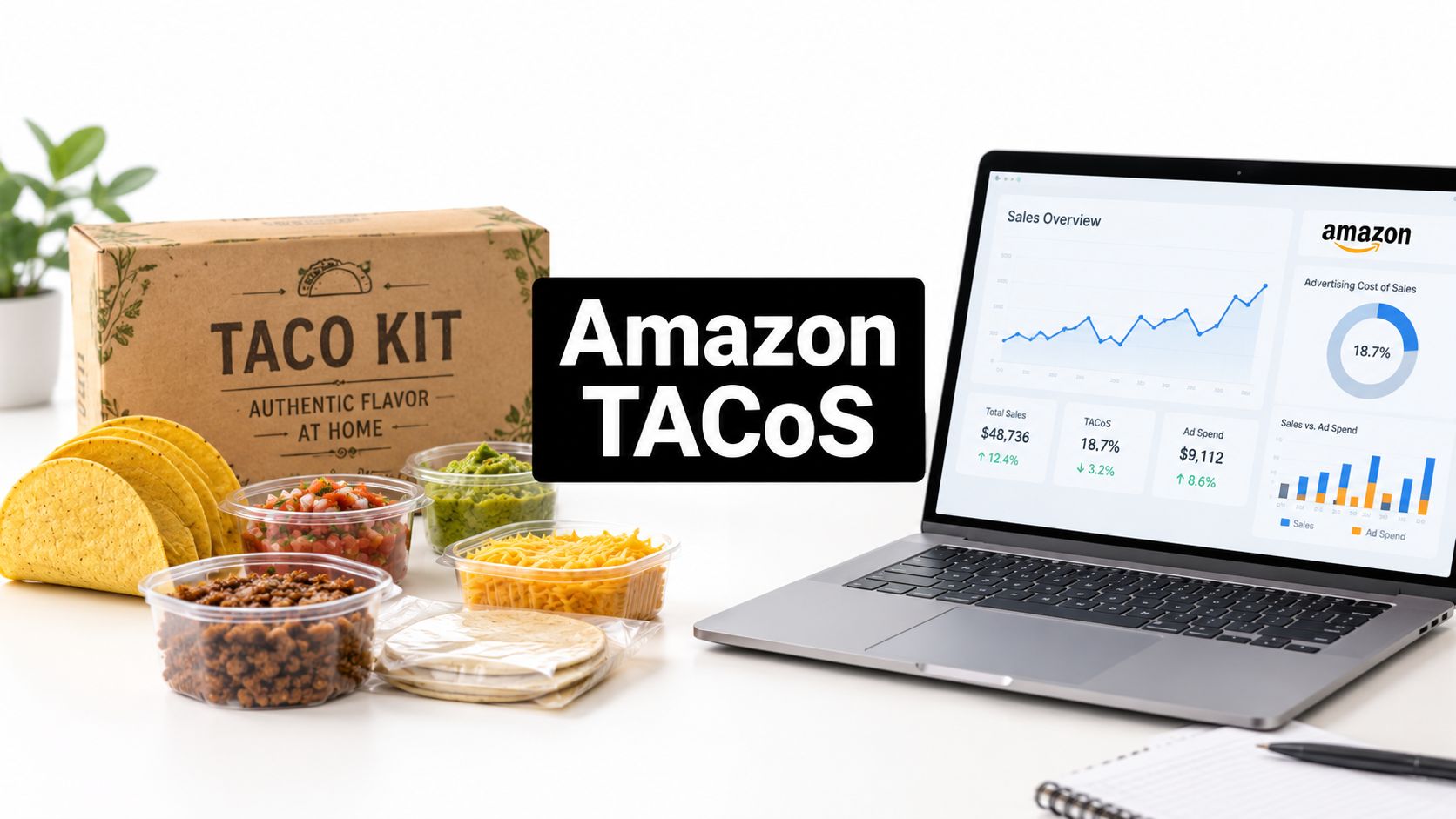
A seller searching “Amazon tacos” may be looking for a grocery kit, while an Amazon operator usually means TACoS, Total Advertising Cost of Sales. The first intent concerns shells, seasoning, fulfillment, and delivered serving cost. The second concerns whether advertising is supporting total revenue, including organic sales, rather than merely producing attributed orders.
Table of Contents
- Decoding the Amazon Tacos Search Intent
- Calculating TACoS From Seller Central Data
- Benchmarking TACoS Across Product Lifecycles
- Fulfillment and Listing Economics for Taco Kits
- Automating TACoS Reporting With Agent Central
- Connecting Seller Central to AI Clients
- Interpreting TACoS Beyond the Surface Metric
Decoding the Amazon Tacos Search Intent
A shopper searching Amazon tacos may want a taco kit, ready-to-eat meal, or grocery bundle. An Amazon seller, agency, or Ads manager may be researching TACoS, the advertising metric commonly typed as “tacos” because the acronym sounds like the food.
These searches create two different workflows. The shopper evaluates what arrives, how many servings it provides, whether the shells survive delivery, and whether the delivered price feels reasonable. The operator evaluates advertising dependence, the balance between paid and organic sales, and whether promoted ASINs are gaining demand beyond ad-attributed orders.
The physical product behind the keyword
Taco kits differ in more than branding. The Taco Bell Crunchy & Soft Taco Kit listing on Amazon, for example, specifies six soft tortillas, six crunchy corn shells, mild sauce, and taco seasoning. A comparable dinner-kit configuration specifies a 12.77-ounce box sold in a 10-pack. Those configurations create different customer expectations and fulfillment requirements.
Pack structure affects the economics before advertising enters the picture. A single box supports household trial or immediate consumption. A multipack can raise order value, while requiring more storage, handling, expiration management, and packaging protection. Inconsistent component details or unclear pack counts can attract clicks from shoppers expecting a different product, producing poor conversion even when the targeting is relevant.
The operator intent behind TACoS
TACoS relates paid activity to the full revenue base. ACoS evaluates ad-attributed sales against the spend assigned to those ads. TACoS evaluates whether total ordered sales are growing enough for advertising to represent a sustainable share of revenue. ROAS shows the revenue generated per unit of ad spend.
The same grocery promotion can affect physical demand, inventory movement, and advertising performance at once. Treating every change in “amazon tacos” search behavior as an ad signal can misclassify product demand as metric research, or the reverse.
Agent Central provides a practical control point for this split. Route product-intent signals toward listing, pack, inventory, and fulfillment checks. Route operator-intent signals toward Seller Central reporting and TACoS analysis. Keeping those workflows separate prevents a seller from changing bids when the underlying issue is a damaged shell, unclear quantity, or mismatched product detail.
Practical rule: Identify whether the search reflects a product question or a measurement question before changing bids, budgets, pack configurations, or listing content.
Calculating TACoS From Seller Central Data
TACoS measures advertising spend as a percentage of total sales. Total sales include ad-attributed revenue and organic revenue. The standard formula is:
TACoS = (Amazon ad spend ÷ total sales) × 100
For example, a seller that spends $2,000 on advertising and generates $20,000 in total revenue has a 10% TACoS, as explained in Bullseye Commerce's TACoS explanation. The denominator includes orders attributed to ads, orders generated through organic visibility, and other non-ad sales paths.
Build the calculation from matching reports
The arithmetic is simple. Selecting comparable data is where operators usually make mistakes.
- Amazon Ads reports provide ad spend and attributed sales. Select the relevant Sponsored Products, Sponsored Display, Sponsored Brands, or DSP reporting scope before evaluating account-level performance.
- Seller Central's Sales and Traffic business report provides total ordered product sales. Use this figure as the denominator for account-level TACoS because it represents the full product revenue being assessed.
- Match the date ranges. A seven-day advertising report compared with a calendar-month sales report produces a ratio that accurately describes neither period.
- Document attribution windows. Amazon Ads assigns sales to ad interactions under its applicable attribution rules. Seller Central records ordered product sales through its own reporting view. Record the selected window and avoid treating mismatched periods as directly comparable.
A launch week compared with a full month can distort the result. Promotions, delayed reporting, and order timing may make one period appear unusually strong or weak. Review a trend across several months instead of relying on one month, particularly when launches or promotions affect demand.
TACoS, ACoS, and ROAS answer different questions
| Metric | Formula | Primary Use Case |
|---|---|---|
| TACoS | Ad spend ÷ total sales × 100 | Measures advertising cost against the complete revenue base |
| ACoS | Ad spend ÷ ad-attributed sales × 100 | Evaluates efficiency of ad-attributed revenue |
| ROAS | Ad-attributed sales ÷ ad spend | Shows revenue generated per unit of ad spend |
ACoS and ROAS use ad-attributed sales. TACoS uses total sales, so it can decline when organic revenue grows faster than advertising spend. That decline does not establish profitability. Contribution margin, inventory availability, refunds, fees, and attribution timing still affect the commercial result.
For a broader attribution workflow, SourceLoop ecommerce attribution can add context on reconciling paid and non-paid activity across ecommerce reporting. Amazon-specific inputs should remain grounded in the applicable Ads and Seller Central reports. Teams documenting report fields, extraction limits, and recurring workflows can use this Amazon Seller Central reports guide as a reference.
Agent Central can automate the handoff between these data sources. A scheduled workflow can collect matching periods, preserve the report definitions, calculate TACoS, and flag changes for review. That is useful for grocery taco kits, where advertising movement may coincide with stock constraints, pack changes, or fulfillment issues. The metric still requires operator judgment, but the recurring collection and comparison work becomes easier to audit.
Product-level TACoS has a narrower scope
Account-level TACoS can include the advertising spend being evaluated across the account. Product-level TACoS requires more care because Amazon attributes Sponsored Products and Sponsored Display spend to individual products, while Sponsored Brands and DSP spend are not assigned to products in the same direct way.
Product-level TACoS by ASIN or parent ASIN therefore generally covers Sponsored Products and Sponsored Display. Do not present it as the product's complete advertising burden when brand or DSP investment is material.
Benchmarking TACoS Across Product Lifecycles
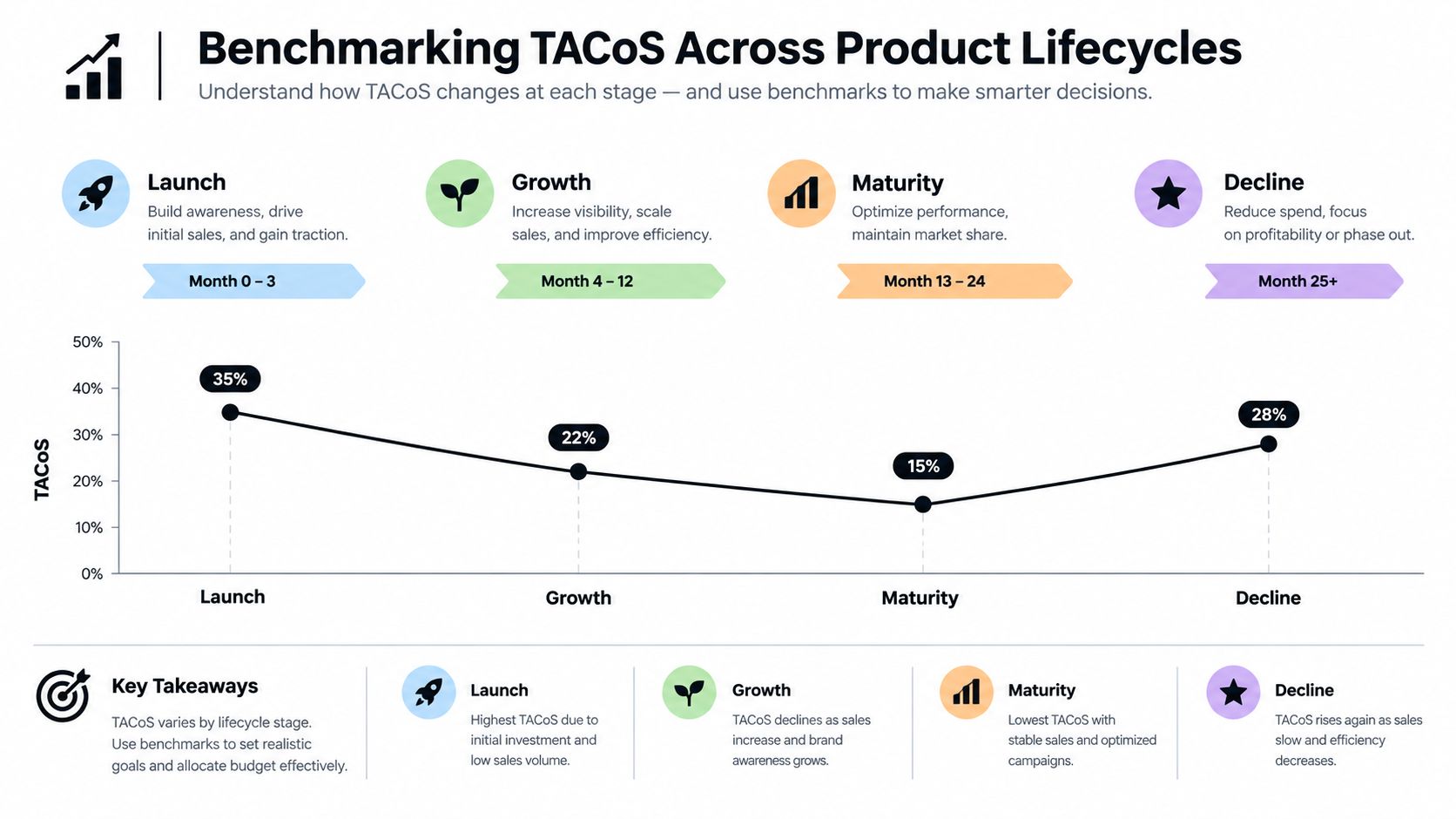
A new grocery taco-kit listing can spend heavily on ads before shoppers recognize the brand, while a mature listing may convert demand with much less paid support. One TACoS target cannot serve both situations, even when the products compete in the same category.
New listings commonly record 20% or more TACoS because advertising may generate much of the early sales volume before the detail page builds organic ranking, reviews, and sales history, according to Shark Labs Global's TACoS benchmark discussion. Established, well-ranked listings are often associated with TACoS below 10%, with a frequently cited mature range of approximately 5% to 10%. These figures are reference points, not automatic targets. Margin, cash flow, conversion, and the purpose of the spend determine whether the result is acceptable.
Launch economics differ from mature economics
During launch, advertising can introduce the listing to shoppers, create initial sales history, and support the growth of organic visibility. A high TACoS may therefore reflect deliberate market entry rather than inefficient bidding. The operator still needs to test whether the added sales justify the spend and whether available margin can carry the investment.
For a mature ASIN, the same ratio can signal a weakening organic position. If organic sales decline, advertising may be replacing revenue the listing once earned with less paid support. Rising TACoS alongside flat total sales points to growing advertising dependence, although inventory, ranking, conversion, pricing, and competitive conditions must be checked before changing bids.
A lifecycle review should separate these operating states:
- Launch: Higher TACoS can be an expected investment when margin and cash flow support it.
- Growth: Total sales should expand while advertising becomes a smaller share of revenue.
- Maturity: Lower, stable TACoS matters more when organic visibility and contribution margin remain healthy.
- Decline or disruption: A sudden shift may result from stock interruptions, listing edits, competition, price movement, or demand changes rather than bid quality alone.
Use trends instead of isolated snapshots
Promotion-heavy periods can distort TACoS. A temporary sales surge may lower the ratio, while aggressive launch spending may raise it even as the listing develops as intended. Review the trend across several months instead of relying on one month, following the same benchmark discussion.
Segment the trend by ASIN, parent ASIN, marketplace, and advertising type when the reports support that level of detail. The Amazon performance metrics workflow provides a practical structure for defining those comparisons. Agent Central automation can then standardize recurring collection and flag changes for review, while the operator decides whether a benchmark still fits the product's lifecycle.
A falling TACoS is evidence, not a finish line. It matters when total sales, margin, stock position, and organic performance support the same conclusion.
Fulfillment and Listing Economics for Taco Kits
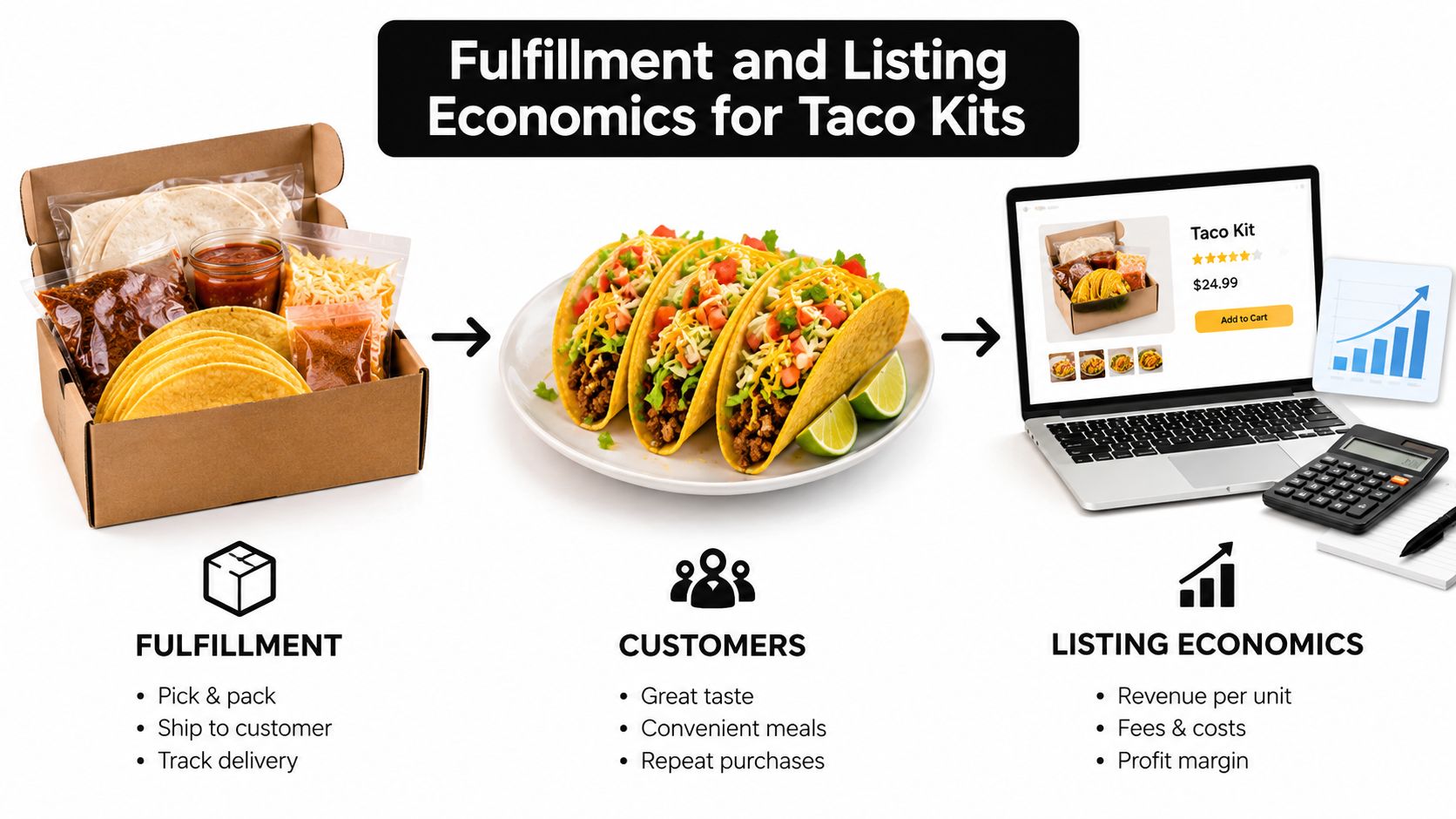
Taco-kit profitability begins with the sellable configuration, then extends into fulfillment and advertising. Shell count, tortilla mix, net weight, pack count, and included components shape the customer's choice while determining handling, storage, and margin requirements.
As noted earlier, the Taco Bell kit includes six soft tortillas, six crunchy corn shells, mild sauce, and taco seasoning. A comparable 12.77-ounce dinner-kit box sold in a 10-pack serves a different shopping need and creates different storage, packing, and handling requirements. Those physical differences affect the economics behind an Amazon tacos listing, including the TACoS a seller can support.
Configuration changes the unit economics
A single box may reduce trial friction and simplify handling. A multipack can increase order value, yet it also raises exposure to dimensional weight, storage fees, crushed shells, aging inventory, and expiration management. Compare configurations by delivered cost per usable serving, not by displayed unit price alone.
A grocery operator should model each configuration separately:
- Net revenue: Subtract discounts, promotions, refunds, and other reductions from the displayed selling price.
- Referral and fulfillment fees: Calculate the actual fee burden for the package dimensions and selected fulfillment method.
- Prep and packaging: Include case handling, protective materials, labeling, and bundling work.
- Spoilage and damage risk: Allow for crushed shells, missing components, and products with insufficient remaining shelf life.
- Meal completion cost: Include protein, fresh toppings, salsa, cheese, and other ingredients needed to turn the kit into a meal.
These inputs also determine how advertising performance should be interpreted. A campaign can produce acceptable TACoS on a high-value multipack while leaving weak contribution after added storage and damage costs. A lower-priced single box may convert more easily but require tighter fulfillment control. Agent Central can bring these operational and advertising records into the same review, so TACoS is assessed against the configuration being sold rather than treated as an isolated campaign ratio.
Marketintelo's packaged taco market report describes strong online growth for packaged-taco sales compared with traditional retail, along with differing shares and growth rates for ready-to-eat tacos and taco kits. Those figures provide market context, not a seller's margin, inventory exposure, or the economics of a particular Amazon offer. Product-level decisions still require the seller's own fee, cost, refund, and fulfillment data.
Detail-page consistency prevents avoidable friction
The title, bullets, images, variation structure, and structured attributes should describe the same physical product. If the title promises a multipack while the image shows one box, or if the bullets omit the shell mix, shoppers may order with the wrong expectation.
That inconsistency creates operational noise. Complaints, returns, negative reviews, and support contacts can hide whether a weak conversion rate reflects poor traffic or an unclear product page. Grocery listings perform more predictably when the configuration is explicit before the seller evaluates TACoS, fulfillment costs, and contribution margin together.
Automating TACoS Reporting With Agent Central
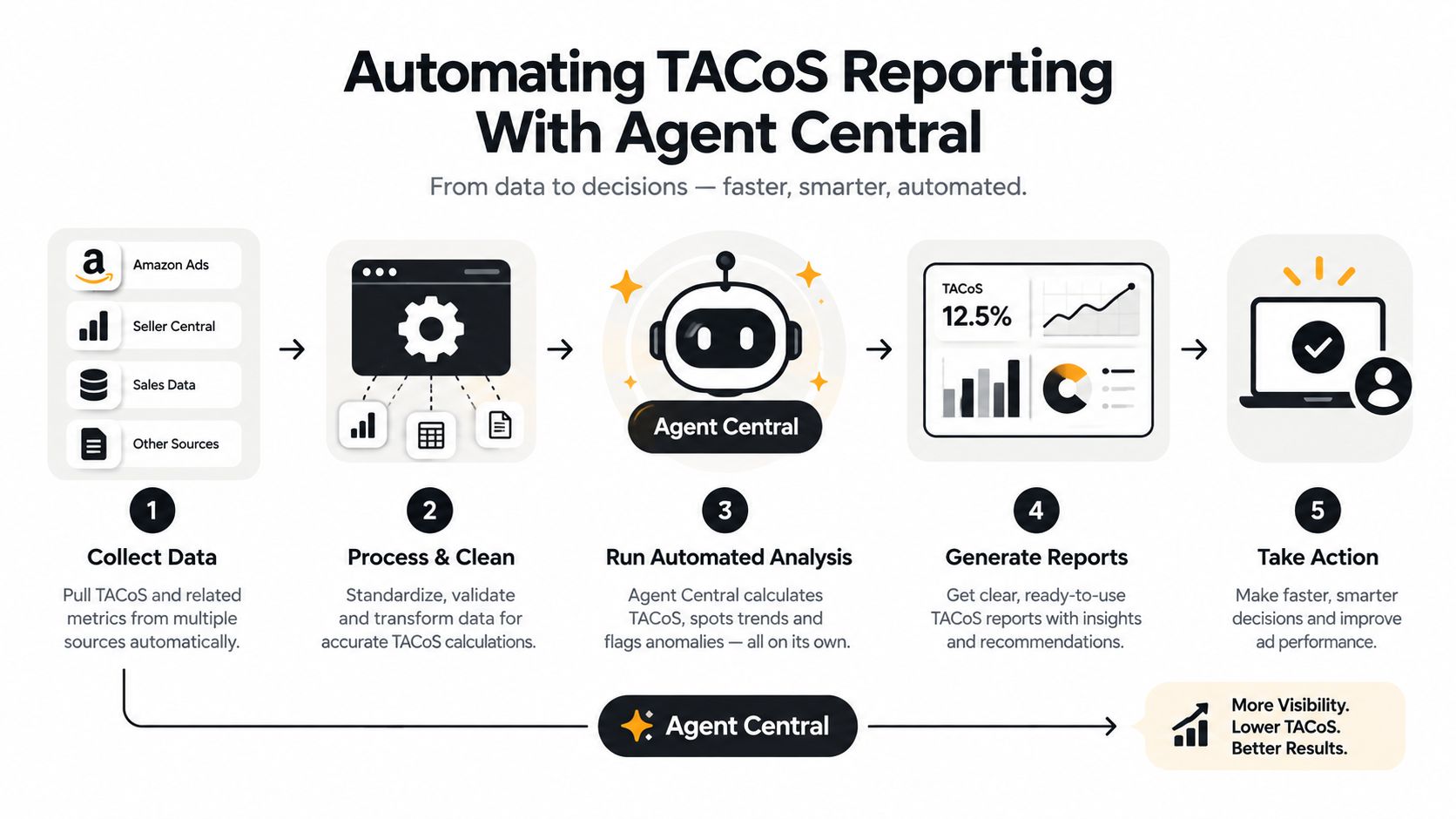
Manual reporting often fails at the joins. An operator exports Amazon Ads data for one date range, downloads a Seller Central business report for another, then tries to reconcile ASINs, parent-child relationships, attribution windows, and marketplace scope in a spreadsheet. Amazon's own reports are asynchronous, so the workflow also depends on report generation and retrieval timing.
Agent Central connects the AI already in use to Amazon Seller Central and Amazon Ads accounts. It is a hosted MCP server that gives Claude, ChatGPT, OpenClaw, Cursor, and other MCP clients structured access to advertising, sales, inventory, orders, catalog, ranking, finance, and fulfillment data. Account data syncs on a schedule, so the client can read prepared records instead of waiting for each Amazon report request to complete.
A controlled calculation workflow
The useful workflow is deterministic:
- The seller connects the relevant Seller Central and Amazon Ads accounts.
- The AI client retrieves ad spend and attributed sales for the selected scope.
- It retrieves total ordered product sales from the corresponding Seller Central business-report records.
- It aligns marketplace, ASIN or parent ASIN, dates, and applicable reporting definitions.
- It calculates TACoS and presents the underlying fields so the operator can inspect the result.
A new account starts with 30 days of history, which then builds from there. Amazon Ads history is kept while the account remains connected. That limitation matters for trend analysis. The first report isn't a complete lifetime view, and a seller shouldn't describe it as one.
Agent Central returns facts, metrics, classifications, and source-provided fields. It doesn't decide whether a seller should cut spend, increase a budget, change a listing, or accept a launch loss. The user's agent or workflow makes that judgment from the returned evidence. A deeper explanation of this hosted MCP approach is available in the MCP server integration guide.
Ask for the scope, not a vague summary
A useful request identifies the product and reporting boundaries. For example, an operator can ask an MCP client to calculate TACoS by ASIN or parent ASIN, specify a synced date range, separate Sponsored Products from Sponsored Display where supported, and return the spend, attributed sales, total ordered product sales, and resulting formula.
That structure makes an audit possible. If the result changes, the operator can determine whether the cause was new sales data, an attribution-window difference, a parent-child mapping issue, or a genuine change in advertising dependence.
Connecting Seller Central to AI Clients
The connection process should be treated like an access-control change, not a casual spreadsheet integration. Amazon authorization determines which Seller Central and Amazon Ads accounts can be connected, while the AI client determines how the returned records are queried and used.
Setup follows a defined path
The practical sequence is straightforward:
- Create the account: Sign up at agentcentral.to.
- Authorize Amazon access: Connect Seller Central and Amazon Ads through Amazon's authorization flow.
- Add the connection: Add the connection to Claude, ChatGPT, OpenClaw, Cursor, or another compatible MCP client.
- Define the reporting scope: Specify marketplace, seller account, date range, ASIN or parent ASIN, and the advertising data required.
- Validate the output: Check the returned source fields before using the calculation in a recurring report or downstream workflow.
The quickstart documentation for Claude is available at Agent Central's Claude quickstart. The process should preserve the separation between retrieving facts and authorizing changes.
Scoped access matters
Scoped API keys and OAuth provide a way to limit how an AI client reaches the connected account. The exact permissions should match the workflow. A reporting client may need access to advertising, sales, and catalog records without needing permission to submit operational changes.
Guarded writes add another control when a workflow supports changes. Supported changes are previewed before execution, protected against duplicate submissions, and recorded in audit logs with before-and-after values. That model gives an agency or internal operator a review point instead of allowing an ambiguous natural-language request to become an unreviewed account change.
Security boundary: The AI client can interpret returned facts, but the seller's permissions, approval process, and audit trail should govern any write.
Plans are priced by monthly Amazon order volume and include a 14-day free trial with no card required. Current plan details are listed in the Agent Central pricing documentation, where operators should verify the commercial terms before connecting production accounts.
Interpreting TACoS Beyond the Surface Metric
A lower TACoS is not automatically a better result. Cutting advertising spend can reduce the ratio while organic visibility, total sales, market position, or inventory velocity deteriorates. TACoS is a diagnostic measure. It needs commercial context before it supports a budget or listing decision.
A falling TACoS may mean organic sales are growing faster than ad spend, as explained in Sales Fortuna's TACoS reference. Analysts should verify that interpretation against contribution margin, inventory availability, and the relevant attribution windows. A stockout can suppress advertising activity and distort the ratio. A low-margin product can remain unprofitable despite apparently efficient TACoS.
The margin check comes first
One reported business generated $47,922.71 in sales at a 30.11% ACoS, while its gross margin was 29%. Advertising therefore consumed more than the gross margin available before other costs, according to Shark Labs Global. The example shows why ACoS and TACoS require a margin comparison, not an isolated efficiency judgment.
For a grocery taco kit, contribution margin must reflect the product that reaches the customer. Referral and fulfillment fees, damaged shells, expiration exposure, discounts, and the cost of a complete meal all affect the money left after an order. TACoS measures advertising spend against revenue. It does not measure cash profit, fulfillment loss, or the cost of correcting a poor kit configuration.
Use the metric as evidence
Treat each TACoS change as a question about the account:
- Are organic ordered sales revenue expanding, stable, or declining?
- Did advertising spend change, or did the revenue denominator change?
- Was the ASIN available in the intended configuration and pack count?
- Are Sponsored Products and Sponsored Display separated from spend that is not assigned at product level?
- Does the ratio remain below the gross margin available to absorb advertising?
- Are the compared dates and attribution windows consistent?
Agent Central can return the underlying Amazon Ads and Seller Central records and calculate TACoS by ASIN or parent ASIN across a synced date range. It provides the evidence, not the business decision. The seller, agency, or connected AI workflow must determine whether the result supports a budget change, listing correction, inventory intervention, or no change.
The strongest Amazon taco operation addresses both meanings of the search term. Grocery sales depend on accurate configuration and dependable fulfillment. TACoS analysis depends on aligned reports, defensible attribution, and margin-aware judgment. Agent Central can connect those operational and financial checks in one workflow, but operators still need to verify what customers receive before optimizing the number.
Agent Central connects Claude, ChatGPT, OpenClaw, Cursor, and other MCP clients to structured Seller Central and Amazon Ads data for ASIN-level TACoS reporting, inventory checks, and auditable workflows. Sellers and agencies can connect their accounts and examine the workflow through the platform.
Related Agent Central pages
- Amazon Ads MCP server
Campaign, keyword, search term, budget, TACOS, and guarded ads-write tools.
- Ads tool reference
Parameter-level docs for Amazon Ads campaign, keyword, search term, budget, and TACOS tools.
- Amazon Seller Central MCP server
Canonical hosted MCP overview for Seller Central, Ads, inventory, catalog, finance, and fulfillment data.
- Amazon seller data for AI agents
How Agent Central normalizes Amazon seller data before exposing it to AI clients.
- Connect Seller Central to Claude
Step-by-step path from Amazon OAuth to a Claude connector or MCP config.
- ChatGPT with Amazon seller data
ChatGPT-specific setup path for Amazon seller data through hosted MCP.
Related reading
- Setup Time Reduction for Amazon MCP Integrations
Cut setup time for Amazon Seller Central and Ads MCP integrations with pre-sync, OAuth, scoped keys, and a rollout playbook for agencies.
- View Amazon Advertising Promotional Credits
Find Amazon Advertising promotional credits, distinguish them from retail promotions, and reconcile promotion status, amounts, dates, and invoices.
- Amazon Best Seller Rank Explained for Operators
What Amazon best seller rank actually measures, how it is updated, and how operators can read BSR trends for inventory, pricing, and ads decisions.
- What Is API Integration and How It Works for Amazon Sellers
Learn what is API integration, how it connects software systems, and why Amazon sellers use MCP servers to access Seller Central, Ads, and fulfillment data
Connect Amazon seller data to your AI client.
Agent Central gives Claude, ChatGPT, OpenClaw, Cursor, and other MCP clients structured access to Amazon Ads, Seller Central, inventory, orders, catalog, finance, and fulfillment data.