
Amazon Ads API Guide: Build vs Agent Central in 2026
Learn how the Amazon Ads API works, authentication, endpoints, and async reporting. See why Agent Central is the faster route for Amazon sellers and agencies.
What matters more for Amazon Ads teams in 2026, raw API access or a workflow that can survive Amazon's reporting lag, throttling, and attribution rules? The Amazon Ads API is free to access in the sense that Amazon does not charge an extra API fee, but access still requires application, approval, Login with Amazon, and advertising profiles, while media spend and normal selling-account fees still apply Amazon Ads API overview. For sellers and agencies, the choice is whether to build all of that plumbing themselves or use a hosted MCP connection like Agent Central.
Table of Contents
- What the Amazon Ads API Is and Who It Serves
- How Access Works and What the API Can Reach
- Making API Calls Work in Practice
- Understanding Limits and Concurrency Constraints
- Why Attribution Timing Breaks Naive Automation
- Building Directly on Amazon Ads API versus Using Agent Central
- Setting Up Agent Central for Amazon Ads MCP Workflows
- Best Practices for Reliable Amazon Ads API Integrations
What the Amazon Ads API Is and Who It Serves
What does the Amazon Ads API do for an advertiser team? The Amazon Ads API is a REST-based interface for programmatic advertising operations. Amazon uses it to let advertisers and members of its Advertising Partner Network manage campaign resources, reporting, and related workflows without living in the console all day Amazon Ads API overview.
Is the Amazon Ads API free? Amazon says it does not charge an additional fee for API access. The rest of the cost picture still applies, because normal Amazon selling-account fees remain in place, and media spend is still tied to the campaigns themselves.
How do you get Amazon Ads API access? Access starts with an application and Amazon's approval process. A developer then works through Amazon's authorization flow and selects the relevant advertising profiles before the API can read or change anything in an advertiser account.
What it is built for
The scope is practical. Amazon designed the API for campaign operations, reporting, and automation across Sponsored Products, Sponsored Brands, Sponsored Display, and DSP for advertisers who have DSP access. That makes it useful for agencies, internal engineering teams, and software providers that need repeatable control at scale.
The operational friction shows up fast. Reporting often arrives asynchronously, rate limits shape how hard you can push the API, report capacity can become a planning issue, and attribution timing can make fresh performance data look incomplete. Teams that build directly on the API need workflows that expect those delays instead of assuming instant, final numbers.
Practical rule: Treat approval as the first gate, not the finish line. Access only matters after authentication, profile selection, and a workflow that can handle reporting delay and account-level permissions.
For operators, the API is an authorization-controlled layer for planning, activating, measuring, and scaling ad activity inside an approved account, and the approval gate is only the beginning.
How Access Works and What the API Can Reach
Access starts with Amazon's developer application flow, then moves through Login with Amazon, profile selection, and scoped authorization. That matters because an integration rarely needs one broad key, it needs a bounded way to act on the right advertiser profile, with the right permissions, and only for the tasks that account is allowed to perform.
Reads and writes are not the same problem
For reads, the main concern is selecting the right profile and understanding which ad product or account the data belongs to. For writes, the bar is higher, because the API can change campaign state, budgets, and bids only within the authorized account context. That is where OAuth, profile scope, and request discipline matter more than raw request syntax.
Amazon's documentation frames the API around campaign management and reporting, not around the rest of the seller business. Inventory, orders, catalog, and finance live outside the Ads API boundary, which is why many operators eventually combine ads data with seller-side data from elsewhere. For a broader Amazon workflow lens, the Amazon SP-API guide shows how sellers usually think about those adjacent systems.
The practical reach
The useful mental model is straightforward.
- Campaign control: create, update, pause, and structure campaigns.
- Budget and bid management: change spend controls programmatically.
- Reporting: request performance data across supported Amazon ad products.
- DSP access: available for advertisers who already have DSP access.
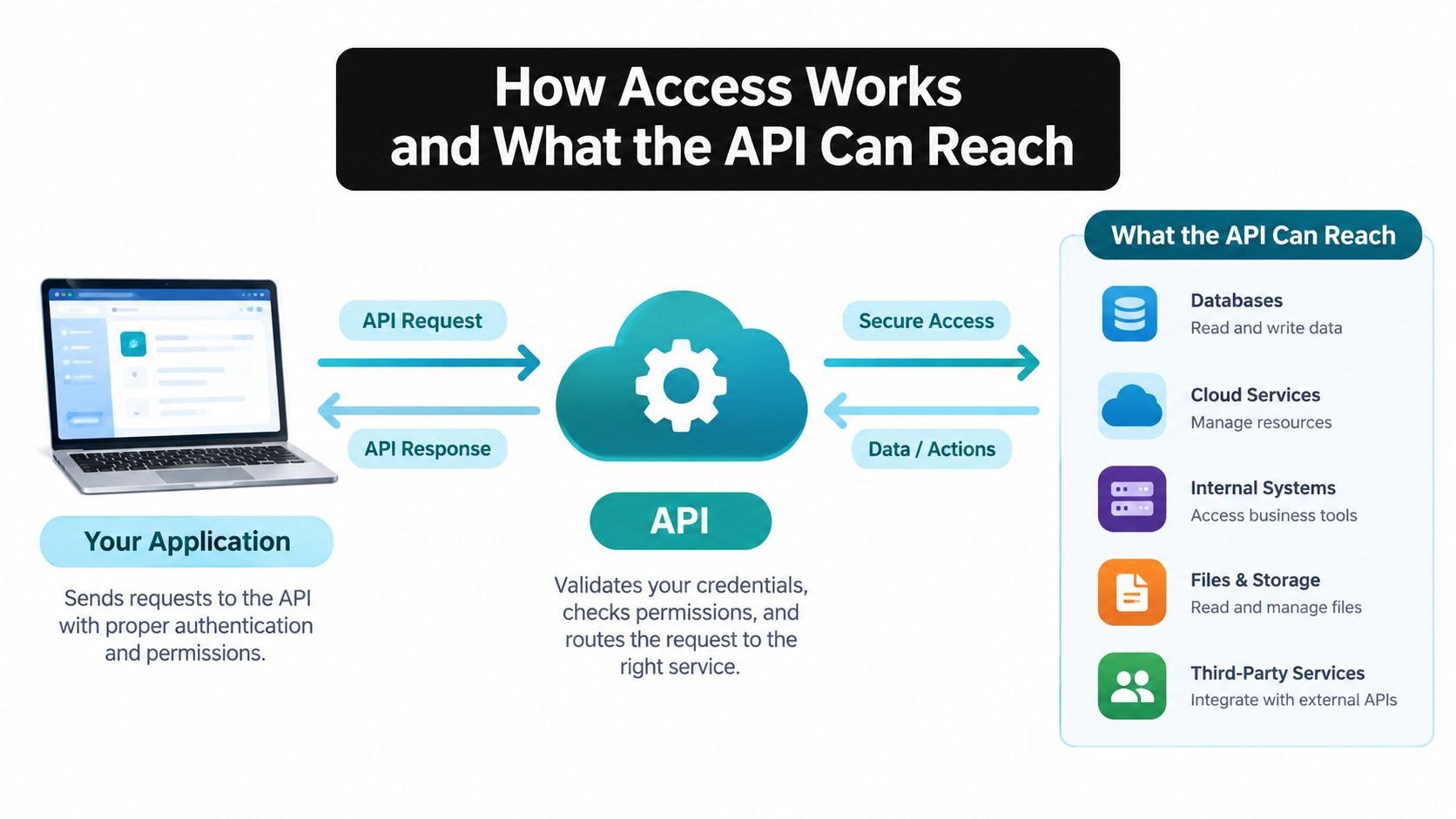
The boundary is the part teams miss. The Ads API can expose and change ad resources inside an authorized advertiser account, but it does not become a universal Amazon control plane. That distinction is why a seller might use Ads API for campaign operations and a broader connection for sales, fees, and inventory.
Making API Calls Work in Practice
The friction is not authentication. It is the combination of token refresh, asynchronous reports, and the fact that Amazon's reporting API behaves like a job system, not a direct database query.
The report flow is a queue, not a query
Amazon's reporting workflow has three stages. Submit a report with POST /reporting/reports, poll the returned reportId with GET /reporting/reports/{reportId}, then download the generated file from the S3 URL that comes back from the job Amazon Ads reporting get-started.
Every request needs an Amazon-Ads-AccountId, groupBy, and a report configuration, and timeUnit can be DAILY or SUMMARY. In practice, that means the safest pattern is to persist report IDs, poll with backoff, and keep the job outside the user session until the file is ready.
A clean implementation also separates request state from metric state. Store the report job as a pending record, then flip it to matured only after the data clears your own freshness rules.
Operator rule: Do not design an interactive tool that waits blindly for Amazon's report to finish. Use a prepared-data step, or the UX will feel broken the moment a report takes longer than expected.
Amazon also publishes timing constraints that shape the workflow Amazon Ads API limits. Synchronous CRUD operations have a 30-second P99 guarantee, while asynchronous report and snapshot generation each have a 15-minute P99 guarantee. Impression and click events can take up to 12 hours to appear, and invalidation can take up to 72 hours.
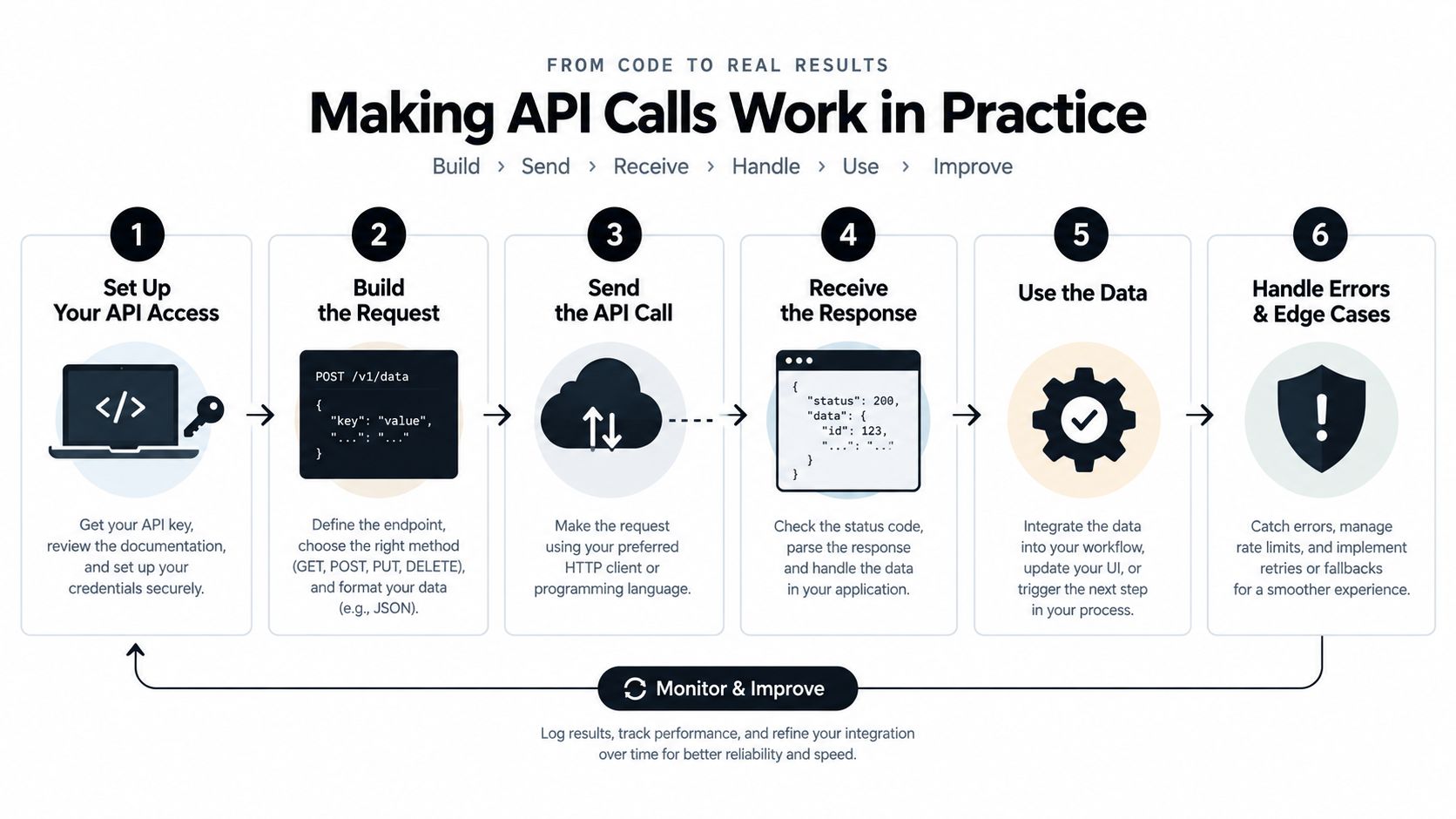
That is the part generic guides skip. A report can succeed while the numbers are still settling, so your pipeline should treat fresh metrics as pending until they age into a stable state. Otherwise, the output looks final when it is still moving.
Understanding Limits and Concurrency Constraints
Why do Amazon Ads integrations break most often at the edges, not the center? Because reporting is asynchronous, capacity is limited, and fresh numbers are often still moving when your automation wants to act.
Amazon's reporting surface groups metrics into traffic, engagement, and conversion categories, including impressions, clicks, total cost, video quartile activity, and video completions Amazon Ads reporting overview. Those metrics are useful, but they do not all settle at the same pace.
Migration changes the operating model
The older v3 reporting API is slated for deprecation after June 30, 2027, so plan the migration now rather than waiting for the cutoff Amazon Ads reporting overview. Amazon's reporting direction also points toward cross-account reporting, cross-ad-product reporting, and a more unified metric model.
That shift looks tidy until capacity shows up. Amazon says unified reporting typically allows only one concurrent report per advertiser and about 100 reports per day, with extra requests potentially queuing or returning HTTP 429 Amazon Ads deprecations. A repeated AI agent that asks for slightly different slices can drain that budget quickly.
Limits are not global
SP-API throttling follows an operation-specific token-bucket model tied to the selling-partner-account and application pair, with grantless operations as an exception SP-API rate limits. One workflow cannot assume a shared request budget across every endpoint.
Marketplace fan-out makes the problem sharper in practice. Amazon's Listings Restrictions API says each store ID in marketplaceIds counts as a separate request, with a default of 5 requests per second per selling-account/application pair, 20 requests per second per application, and a burst allowance of 10 Listings Restrictions API rate limits. For a practical primer on shaping that traffic, the guide to API limiting is worth a read.
Build queued work, deduplication, and concurrency gates into the integration from day one, because Amazon's limits make them required.
Why Attribution Timing Breaks Naive Automation
Why does an Amazon Ads workflow look correct in the morning and wrong by afternoon? Because attribution and order data do not settle on the same schedule.
Amazon Ads conversions can take up to 12 hours to appear, and unified-reporting conversion metrics are recorded on the ad-interaction date, not always the purchase date Amazon Ads attribution help. That matters the moment a workflow joins ad rows to seller orders. A same-day snapshot can look complete while the underlying attribution is still shifting.
Same-day ROAS can mislead automation
A traffic-date row can change after the day closes. Seller Central order data may land on a different date. If an agent compares those systems too early, it can cut bids on incomplete data or double count delayed conversions during reconciliation.
Amazon's standard view-attribution lookback is 14 days, and Amazon introduced additional shopping-behavior signals for some view-attribution placements beginning January 1, 2026. Those rules change how a campaign should be read. A weak same-day snapshot can look normal once the attribution window matures.
Safer data design
A better automation design keeps time semantics visible.
- Immutable interaction-date snapshots: preserve the original row before later conversions land.
- Late-conversion backfills: update history explicitly instead of overwriting without notice.
- Attribution-window labels: mark which window produced each metric.
- Separate metric states: keep reported, matured, and cash-or-order values apart.
Slow reporting is survivable. Treating a provisional metric as settled accounting is what breaks bid automation and finance reconciliation.
That separation protects media decisions and finance reconciliation. It also keeps seller-side order data, ad-side attribution, and inventory planning from being collapsed into one misleading daily number.
Building Directly on Amazon Ads API versus Using Agent Central
Why spend engineering time on report queues, rate limits, and reconciliation logic if your workflow keeps hitting the same operational walls?
Building directly on the Amazon Ads API gives full control, but it also means owning token management, concurrency controls, deprecation handling, and the cleanup work after attribution lag. That is manageable for a team with strong platform support. It is still real infrastructure work.
The build path
A direct build fits teams that want to control request patterns, storage, and internal joins. The trade-off is that the team also owns the failure modes. When Amazon queues reports during a Prime Day bid sweep, a direct integration can stall on delayed output while dashboards and bidding logic keep waiting for numbers that have not landed yet. If the reporting contract shifts, the integration team absorbs the repair work.
The hosted MCP path
Agent Central takes a different route. It is an approved Amazon Ads API connection that lets Claude, ChatGPT, OpenClaw, Cursor, and other MCP clients reach Amazon Ads data alongside Seller Central sales, fees, inventory, orders, catalog, ranking, finance, and fulfillment data through a hosted MCP server Agent Central Amazon Ads MCP server. It returns facts, metrics, classifications, source-provided fields, and guarded write tools with audit logs, so the agent or workflow still controls the action.
That changes the day-to-day burden. Repeated reads do not depend on Amazon's asynchronous reporting every time, and supported changes can be previewed before they are applied. The practical gain is less plumbing around report polling, retry logic, and duplicate submissions. For teams comparing automation options, the Amazon Ads automation guide lays out the operational trade-offs in more detail.
A new account starts with 30 days of history that builds from there, and Amazon Ads history is kept while the account stays connected. That matters because the prepared-data model reduces friction where Amazon Ads API work usually breaks first, report capacity, asynchronous reads, and the reconciliation gap between what the API has returned and what a bid automation system wants to act on.
Setting Up Agent Central for Amazon Ads MCP Workflows
Setup starts with Seller Central and Amazon Ads authorization inside Claude quickstart, then the connection is added to the AI client. From there, the practical first test is simple: ask for yesterday's Sponsored Products spend, then compare it with the same day last week so the agent has a real baseline before it touches bids or budgets.
What happens after connection
Once connected, the hosted MCP server places ads data beside seller-side facts, so the agent can compare campaign metrics with sales, fees, inventory, and other operational fields in one workflow. History is loaded into a prepared data layer, which means repeated reads do not have to wait on Amazon's async reporting path every time.
That matters because the hard parts are operational, not conceptual. Report capacity, rate limits, and the lag between an action and attributable performance can break a clean prompt loop fast. Prepared data helps the agent answer from what is already available, instead of guessing while reports are still pending.
Guarded write tools let teams preview supported changes before they land, and logged actions leave an audit trail for bids, budgets, or other adjustments. For teams comparing orchestration patterns, the production-ready AI orchestration guide is a useful parallel read.
If pricing matters, the plans are priced by monthly Amazon order volume and include a 14-day free trial that does not need a card pricing. For Amazon Ads MCP support, the direct reference is agentcentral.to/amazon-ads-mcp-server. The practical value is scoped keys, auditability, and prepared data that keeps agents from waiting on Amazon's asynchronous reports for every question.
Best Practices for Reliable Amazon Ads API Integrations
What makes an Amazon Ads integration hold up under real use? The answer is usually not a clever prompt or a cleaner dashboard. It is disciplined handling of async reports, limits, and write controls.
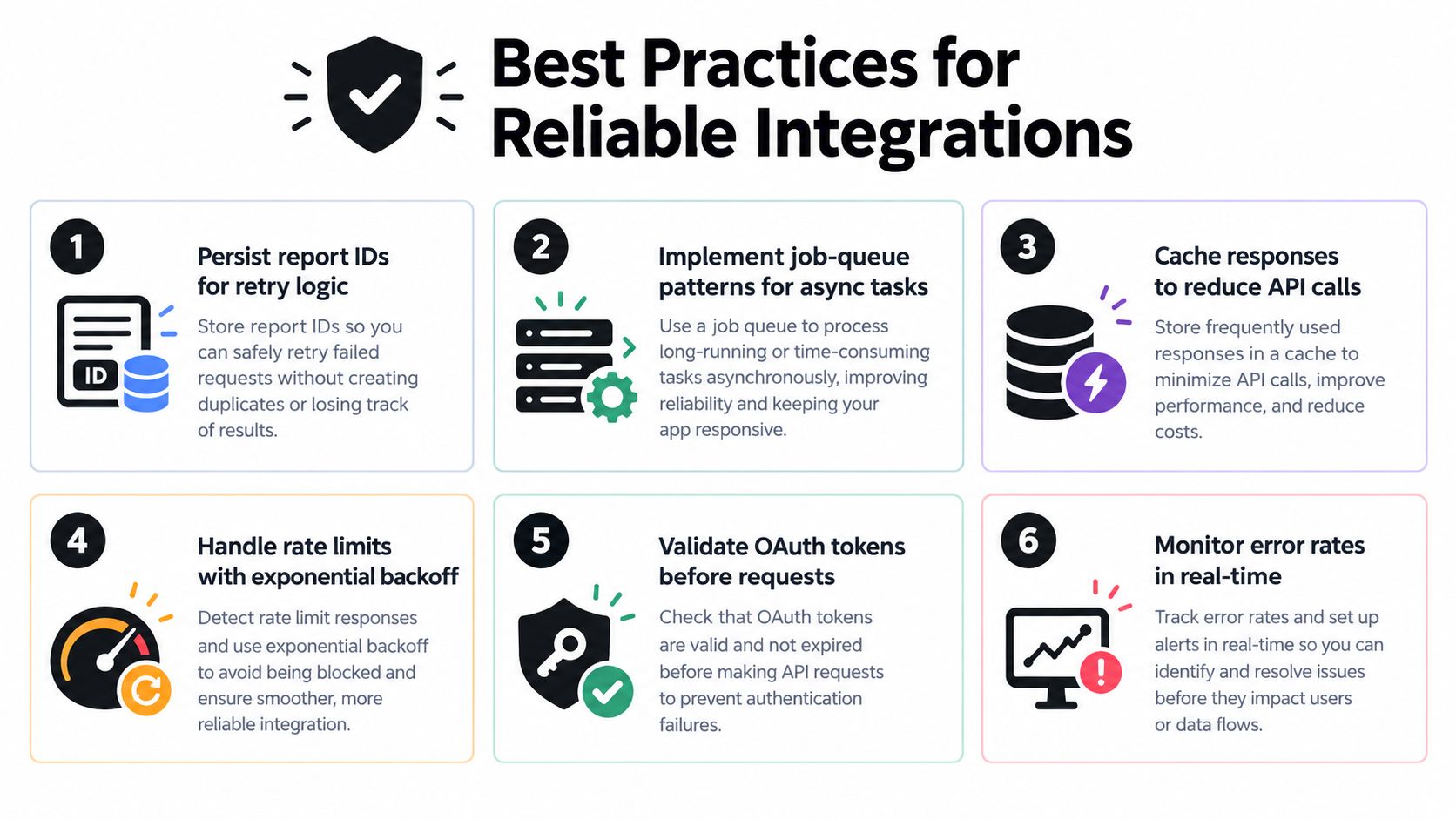
Reliable integrations keep a few unglamorous habits in place. Persist report IDs. Treat report generation like a job queue. Cache equivalent requests so an agent does not ask for the same slice five ways. Record freshness metadata so downstream logic can tell pending from mature data.
Governance beats improvisation
Access controls matter because API power can change real spend. Scoped API keys, OAuth lifetime handling, and guarded writes should be part of the first design, not a later cleanup. See API key scoping best practices. Audit logs should capture before-and-after values whenever a campaign, budget, bid, or state change is applied.
Migration discipline matters too
Legacy report types need to be mapped to flexible dimensions instead of copied mechanically. Incomplete coverage should be detected explicitly, especially when some report families still sit outside unified reporting. Workloads also need to respect per-advertiser concurrency gates so the integration does not queue itself into a throttle.
A concise operating model looks like this:
- Persist request state: store report IDs, timestamps, and job status.
- Deduplicate requests: collapse equivalent report asks before they hit Amazon.
- Expose freshness: label data as reported, matured, or pending.
- Log writes: keep audit trails for every guarded change.
- Plan around limits: schedule generation around account-level concurrency and daily capacity.
Useful boundary: let the integration return facts and logged changes, then let the user's agent or team decide the action. That keeps speed and accountability in the same workflow instead of trading one for the other.
Related Agent Central pages
- Amazon Seller Central MCP server
Canonical hosted MCP overview for Seller Central, Ads, inventory, catalog, finance, and fulfillment data.
- Amazon seller data for AI agents
How Agent Central normalizes Amazon seller data before exposing it to AI clients.
- Connect Seller Central to Claude
Step-by-step path from Amazon OAuth to a Claude connector or MCP config.
- ChatGPT with Amazon seller data
ChatGPT-specific setup path for Amazon seller data through hosted MCP.
- Amazon Ads MCP server
Campaign, keyword, search term, budget, TACOS, and guarded ads-write tools.
- Ads tool reference
Parameter-level docs for Amazon Ads campaign, keyword, search term, budget, and TACOS tools.
Related reading
- Amazon Analytics for Sellers: Data Sources and AI Workflows
Learn what Amazon analytics means for sellers, which data sources power seller reporting, and why AI agents work better on a structured data-access system.
- Amazon Tacos: TACoS Metrics and Seller Guide
Decode Amazon Tacos search intent and master TACoS metrics. Learn to calculate ad efficiency, optimize listings, and automate reporting with Agent Central.
- MCP Server Governance for Amazon Workflows
Practical mcp server governance for Amazon seller agents — scoped keys, audit logs, idempotency, and tenant isolation explained.
- What Is an MCP Server? A Guide for Amazon Sellers
What an MCP server is, how it works, and what Amazon sellers should look for in a hosted MCP server for Seller Central and Amazon Ads data.
Connect Amazon seller data to your AI client.
Agent Central gives Claude, ChatGPT, OpenClaw, Cursor, and other MCP clients structured access to Amazon Ads, Seller Central, inventory, orders, catalog, finance, and fulfillment data.