
FBA Removal Order Fees: Rates and How to Review Them
FBA removal order fees are charged per unit by size tier and shipping weight. See current U.S. rates, what drives the cost, and how to review charges.

FBA removal order fees are charged per unit by size tier and shipping weight, with U.S. standard-size inventory weighing 0 to 0.5 lb listed at $1.04 per unit. The counterintuitive budgeting issue is that an unchanged rate can still produce a different cash-flow result when units leave fulfillment centers on staggered dates.
A useful removal forecast therefore needs more than an order total. Operators need a record of the units requested, the units removed in practice, the applicable fee schedule, and the dates charges appear in financial records.
Table of Contents
- What Are FBA Removal Order Fees?
- Current U.S. Removal Fee Rates by Size Tier
- What Makes a Removal Order More Expensive?
- Why Removal Fees Hit Cash Flow on Different Dates
- How to Review Removal Activity and Fees Step by Step
- Why Removal Charges Do Not Match Your Estimate
- Confirm Removal Charges Before Placing the Next Order
What Are FBA Removal Order Fees?
FBA removal order fees are per-unit charges based on each item's size tier and shipping weight, rather than the inventory's selling price or total order value. The calculation applies the appropriate rate to the units removed, then adds the results across the order's SKUs and weight bands.
A removal sends FBA inventory to the seller's return-to address or a third-party freight forwarder. Disposal has a different physical outcome: eligible inventory is donated, recycled, or discarded. Those outcomes should remain separate in inventory records even when Amazon presents their fees together.

Calculate the charge by unit classification
Removal pricing works like parcel postage by weight class. In a hypothetical comparison, 500 small units and 500 heavy units can have the same selling price but different removal costs because Amazon prices the physical handling category, not the merchandise value.
The operating formula is:
Estimated removal charge = the sum of units in each size-and-weight band multiplied by that band's fee.
Amazon's removal, disposal, and liquidation fee guidance bases removal charges on unit size and shipping weight and separately lists U.S. standard-size liquidation processing at $0.25 for units up to 0.5 lb, effective January 15, 2026. That liquidation processing amount isn't a removal rate and shouldn't be substituted into a return-removal estimate.
Keep the cost categories separate
- Removal fees: Charges associated with taking units out of FBA through the selected removal process.
- Referral and fulfillment fees: Selling and customer-order fulfillment costs, not substitutes for removal charges.
- Liquidation processing: A separate schedule associated with the liquidation route.
- Direct carrier charges: Additional services beyond basic delivery that carriers may bill directly to the seller.
The estimate should use Amazon's stored dimensions and shipping weight, not a supplier's carton specification or an assumed packaging weight. A seller can otherwise apply the right arithmetic to the wrong tier.
The resulting budget is a unit-based removal estimate plus any separately applicable carrier charges. Receiving, inspection, and subsequent storage should be tracked as destination costs rather than hidden inside Amazon's removal fee.
Current U.S. Removal Fee Rates by Size Tier
The table below is the lookup needed before calculating a U.S. removal order. Amazon's U.S. removal fee table lists the following per-unit rates by size tier and shipping weight.
U.S. FBA removal fees per unit by size tier and weight
| Size tier | Shipping weight | Fee per unit |
|---|---|---|
| Standard size | 0 to 0.5 lb | $1.04 |
| Standard size | Over 0.5 to 1 lb | $1.53 |
| Standard size | Over 1 to 2 lb | $2.27 |
| Standard size | Over 2 lb | $2.89 plus $1.06 per lb above 2 lb |
| Large bulky, extra-large, special handling | 0 to 1 lb | $3.12 |
| Large bulky, extra-large, special handling | Over 1 to 2 lb | $4.30 |
| Large bulky, extra-large, special handling | Over 2 to 4 lb | $6.36 |
| Large bulky, extra-large, special handling | Over 4 to 10 lb | $10.04 |
| Large bulky, extra-large, special handling | Over 10 lb | $14.32 plus $1.06 per lb above 10 lb |
Match the record before multiplying
The lookup sequence matters because weight alone doesn't identify the correct fee:
- Read the shipping weight. Use the value stored in Amazon's record for the SKU.
- Identify the size classification. Separate standard-size inventory from large bulky, extra-large, and special-handling inventory.
- Select the weight band. Apply the relevant per-pound add-on when the unit exceeds the schedule's threshold.
- Multiply by removed units. Calculate each SKU or classification group separately before summing the order.
For a hypothetical removal of 40 standard-size units weighing over 1 through 2 lb, the calculation using the listed rate is 40 × $2.27 = $90.80, before other charges. A 100-unit check in that same band produces $227.
Those calculations are estimates for the stated quantities, not evidence that Amazon has removed those quantities. The reconciliation should later replace the planned count with the actual removed count.
Preserve the fee category
These are removal-order charges, not referral or ordinary fulfillment fees. Operators reviewing broader expenses can keep the categories distinct using the Seller Central fees guide.
For heavier units, the base amount alone is incomplete. The per-pound component must remain visible in the calculation so another operator can reproduce the result.
Before budgeting, the seller should confirm Amazon's current marketplace fee page. A saved spreadsheet should retain the schedule used for the estimate rather than replacing older assumptions with a newly downloaded rate without notice.
What Makes a Removal Order More Expensive?
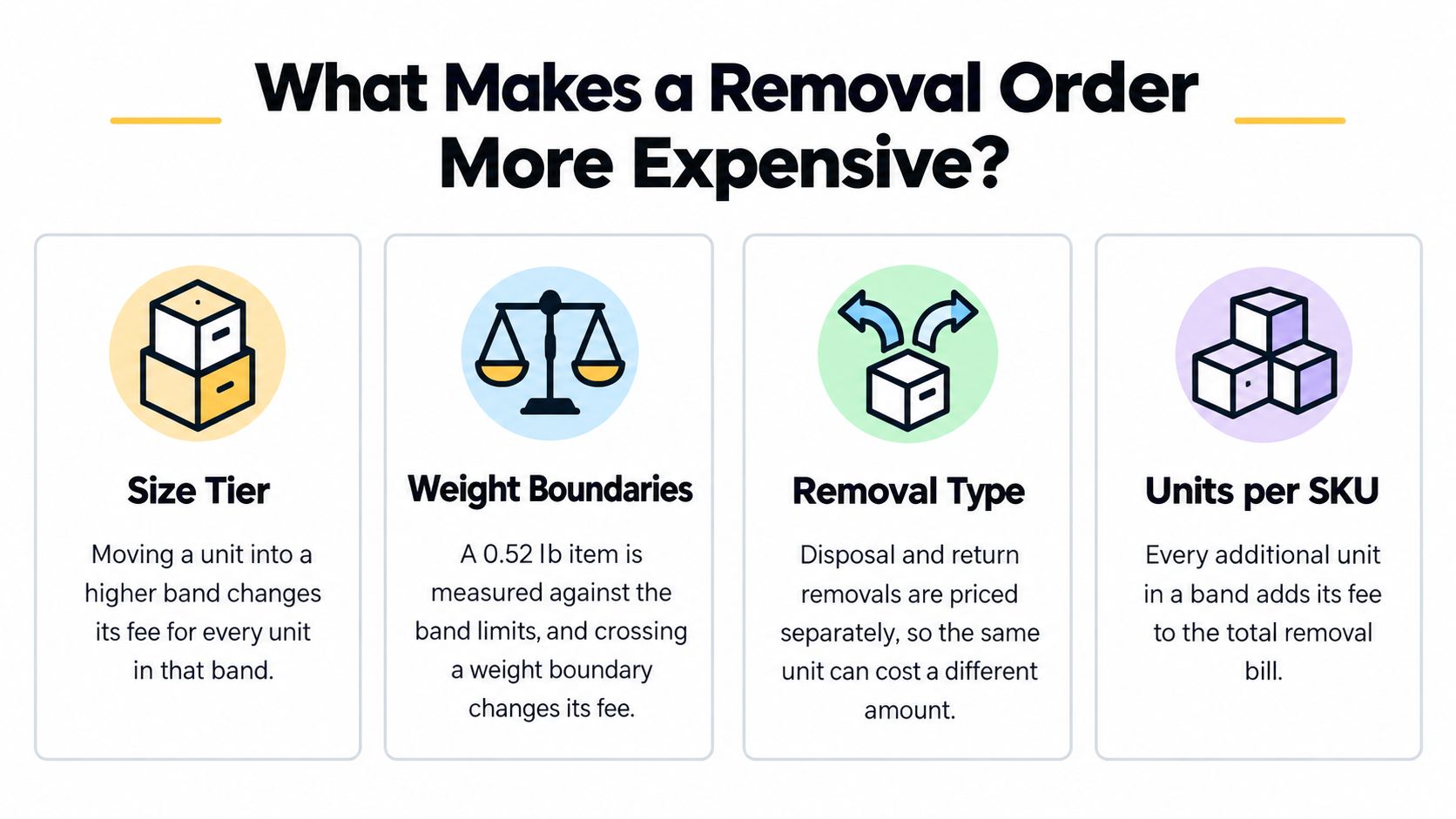
A removal bill changes when the classification, weight, quantity, or applicable rate schedule changes. Those drivers should be tested separately, because each points to a different operational check.
Classification and weight affect every matching unit
Size tier determines which schedule applies. A seller shouldn't estimate a large bulky item using a standard-size row merely because the product feels small when handled.
Weight boundaries create a different kind of exposure. In a hypothetical case, a standard-size item recorded at 0.52 lb belongs in the over-half-pound band: its fee is $1.53 rather than $1.04, a calculated difference of $0.49 per unit, or $490 across 1,000 units.
Unit count then scales the classification result. A small per-unit error becomes an order-level variance when the same assumption is repeated across the requested quantity.
Boundary check: A measurement discrepancy should be resolved before the same disputed classification is multiplied across the entire removal.
Historical changes weren't uniform
Amazon's U.S. fee-change notice records changes effective February 5, 2024: standard-size inventory weighing 0 to 0.5 lb increased from $0.97 to $1.04, approximately 7.2%, while the next standard-size bands increased from $1.46 to $1.53 and $2.20 to $2.27.
The same notice shows uneven changes for large bulky, extra-large, and special-handling inventory. The 0 to 1 lb band stayed at $3.12, while 1 to 2 lb increased from $4.07 to $4.30, and 2 to 4 lb increased from $5.56 to $6.36.
For 1,000 standard-size units weighing 0 to 0.5 lb, that historical change added $70 before other inventory costs. A blanket percentage uplift would therefore have misstated some SKUs and unnecessarily increased others.
The operational conclusion is narrower than “removals became more expensive.” A seller needs to know which classification changed, which schedule applies, and how many units fall into that classification.
The selected removal route also needs its own fee lookup. An illustration that distinguishes return, disposal, and liquidation shouldn't be read as proof that their prices always differ in every marketplace.
Before submission, operators should verify stored weights for units near a band boundary. Correcting an estimate after shipment is an accounting exercise; checking its assumptions beforehand is a purchasing and cash-planning control.
Why Removal Fees Hit Cash Flow on Different Dates
The submission date doesn't establish a universal posting date for the entire removal order. Processing and dispatch can span accounting periods, so operators should distinguish an expected expense from a charge already visible in transaction records.
Amazon's removal processing guidance describes 10 to 14 business days for normal picking, packing, and processing, extensions to 90 days or more during busy removal periods, 30 business days or more during holiday and peak periods, and about two additional weeks for carrier delivery after dispatch.
Removal order timelines from submission to delivery
| Stage | Typical duration | What it means |
|---|---|---|
| Pick, pack and process at the fulfillment center | 10 to 14 business days | Standard planning window for normal periods |
| Busy removal periods | 90 days or more | Processing can extend well beyond the standard window |
| Holiday and peak periods | 30 business days or more | Add lead time before these windows |
| Carrier delivery after dispatch | About 2 weeks | Stock stays in transit after it leaves the center |
These are planning ranges, not delivery guarantees. Busy-period and peak-period rows describe alternative processing conditions, not consecutive stages that should automatically be added together.
Separate cash timing from stock availability
Consider a hypothetical 600-unit removal submitted in late November during a peak period. Some inventory may remain in processing when the new year starts, meaning the estimate, removal activity, posted charges, and warehouse receipt can belong to different periods.
The cash forecast should follow the applicable marketplace charging rule and actual removal progress. The destination warehouse's stock forecast should follow dispatch and receipt, since a fee posting doesn't prove the returned inventory is available for resale.
Inventory availability and cash exposure need separate dates. Neither can be inferred safely from the removal request alone.
A useful working file therefore keeps these fields distinct:
- Submission date: When the seller requested the removal.
- Expected departure window: The planning assumption for processing completion.
- Actual dispatch and posting dates: The operational and financial evidence.
- Receipt date: When the destination confirms possession.
For operators connecting those records to a treasury forecast, Business Loan Warrior's guide to understanding small business cash flow management provides broader context on cash availability. The cash-flow forecasting guide supports the separate task of placing expected outflows into a forecast.
A seller with overlapping removals should compare planned and actual departures by order. A single monthly allowance can conceal unfinished requests and charges that haven't posted yet.
How to Review Removal Activity and Fees Step by Step
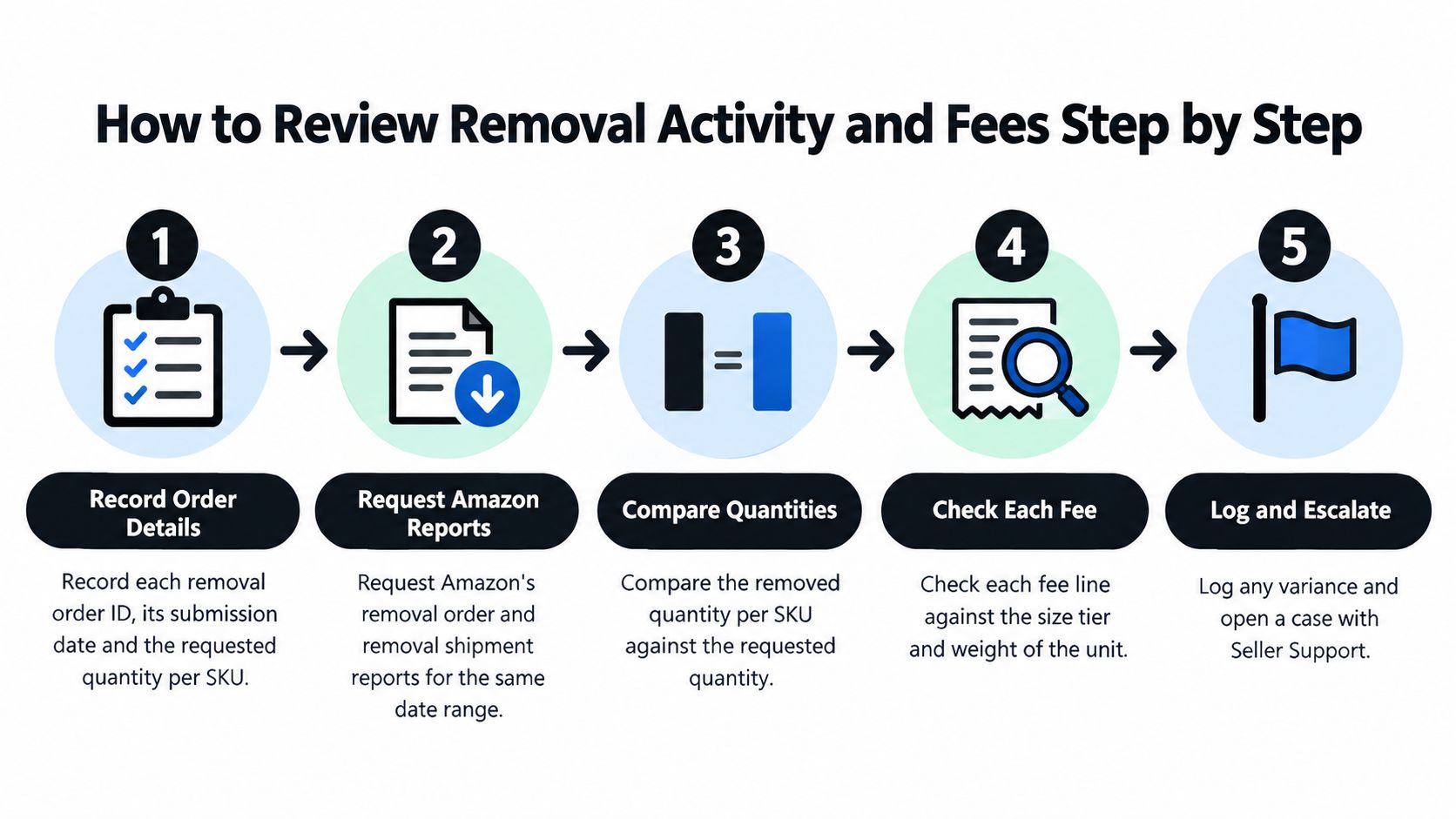
The reconciliation should produce a traceable path from the original request to the inventory movement and financial posting. A spreadsheet can support that process, provided it preserves the underlying report files and doesn't replace shipment evidence with the requested quantity.
Build the reconciliation from source records
- Record the request. Save each removal order ID, submission date, marketplace, and requested quantity per SKU. This establishes the original scope without treating the request as proof of completion.
- Request the removal reports. Obtain Amazon's removal order and removal shipment reports for a consistent date range. Amazon reports are generated asynchronously, so the workflow should request the report, wait for completion, and then download the completed document.
- Compare quantities by SKU. Match requested quantities against shipped quantities and identify partial removals, outstanding units, and cancellations. A quantity difference needs a status explanation before it becomes a fee dispute.
- Confirm the classification. Retrieve the stored size tier and shipping weight used for the SKU. Keep the recorded values with the calculation so a later measurement change doesn't obscure the basis of the original estimate.
- Calculate the expected charge. Apply the appropriate rate to shipped units in each classification, including any applicable per-pound component. Maintain separate calculation rows when a SKU's units require different treatment.
- Match financial postings. Locate related charges in transaction or settlement data using the removal order reference and posting date where those fields are available. Preserve the original transaction identifiers rather than matching only on equal amounts.
- Explain the variance. Compare expected and posted totals, then classify differences by quantity, tier, schedule, currency, or timing. Unmatched charges should remain exceptions until supporting records explain them.
- Save the audit package. Retain the order ID, units, classification, rate basis, relevant dates, report files, and financial references. Another operator should be able to reproduce the conclusion without rebuilding the entire investigation.
Keep inventory evidence and accounting evidence distinct
The Amazon inventory ledger report guide helps place removal movements within the wider inventory record. It shouldn't replace shipment evidence or financial transactions when confirming a particular charge.
The review should run separately for each marketplace and currency. Currency conversion belongs in a separate reporting step, otherwise exchange-rate effects can be mistaken for Amazon fee discrepancies.
For agencies preparing accounting handoffs, BankStatementWizard's guidance on preparing client statements for accounting offers context for organizing statement evidence. The removal workpaper still needs Amazon's order, shipment, and transaction references to support each conclusion.
A useful exception record contains the expected result, the observed result, the suspected cause, and the evidence still missing. Seller Support escalation should include that record, not just a screenshot of an unexpected total.
The same discipline applies to an SP-API workflow. Imported fields should retain their source identifiers and extraction context, and repeated report rows should be checked before quantities are summed.
Why Removal Charges Do Not Match Your Estimate
A removal order's estimate rarely matches its posted charges line for line, because removal fees accrue per unit and post as units leave the fulfillment network. Treat each removal as a liability tracked by unit, marketplace, weight tier, and posting date, then reconcile posted charges against it as they arrive.
Amazon's marketplace removal charging guidance identifies per-unit charging transitions beginning March 1, 2026 in Brazil, April 1, 2026 in Japan, and May 1, 2026 in the UK, with UK rates unchanged despite the timing change.
The distinction matters: a rate increase isn't necessary to create a working-capital problem. Staggered posting dates alone can shift the cash required inside a reporting period even when the total order cost stays flat.
Removal charge mismatches, likely causes and what to check
| Symptom | Likely cause | What to check |
|---|---|---|
| Posted fee above estimate | Unit crossed a weight or size boundary | Stored dimensions and shipping weight versus packaging assumptions |
| Fee posted in a later period | Units removed after the submission date | Removal shipment dates versus the order date |
| Fee lower than estimate | Fewer units shipped than requested | Requested versus shipped quantity per SKU |
| Old rate applied | Order placed before the rate effective date | Order placement date versus the schedule effective date |
| Charge timing differs by marketplace | Marketplace-specific charging start date | That marketplace's schedule and its start date |
Distinguish rate eligibility from charge timing
The applicable rate and the posting trigger answer different questions. Before comparing amounts, check the order's placement date against the schedule's effective date, because orders placed before a rate change can carry the earlier fee.
Applying the newest fee table to every newly posted transaction manufactures false exceptions. The correct test needs two dates: the date that determines which rate applies, and the date the charge posted.
A UK order submitted before the May 1, 2026 transition and processed afterward shows why. Rates there are unchanged, so the per-unit fee should match the estimate, yet the charge can still land in a different reporting period. The operator should read the transition rule and the removal activity record rather than assume the request date fixes the accounting result.
Route exceptions only after establishing the basis
A practical management workpaper can separate:
- Unprocessed exposure: Estimated fees for requested units still awaiting removal.
- Processed but unmatched activity: Removed units whose related financial postings haven't been identified.
- Matched charges: Posted amounts supported by the relevant unit and rate records.
- Unresolved variances: Differences that remain after quantity, date, classification, and currency checks.
These are operational reconciliation categories. Finance should determine how they map into the general ledger and the business's recognition policy.
Loopfour's discussion of audit-ready reconciliation exception routing offers a useful pattern for assigning unresolved items and preserving evidence. The removal-specific control is to confirm the date basis before escalating an amount difference.
Confirm Removal Charges Before Placing the Next Order
A pre-submission review should leave the operator with a documented estimate and explicit assumptions. Approval should depend on the quality of those inputs, not just whether the displayed total looks reasonable.
- Verify classification: Confirm each SKU's stored shipping weight and size tier, prioritizing units close to a band boundary.
- Confirm marketplace treatment: Record the applicable rate schedule, currency, and charging rule.
- Validate quantities: Compare the intended removal with the requested units and plan for partial processing.
- Separate timing assumptions: Establish processing, expected posting, and destination receipt windows without treating them as the same event.
Use connected account facts without assuming live state
Agent Central is a hosted MCP server connecting the AI client already in use to Seller Central and Amazon Ads, with structured access to inventory, orders, catalog, ranking, finance, fulfillment, and advertising records. Supported clients include Claude, ChatGPT, OpenClaw, Cursor, and other MCP clients; account access uses Amazon's authorization and supported scoped-key or OAuth connection methods.
The setup route is to sign up at Agent Central, connect Seller Central and Amazon Ads through Amazon's authorization, then add the connection to the AI client using the Claude quickstart. Account data syncs on a schedule, so returned facts reflect the last sync rather than live Amazon state.
A new account starts with 30 days of history that builds from there, and Amazon Ads history is retained while the account stays connected. Agent Central returns facts, metrics, classifications, and Amazon's source-provided fields; the user's agent or team decides what those records mean for the removal review.
A connected workflow should preserve the distinction between a returned fact, a calculated estimate, and a decision.
Supported write tools have guardrails and audit logs, but removal orders are still submitted through Amazon. Plans are priced by monthly Amazon order volume, with a 14-day free trial that needs no card, as described in the pricing documentation.
Agent Central gives connected AI clients structured access to Amazon seller and advertising facts that can support a removal-fee review alongside the original Amazon reports. Operators can visit agentcentral to connect account records, compare removal assumptions with available inventory and finance evidence, and keep the final decision with their team.
Related Agent Central pages
- Amazon Seller Central MCP server
Canonical hosted MCP overview for Seller Central, Ads, inventory, catalog, finance, and fulfillment data.
- Amazon seller data for AI agents
How Agent Central normalizes Amazon seller data before exposing it to AI clients.
- Inventory tool reference
Inventory, orders, sales velocity, listing registry, days of cover, returns, and reimbursements.
- Finance tool reference
Payment transactions, fee breakdowns, profitability, and settlement economics.
- Fulfillment tool reference
MCF shipping previews, orders, order creation, tracking, and returns.
- Amazon seller MCP servers compared
How hosted MCP services compare with official Ads MCP, local repos, connector tools, and automation platforms.
Related reading
- Amazon Seller Accounting: How to Reconcile Settlements
Amazon seller accounting guide: reconcile settlements, refunds, reimbursements and ad costs against bank deposits using Amazon's own sources.
- Amazon Inventory Ledger Report: Reconcile Stock
Explore the Amazon inventory ledger report to understand key fields, track inventory changes, and reconcile stock with confidence.
- Amazon Search Term Report: How to Read and Use It
Learn how to access the Amazon search term report, interpret its fields, find wasted spend, and turn settled search-term data into controlled actions.
- Amazon IPI Score: What It Is and How to Improve It
What the Amazon IPI score measures, how it relates to monthly FBA capacity limits, and how to improve it ASIN by ASIN without cutting stock that sells.
Connect Amazon seller data to your AI client.
Agent Central gives Claude, ChatGPT, OpenClaw, Cursor, and other MCP clients structured access to Amazon Ads, Seller Central, inventory, orders, catalog, finance, and fulfillment data.