
Amazon Search Term Report: How to Read and Use It
Learn how to access the Amazon search term report, interpret its fields, find wasted spend, and turn settled search-term data into controlled actions.

A campaign can show spend while its search-term rows appear to tell only part of the story. To find potential waste in the Amazon Search Term report, compare the shopper's query with the matched targeting, then review spend and attributed outcomes alongside relevance and data maturity. It's a useful performance and query-discovery reference, not a complete record of every search impression.
The key is to separate what the report directly shows from what an operator still needs to verify. The sections below distinguish the available report types, explain access and field meanings, then cover inclusion and attribution limits before laying out a seller-run weekly review and an auditable connected workflow.
Table of Contents
- Amazon Search Term Report at a Glance
- Choose the Right Amazon Search Term Report
- Generate and Access the Search Term Report
- Search Term Report Fields Explained
- Interpret Coverage Attribution and Timing
- Run a Weekly Review for Wasted Spend
- Connect Search Term Analysis to Agent Central
- Quick Reference and Related Resources
Amazon Search Term Report at a Glance
A Sponsored Products campaign spends all week on a broad-match target, and the operator needs to know which shopper queries produced that spend. The Amazon Search Term report answers that directly. Each row connects a customer search term with the targeting expression that matched it, plus the advertising performance that followed. Amazon's documentation frames the report as an input for discovering high-performing customer searches and for creating negative keywords or product targets when searches miss campaign goals.
That query-level view carries one structural limit operators have to respect. For Sponsored Products and Sponsored Brands, a customer search term enters the report only after the associated ad generated at least one click, so an absent term leaves impressions for that query unconfirmed. The report works as a click-qualified dataset: strong for finding real queries and judging their outcomes, weaker as a measure of total demand or ad visibility.
A sound review asks four questions in sequence:
- What did the shopper search? Read the query itself, not just the campaign's keyword or target.
- What matched it? Identify the targeting expression associated with the query.
- What happened after the click? Compare spend with attributed orders and sales, using the report's available performance fields.
- Is the evidence ready for a decision? Weigh relevance, purchase latency, and whether attribution has had time to settle.
Run on a weekly cadence, those four questions turn the report into an auditable input for campaign decisions. In a connected Agent Central workflow, the same query and performance fields can feed an automated check, while the customer's agent decides whether any term warrants action. The evidence comes from the report; the call stays with the operator's configured rules.
Choose the Right Amazon Search Term Report
Several Amazon reports use search-related language, but they answer different questions. The Amazon Ads Search Term report is tied to advertising activity and connects a shopper's query with the targeting expression that matched it and associated performance. Brand Analytics Search Terms provides aggregate market signals about popular searches and the products clicked after those searches. Search Query Performance (SQP) is a separate Brand Analytics report, not another name for the Ads Search Term report.
| Report | Purpose | Data character | Operator question |
|---|---|---|---|
| Amazon Ads Search Term | Inspect advertising traffic and matched targeting | Click-qualified query and performance rows for applicable ad reports | Which queries generated measurable ad traffic, and how did they perform? |
| Brand Analytics Search Terms | Examine search-frequency rank and leading clicked products | Aggregate market intelligence, not an individual-customer log | Which products are among the top clicked for a term, and how are their click and conversion shares changing? |
| Search Query Performance | Review its own Brand Analytics query-performance view | Separate Brand Analytics report | What does the SQP view show for the query or product being evaluated? |
Brand Analytics Search Terms assigns a search-frequency rank relative to other terms for a selected period and shows the top three products customers clicked after searching. For those products, Amazon reports click share and conversion share. The measures are independent: a product can receive a larger share of purchases than clicks if it converts its traffic more efficiently. The report also shows when a brand's product leaves the top three and its prior-week click rank, and its table refreshes weekly. Access is limited to brand representatives enrolled in Amazon Brand Registry with the Brand Analytics Selling Partner API role (Amazon Brand Analytics Search Terms report details).
A practical choice
Use Ads Search Term rows to inspect queries associated with clicked ad traffic and determine which targeting expression matched. Use Brand Analytics Search Terms when the question concerns aggregate search rank and top clicked products, not a specific campaign's customer-level event. Turn to SQP for its separate query-performance view rather than assuming it duplicates either of the other reports.
This distinction prevents a common analytical error: comparing campaign performance rows with marketplace-level signals as though they describe the same population. They don't. Each report has a different scope, so the operator should first choose the source that matches the question.
Generate and Access the Search Term Report
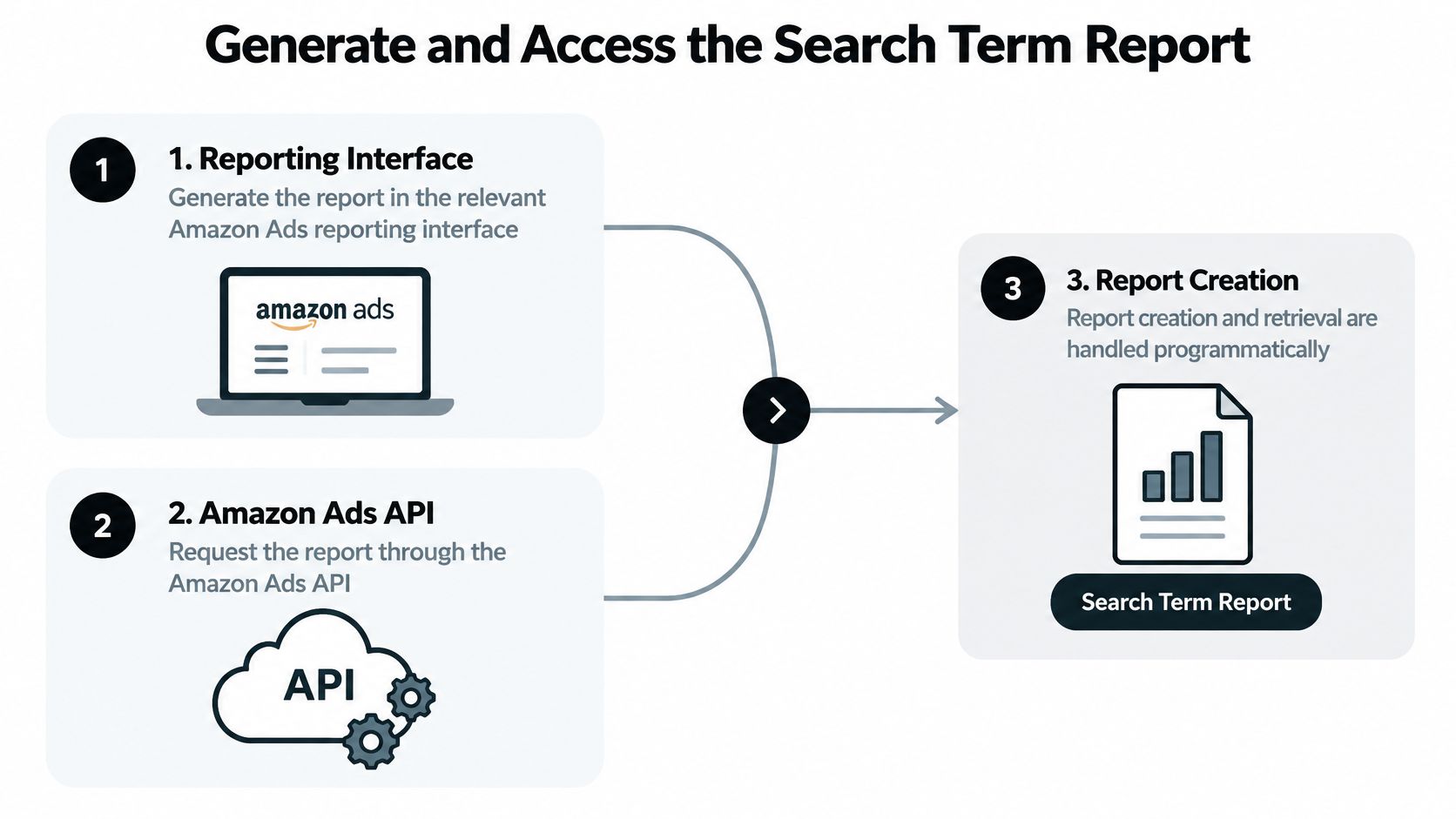
Treat generation as a job, not a lookup. A request creates a report; usable rows arrive later, after Amazon finishes the asynchronous run, so the useful artifact is the completed download rather than the initial response.
Interface retrieval
In the Amazon Ads reporting interface, choose the report and ad product, set the period and available time unit, then download the finished file. Labels and eligibility can differ by account, so let the current console options determine the clicks. For weekly review, keep the period comparable and archive exports outside the limited historical window; otherwise last month's query rows can disappear before an attribution question is settled.
API retrieval
Sponsored Products and Sponsored Brands use separate report identifiers, spSearchTerm and sbSearchTerm, with summary or daily grouping. Single requests are range-bound and historical access is limited, so recurring extraction needs durable storage instead of repeated backfills.
Clients submit POST /reporting/reports, persist the returned report ID, poll with backoff until completion, then fetch the output. Identical requests submitted too early can be rejected as duplicates, and aggressive polling can be throttled, as noted earlier. Retain targeting and ad-product context with each row, and leave room for late-attributed outcomes before judging fresh queries.
Search Term Report Fields Explained
A single row packs four kinds of information: query identity, matching context, traffic, and outcomes. Reading them separately prevents the most common misread, treating an attributed outcome as a verdict on the query itself.
Query and targeting
The customer-search-term field records what the shopper typed, or a term Amazon inferred where the ad served outside a search context. Alongside it, the report shows the targeting expression or keyword that matched that query. The distinction matters operationally. The query is what the shopper wanted; the target is how the ad became eligible to serve.
A broad target like "insulated bottle" might produce the query "stainless steel bottle for hiking." The query looks promising and the match is legitimate. Nothing in that row, though, says whether the term deserves its own exact keyword, a bid change, or no action at all.
Traffic
Clicks count visits following an ad interaction, and spend records the cost tied to them. These fields describe observed activity. They are useful for ranking where money went during the period, but a high-spend row is a prompt for review rather than proof of a problem.
One caveat carries weight here. Row presence reflects qualifying activity under the report's inclusion rules, so traffic figures should be read as a sample of engagement, not a census of everything that happened.
Outcomes
Orders and sales report attributed results under the report's definitions. ACOS relates spend to attributed sales, and it only makes sense next to order volume, margin, relevance, and the reporting window. A low or high figure is a starting point for judgment, not a universal grade for the query.
Consider two rows with identical spend and no attributed orders. On one, the query is clearly relevant to the product; attribution may only need more time to settle. On the other, the query has nothing to do with the listing. Same metrics, different problems. The second row is evidence of a mismatch worth investigating.
Reading rule: Relevance and attributed performance answer different questions. A row can score well on one and poorly on the other.
Amazon frames the report as performance broken down by targeting expressions and keywords, and positions it as an input for finding strong searches or flagging negative-targeting candidates. That framing holds up in weekly reviews, provided each row is read as a field-level record rather than a ready-made decision. In an Agent Central workflow, the fields remain auditable inputs; the customer's agent weighs them and decides whether any change is justified.
Interpret Coverage Attribution and Timing
A search-term row is evidence with boundaries. Before two rows are compared, confirm they come from the same ad product, report type, date basis, and field definitions; a gap can reflect scope or attribution instead of a demand shift.
Coverage is not impression completeness
For Sponsored Products and Sponsored Brands, a term enters search-term reporting after the associated ad produced a click. That makes the report useful for query discovery, but incomplete as delivery measurement: impression totals can differ from Campaign Manager, and an absent query may have received impressions that never earned a click.
Use daily rows when movement inside the period matters, and summary rows when the question is period-level contribution. The lookback window and API request span are limited, so retain exports with their parameters instead of assuming the same slice can be pulled again later.
Verify product and attribution definitions
Do not assume Sponsored Products, Sponsored Brands, and Sponsored Display expose the same report structure. Documented search-term API identifiers cover Sponsored Products and Sponsored Brands, while Sponsored Display needs its own check in the current Amazon Ads reference before fields are compared.
Treat click-through and view-through as separate contexts, and treat seller versus vendor reporting as separate until the field definitions prove otherwise. Recent orders and sales can mature after the click date, which is why source rows, report type, and pull date should be stored together. For a deeper check on why identical labels can produce different credited outcomes, see how attribution models shape reported orders and sales.
That stored context is what makes later review auditable. In an Agent Central workflow, the customer's agent can compare the preserved rows against account rules and decide whether to act, while the report remains the imperfect performance input rather than the decision itself.
Run a Weekly Review for Wasted Spend
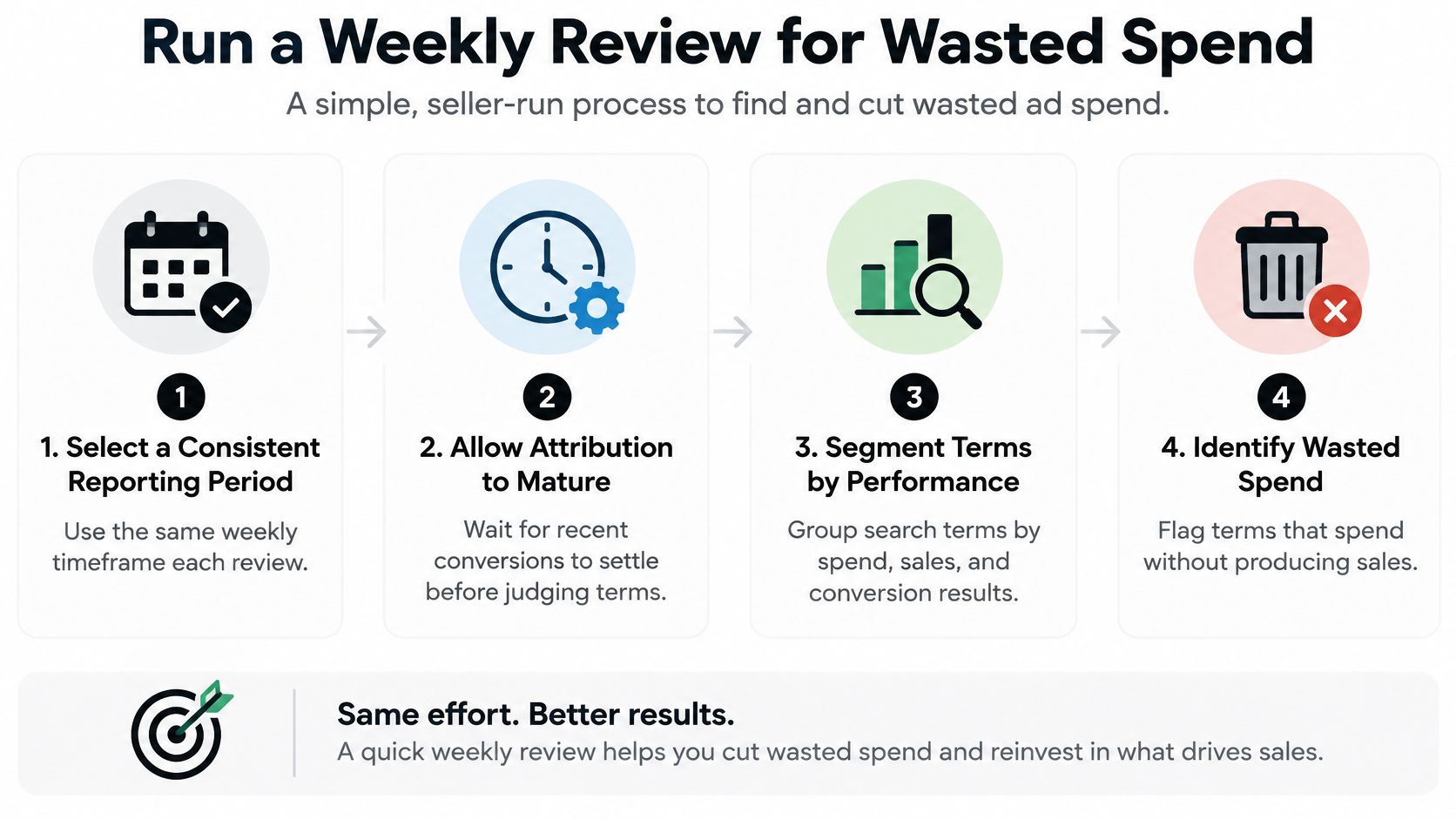
A Friday pull of the last 30 days surfaces the same pattern in most accounts: a handful of queries carrying real spend with no attributed order, sitting next to relevant terms that haven't converted yet. The review's job is to separate those two groups before anyone touches targeting. Pick a consistent reporting period, let recent outcomes settle, and rank terms by spend, clicks, orders, sales, and ACOS. Relevance to the advertised product and the campaign's purpose come before any change.
Work from evidence to candidate actions
Start with the highest-spend rows and compare each query against its matched target and the advertised product. An unrelated query with meaningful spend is a stronger candidate for investigation than a relevant query still waiting on its first attributed order. Neither pattern dictates a change on its own.
A relevant query already producing orders can be considered for controlled exact-match targeting if the team wants to manage it separately. Check the campaign's purpose and the term's economics first. A converting term can still be a poor candidate if moving it breaks the structure it was serving.
Practical rule: Treat a click threshold as a screening aid, not a decision rule. The right interpretation depends on conversion rate, price, margin, purchase latency, and statistical volume.
One concrete case: a home-goods seller finds a relevant query with spend and clicks but no attributed order in a recent window. That alone doesn't make it waste. The operator checks whether the period has settled and whether the query fits the product. A query for a product type the seller doesn't stock is different, because the relevance mismatch justifies investigation even on a thin sample.
Any thresholds a team applies are illustrative decision aids, not Agent Central recommendations. A fixed click cutoff misleads when products differ in price, margin, conversion behavior, or time to purchase. The report shows what happened inside its reporting scope. The seller decides how much evidence is enough.
Keep the decision connected to match rules
Document why each candidate is under review and where a change would apply. Negative match behavior can affect related searches, so verify the intended scope instead of copying a negative across campaigns out of habit. The guide to Amazon negative-keyword match rules covers those rules; the relevance and evidence checks behind an account decision remain the operator's job.
That documentation has a second use. A recorded candidate list, with the evidence attached, is what lets any downstream review (manual or agent-assisted) be audited against the original report rows rather than reconstructed from memory.
Connect Search Term Analysis to Agent Central
Exported reports give an operator direct control over selection and inspection. A connected workflow takes a different path: an AI client reads synced account data in a structured form, while the team keeps control over any account change. Both approaches work from the same reporting scope, so the choice comes down to whether the operator prefers manual exports or connected data.
Agent Central connects Claude, ChatGPT, OpenClaw, Cursor, and other MCP clients to Amazon Seller Central and Amazon Ads through Amazon authorization. In this workflow, a client can read synced search-term rows and show a preview before supported negative-keyword changes. The customer's agent or team decides whether to proceed. Agent Central returns facts and fields, not recommendations, and supported changes carry an audit history.
Two timing constraints apply. Account data syncs on a schedule, and Amazon report generation stays asynchronous, so the workflow is not an instant refresh. Operators should weigh both when checking whether a recent outcome has appeared. For context on the broader connected workflow, see Amazon Ads analysis and optimization workflows.
Set up the connection
Setup is direct: sign up at agentcentral.to, connect Seller Central and Amazon Ads through Amazon's authorization, then add the connection to the AI client. Each supported client has a dedicated quickstart in the Agent Central documentation. The workflow pays off when an operator wants a client to inspect synced search-term facts and preview a supported change while keeping a human decision point.
A client can organize rows by query, matched targeting, spend, or attributed outcomes. Those groupings organize the evidence; they do not make the call. The team still weighs relevance, attribution maturity, campaign intent, and the consequences of a negative before approving anything.
Quick Reference and Related Resources
| Operator question | Where to look |
|---|---|
| Which search report fits the question? | Compare Ads Search Term rows with aggregate Brand Analytics Search Terms and the separate SQP view. |
| How is the Ads report retrieved? | Use the relevant Amazon Ads reporting interface or the API lifecycle described above. |
| What does a row or field mean? | Read the query, matched targeting, traffic, and outcome fields as separate evidence. |
| Why might a term be missing? | Check the click-qualified inclusion rule before inferring that no impressions occurred. |
| What should be checked before considering a negative? | Validate query relevance, campaign context, attribution maturity, and the intended match behavior. |
Amazon's documentation remains the reference for report structure and API retrieval behavior. The report-type specification linked earlier covers identifiers, granularity, and date limits, while the Reporting API guide describes asynchronous generation and request handling. Brand Analytics Search Terms and SQP offer different perspectives from ad-level query rows, so they complement the Ads report rather than replace it.
For the connected workflow, the Amazon Ads workflow for connected analysis outlines how synced account data supports inspection and preview. The client setup steps and the negative match-type behavior were covered in the sections above.
A practical next step is to review a settled reporting period, verify relevance and attribution context for the queries drawing attention, then decide whether a connected read-and-preview workflow fits the team's process. Treat the report as a discovery reference and a partial dataset at once, and let the team's judgment close the gap.
Connect the AI client already in use to Amazon Seller Central and Amazon Ads to inspect synced search-term facts and preview supported negative-keyword changes with audit history. Visit agentcentral to evaluate that workflow for the account.
Related Agent Central pages
- Amazon Seller Central MCP server
Canonical hosted MCP overview for Seller Central, Ads, inventory, catalog, finance, and fulfillment data.
- Amazon seller data for AI agents
How Agent Central normalizes Amazon seller data before exposing it to AI clients.
- Amazon Ads MCP server
Campaign, keyword, search term, budget, TACOS, and guarded ads-write tools.
- Ads tool reference
Parameter-level docs for Amazon Ads campaign, keyword, search term, budget, and TACOS tools.
- Amazon seller MCP servers compared
How hosted MCP services compare with official Ads MCP, local repos, connector tools, and automation platforms.
- Connect Seller Central to Claude
Step-by-step path from Amazon OAuth to a Claude connector or MCP config.
Related reading
- How AI Agents Manage Amazon Seller Workflows
AI agents read Amazon seller data, calculate metrics and draft changes for approval. See the five-stage workflow, four recipes and the safety controls.
- 8 Common Mistakes to Avoid as Amazon Sellers
Learn 8 common mistakes to avoid in Amazon seller and MCP workflows, from API delays and weak permissions to unsafe writes and missing audit trails.
- Amazon IPI Score: What It Is and How to Improve It
What the Amazon IPI score measures, how it relates to monthly FBA capacity limits, and how to improve it ASIN by ASIN without cutting stock that sells.
- Amazon Pricing API: A Practical Guide for Sellers
How Amazon's pricing APIs work for sellers: what Product Pricing returns, batch limits, Featured Offer fields, and changing prices via Listings Items.
Connect Amazon seller data to your AI client.
Agent Central gives Claude, ChatGPT, OpenClaw, Cursor, and other MCP clients structured access to Amazon Ads, Seller Central, inventory, orders, catalog, finance, and fulfillment data.