
Amazon Inventory Ledger Report: Reconcile Stock
Explore the Amazon inventory ledger report to understand key fields, track inventory changes, and reconcile stock with confidence.
The Amazon Inventory Ledger Report is a consolidated FBA accounting record for a selected period, showing a starting warehouse balance, movements such as receipts, customer shipments, returns, transfers, removals, damages, losses, found units, and adjustments, and an ending warehouse balance. Sellers can access up to 18 months of historical inventory data.
Which inventory number should an operator trust when units are moving between fulfillment centers? A warehouse balance alone may not answer that question. The ledger is a transaction record, so reconciliation depends on preserving what each row means, where it applies, and when the report was requested.
Table of Contents
- What the Amazon Inventory Ledger Report Actually Is
- How the Ledger Balances Opening and Closing Inventory
- Summary View and Detail View Compared
- Key Fields and Identifiers in the Ledger
- Reconciling In-Transit Inventory and Warehouse Balances
- Tracing a Single SKU from Opening to Closing Balance
- Historical Data Limits and Duplicate Rows
- Requesting the Ledger Through the SP-API
- Choosing Between Manual Downloads, SP-API, and a Hosted MCP Connection
- Quick Reference for Ledger Terms and Report Types
- Connecting Your Ledger Data to an AI Client
What the Amazon Inventory Ledger Report Actually Is
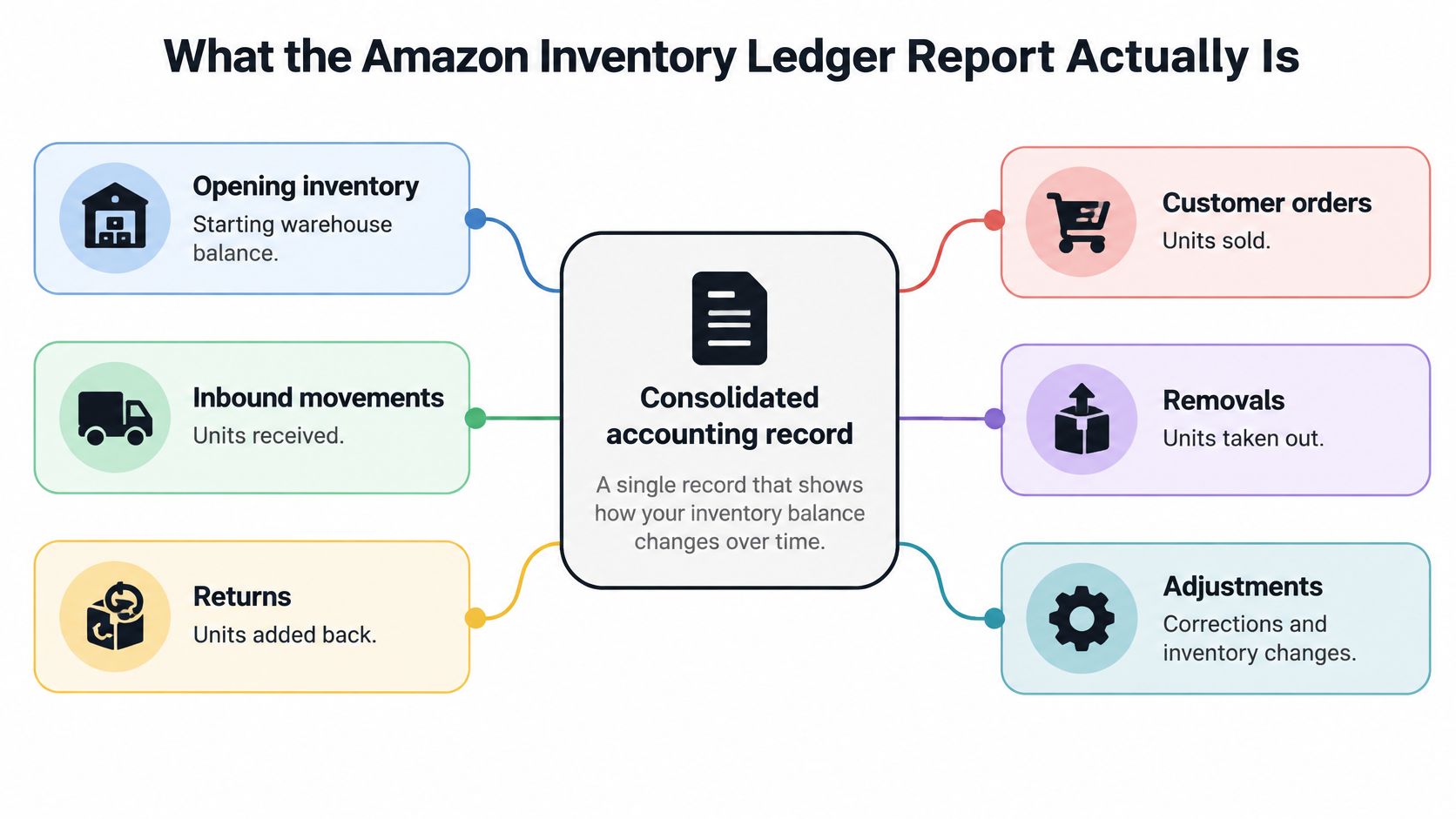
How can an operator distinguish a recorded warehouse movement from inventory that is still in transit or has already been reimbursed? The Amazon Inventory Ledger Report provides transaction-level records for FBA inventory over a selected period. Each row captures a recorded event and its effect on inventory, making the ledger useful for reconciling movements rather than checking a live network-wide count. Amazon's Inventory Ledger guidance describes the report's purpose and available history.
The ledger's movement categories include receipts, customer shipments and returns, warehouse transfers, removals, damages, losses, found units, and manual or system adjustments. Reconciliation requires keeping these events distinct: a transfer can affect a unit's location without representing a customer shipment, while a damage or loss row records an exception that may need a separate reimbursement check.
Amazon makes up to 18 months of historical inventory data available. Save the original report, request period, and relevant identifiers before that detail window closes. A ledger row documents a recorded inventory event; it does not, by itself, prove that a unit is currently sellable, still in transit, or reimbursed. Use the reimbursement record and inventory status separately when reconciling those exposures.
How the Ledger Balances Opening and Closing Inventory
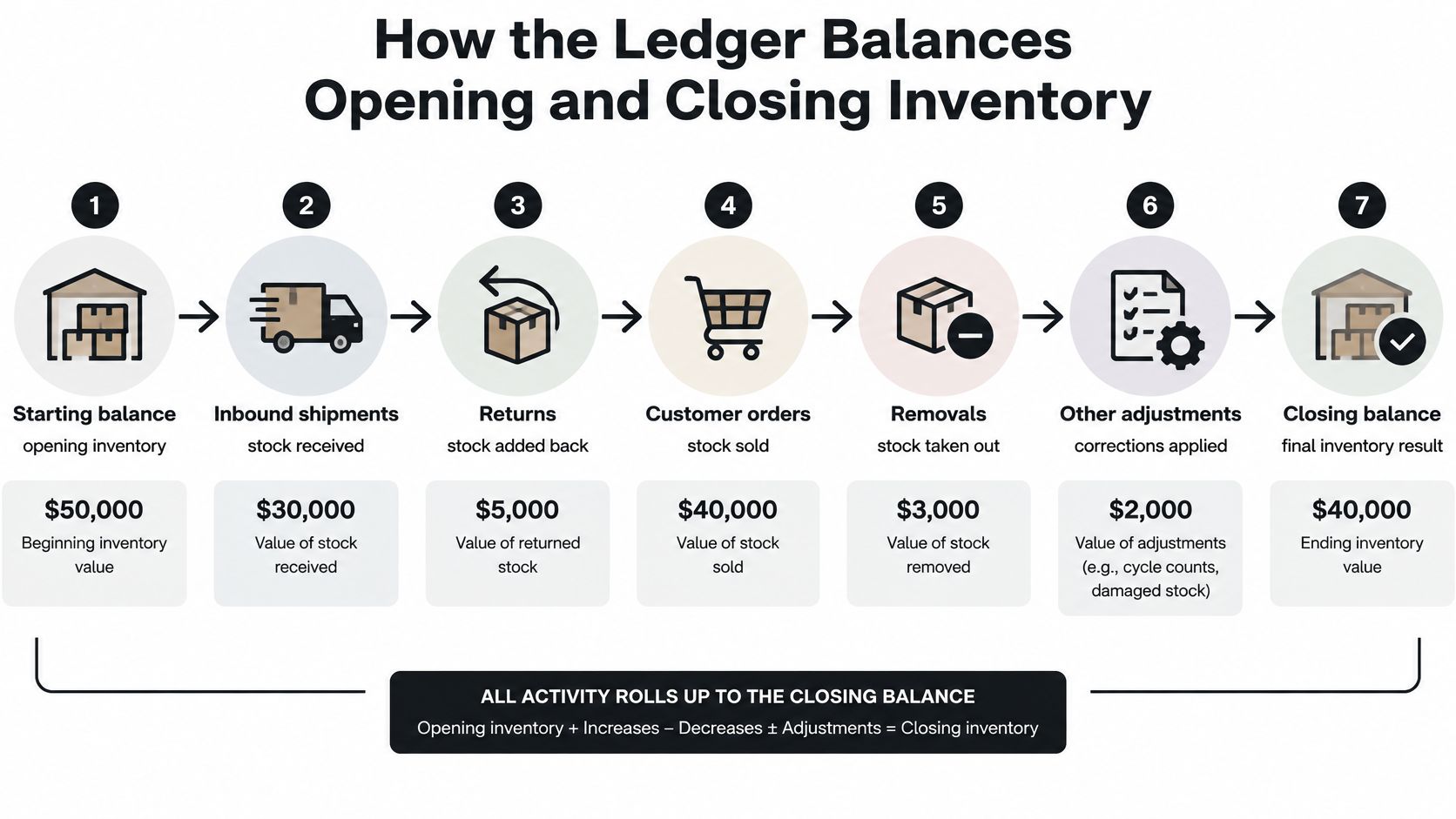
Does each recorded movement account for the change from opening to closing inventory? The summary view groups quantities such as units received, customer orders, returns, adjustments, and removals. Reconciliation starts with the opening balance, applies these movements according to their effect on stock, and compares the result with the reported ending balance.
Receipts and customer returns generally increase recorded quantity; customer shipments and removals reduce it. Adjustments require separate review because they can include damages, losses, found units, or corrections. Transfers between fulfillment centers change a unit's location, so they should not be treated automatically as a sale or as a net reduction in Amazon-held inventory.
The balance depends on matching the right product and fulfillment record. An ASIN identifies the Amazon catalog product, an MSKU is the seller's SKU, and an FNSKU identifies inventory for fulfillment by Amazon. These identifiers refer to different records; using only the ASIN can combine seller SKUs that need separate reconciliation.
For each SKU, compare the opening quantity with the signed movement quantities, then check the calculated result against the closing quantity. Treat any difference as a variance to investigate, not as grounds for a blanket adjustment. A unit recorded in transit or reimbursed also needs separate classification: neither status, by itself, establishes that the unit is part of the warehouse balance.
Summary View and Detail View Compared
Which inventory movements explain a period's closing balance, and which individual records account for a specific change? The summary and detail views answer these questions at different levels of granularity.
The summary view, identified by report type GET_LEDGER_SUMMARY_VIEW_DATA, groups inventory movements by period. It is a tab-delimited flat file with opening balance, units received, customer orders, customer returns, adjustments, removals, and ending balance. Amazon classifies it as an Amazon Fulfillment report that can be requested, not scheduled. The detail view provides individual inventory event records for investigating movements behind period totals.
| View or report | Report type | Granularity | Question it answers |
|---|---|---|---|
| Inventory Ledger summary | GET_LEDGER_SUMMARY_VIEW_DATA | Period-level movement totals | How do the reported movements account for opening and ending balances? |
| Inventory Ledger detail | Inventory Ledger detail view | Individual event records | Which recorded events explain a quantity change? |
| Open-listings inventory report | Open-listings report | Listing-level price and quantity fields | What price and quantity fields are associated with a listing? |
Start with the summary to identify a period and movement category with an unexplained difference. Then use detail records to investigate the relevant events. The open-listings report serves a different purpose: it shows listing-level price and quantity fields, not period-based inventory movements.
Because the summary report is request-only, an automated workflow must submit a report request and retrieve its resulting document. It should not depend on a scheduled export or a continuously refreshed ledger file.
Key Fields and Identifiers in the Ledger
Which fields keep a ledger movement tied to the right product and inventory condition? Start with identifiers, then review event quantities and disposition.
| Field group | Example fields | What it tells you | Reconciliation use |
|---|---|---|---|
| Identifiers | ASIN, MSKU, FNSKU | Product, seller SKU, and fulfillment-network inventory identity | Match movements to the appropriate product and seller listing |
| Quantities and events | Receipts, customer shipments, returns, transfers, removals, adjustments | How recorded units entered, left, or changed during the period | Explain the difference between opening and ending balances |
| Disposition | Sellable, customer-damaged, carrier-damaged, fulfillment-center-damaged, expired, distributor-damaged, defective | The reported condition or classification of inventory | Separate sellable units from units in other conditions |
Analyze records by SKU and disposition. A single total can include sellable units alongside inventory classified as damaged, expired, or defective, which may not be available for the same operational purpose.
An ASIN-level rollup can combine records associated with different seller SKUs or FNSKUs. Retain all three identifiers in the audit record. Otherwise, the rollup may obscure which seller listing the inventory belonged to and which fulfillment identifier was associated with its movement.
Reconciling In-Transit Inventory and Warehouse Balances
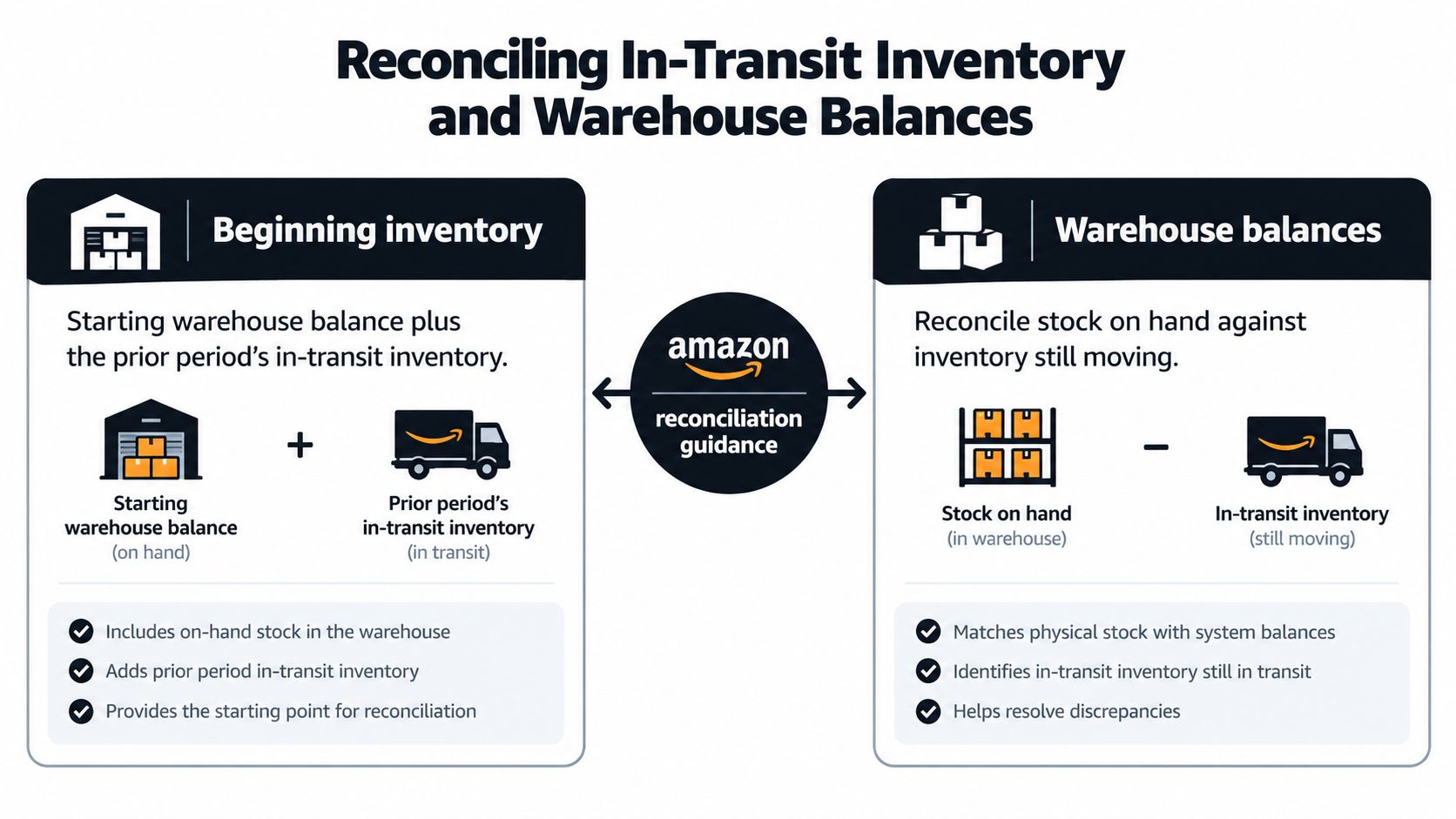
How many units does the ledger show in fulfillment centers, and how many remain in transfer between them? These are separate balances. Amazon's reconciliation guidance defines beginning inventory as the starting warehouse balance plus prior-period in-transit quantity, and ending inventory as the ending warehouse balance plus current-period in-transit quantity. The summary view excludes in-transit units by default. Amazon's reconciliation guidance describes this adjustment.
Use the fields according to the question being reconciled:
- Beginning inventory: starting warehouse balance + prior-period in-transit quantity.
- Ending inventory: ending warehouse balance + current-period in-transit quantity.
For example, an ending warehouse balance of 80 units and an in-transit quantity of 12 produces a reconciled ending inventory of 92 units. This is an arithmetic illustration, not an Amazon-reported balance. The warehouse balance remains 80; the combined figure includes units still transferring between facilities.
Report formats also affect comparisons. Older Daily Inventory History reports displayed in-transit units in a separate row marked XFR in the Warehouse ID column. The Inventory Ledger summary uses an “In transit between warehouses” column. Align the report type, period, and fields before treating a difference as a variance.
Keep four measures distinct: warehouse-held stock, in-transit units, physical availability, and reimbursed units. A transfer record does not establish that stock is available to fulfill orders; an inventory adjustment does not establish that Amazon reimbursed the seller. Recording these as separate quantities supports accurate reconciliation and protecting margins for Amazon brands.
Preserve the report period and balance definitions in the reconciliation record. A documented inventory accuracy workflow can help teams retain those distinctions when comparing ledger records with operational totals.
Tracing a Single SKU from Opening to Closing Balance
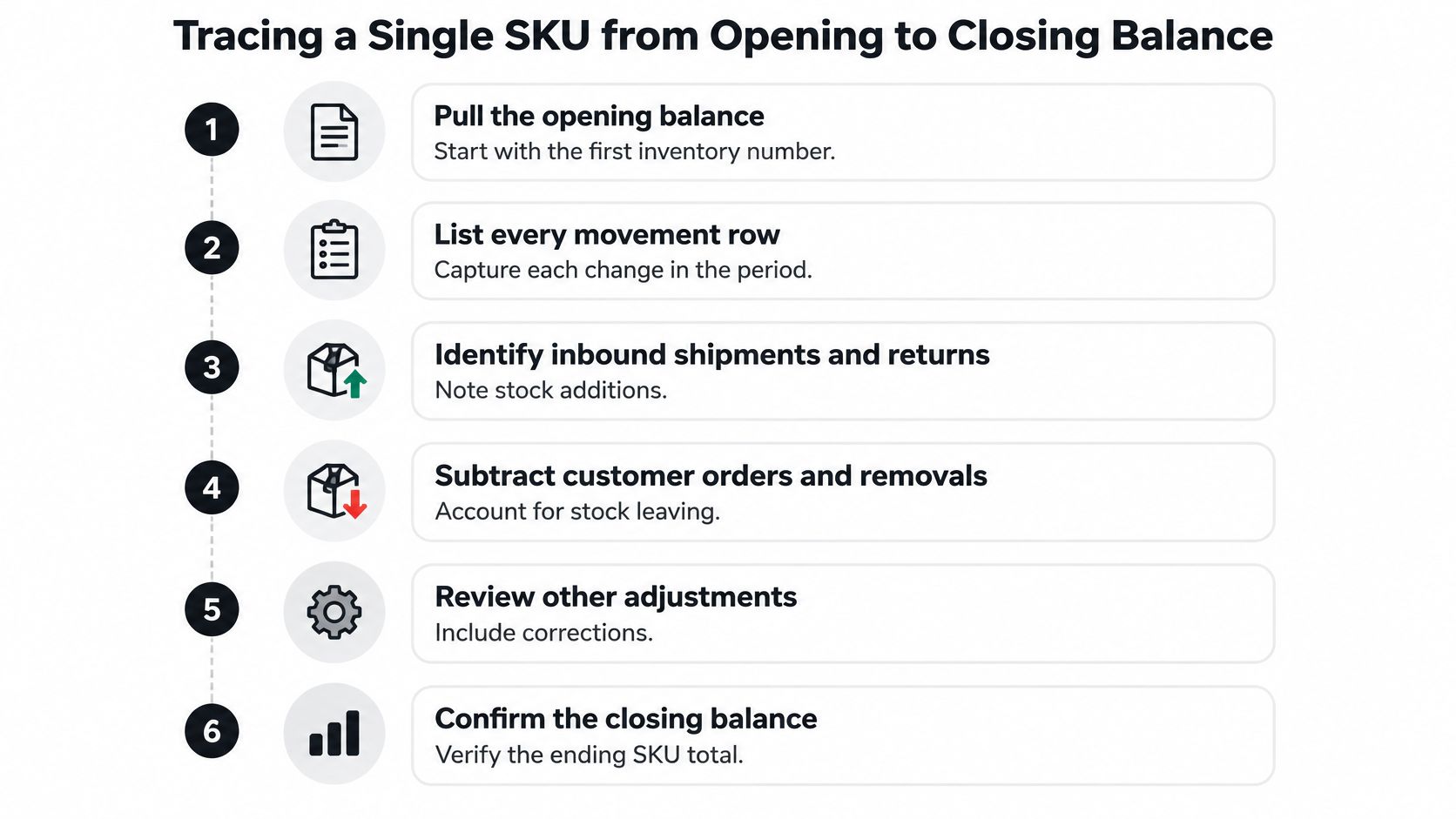
A single-SKU investigation should produce an explanation of the movements, not only a variance number. Use the same reporting period for the opening balance, event records, and closing balance, then preserve the identifiers that connect those records.
- Pull the opening balance. Record the SKU and fulfillment identifier alongside the starting warehouse balance.
- List every movement row in date order. Keep the original event details rather than summing first.
- Classify each event. Mark customer-driven activity, such as shipments and returns, separately from Amazon-driven events, such as adjustments or damages.
- Account for additions and deductions. Include receipts and returns, customer orders, removals, and other adjustments.
- Check transfers and exceptions. A transfer can leave one fulfillment center before arriving at another. A removal and a later reimbursement may also fall in different reporting periods.
- Compare with the closing balance. Identify which event records explain the close and list the remaining unexplained units individually.
Amazon's reconciliation guidance recommends FNSKU-level reconciliation and cross-checking customer shipments, returns, removals, and reimbursements rather than relying on a single total. That approach helps distinguish a recorded movement from a financial outcome: a removal tells the inventory story, while reimbursement evidence must be checked separately.
This procedure works in a spreadsheet and can later be represented as a defined agent workflow. The important constraint is to retain the source rows and their classifications so an operator can inspect the evidence behind a calculated balance.
Historical Data Limits and Duplicate Rows
Amazon retains detailed inventory transactions for only the trailing 18 months, while aggregate inventory levels are kept indefinitely, as noted earlier in this article. The two are not interchangeable. A download run today can reproduce a historical aggregate figure without reproducing the event-level rows that explain how that figure was reached.
The exposure shows up in specific workflows: reimbursement investigations, tax-year comparisons, acquisition due diligence, and seasonality analysis. Each depends on transaction-level evidence, not just a balance. Once the detailed-history window closes on a period, the ledger stops being an audit trail for that period and becomes a number without a paper trail. Sellers who plan to retrieve history later are assuming a retrieval right that expires.
A Seller Central forum question illustrates the second problem. One seller described a year-end report with roughly 49,000 rows for a store carrying about 3,000 items, including repeated SKUs and products the seller did not recognize. That is one reported example, not a standard report size, but it raises a question every analyst hits on first contact with the detail view: are repeated rows errors? Usually they are not. Different dates, locations, dispositions, FNSKUs, and event records each legitimately produce separate rows. A row count is not a unit count, and deduplicating on SKU alone destroys real transactions.
A defensible archive therefore needs three things:
- The raw file preserved exactly as retrieved, with its report period and request context.
- Record keys built from marketplace, date, FNSKU, location, disposition, and event so distinct records are never merged.
- Aggregates stored separately at the daily or monthly level, each retaining a link back to the raw evidence.
With that structure, an analyst can trace any reported total down to its source rows. Without it, the ledger degrades into the same aggregate-only position Amazon's retention policy imposes anyway, just earlier and by choice.
Requesting the Ledger Through the SP-API
A ledger request produces a transaction evidence file for a defined scope and requires a managed request-retrieval lifecycle. The operator or system submits the request, records its context, checks the status until the report becomes available or reaches a failed state, retrieves the document, and stores the result with its request record. The returned file alone cannot establish which marketplace, period, account, or parameters produced it.
Availability should be validated before an API process depends on the ledger. Certain FBA reports can be requested only once within a specified period, so a repeated request during that interval may be cancelled. Some Seller Central reports are inaccessible through the Reports API, some report types are unavailable to vendors, and report types can be deprecated. Amazon's Reports API FAQ documents these constraints. For teams mapping the retrieval lifecycle to Amazon's broader interface model, this guide to Amazon SP-API report workflows provides additional context.
A cancellation or unavailable report type should remain part of the evidence trail. Substituting a different inventory report can change the transaction definition, timing, or fields used for reconciliation, making a later comparison unreliable.
Each retrieval record should answer four questions:
- Which report type was requested?
- Which account, marketplace, and period applied?
- When was the request submitted, and what was its final status?
- Which document was returned?
That provenance lets an operator distinguish a missing ledger from a cancelled request and prevents a replacement file from being treated as the original reconciliation evidence.
Choosing Between Manual Downloads, SP-API, and a Hosted MCP Connection
The retrieval method should fit the investigation's repeatability and audit requirements. Manual downloads, direct SP-API integration, and a hosted MCP connection have different operational tradeoffs.
| Method | Best fit | Main control | Main caveat |
|---|---|---|---|
| Manual Seller Central download | A one-off question | The operator chooses the report and period | The downloaded file may lack stored request metadata unless the operator archives it |
| Direct SP-API integration | A system-managed report archive | The team controls request handling and storage | The team must manage report status, request limits, availability, and deprecation |
| Hosted MCP connection | Structured access from an AI client | The client can query prepared account records | Sync timing and the available account history still matter |
Agent Central is a hosted MCP server that connects AI clients such as Claude, ChatGPT, OpenClaw, and Cursor to Amazon Seller Central and Amazon Ads accounts. It provides structured access to seller data including inventory, orders, catalog, finance, ranking, and fulfillment, alongside advertising data. Account data syncs on a schedule. A new account starts with 30 days of history that builds from there, and Amazon Ads history is kept while the account stays connected.
Agent Central returns facts, metrics, classifications, and Amazon-provided fields; it doesn't recommend what a seller should do. The user's agent or team interprets the results. Supported changes are previewed by default, protected against duplicate submissions, and logged with before-and-after values. Access uses Amazon authorization and a scoped API key, a Connector URL, or Claude's OAuth connection.
A hosted MCP connection is not a substitute for preserving source files when a ledger transaction audit requires the original report. Teams can use it for structured reads while maintaining report archives and request metadata through Seller Central or their own SP-API workflow.
Quick Reference for Ledger Terms and Report Types
| Term or report | Definition | Where to apply it |
|---|---|---|
| Summary view | Period-level opening balance, receipts, orders, returns, adjustments, removals, and ending balance | Locate a period-level variance |
GET_LEDGER_SUMMARY_VIEW_DATA | Report type identifier for the summary view | Specify the report type when requesting it |
| Detail view | Individual event records behind inventory movements | Trace the events behind a quantity change |
| ASIN | Amazon's 10-character product identifier | Identify the catalog product |
| MSKU | Seller-assigned SKU | Match the seller's inventory record |
| FNSKU | Identifier for products stored in and fulfilled from an Amazon fulfillment center | Match product records to fulfillment inventory |
| Disposition | Inventory condition, such as sellable, damaged, expired, or defective | Reconcile quantities by condition |
| In-transit inventory | Units moving between fulfillment centers, excluded from the summary warehouse balance by default | Apply the beginning and ending reconciliation formulas |
The summary report is request-only, not scheduled. Detailed transaction history covers the trailing 18 months; aggregate inventory levels remain available indefinitely. Preserve downloaded detail reports and their request metadata before the transaction window expires. The overview of Amazon Seller Central reports places the ledger alongside other report types used for listing and account analysis.
Connecting Your Ledger Data to an AI Client
An AI client can query Amazon account data through a hosted MCP connection. Agent Central connects to Seller Central and Amazon Ads using Amazon authorization, then makes structured account data available to the client. The Claude quickstart explains the setup steps.
For ledger reconciliation, an AI client can help retrieve and organize account data, but it does not replace the report archive. Keep the original ledger files with their report dates and field definitions. That preserves transaction-level evidence for comparing warehouse balances, in-transit units, and reimbursements.
New accounts start with 30 days of history, which builds over time. Plans are priced by monthly Amazon order volume, and a 14-day free trial is available without a card. See Agent Central pricing for current plan details.
Agent Central provides a hosted MCP connection to Seller Central and Amazon Ads data. Its output is structured information, not recommendations.
Related Agent Central pages
- Amazon seller data for AI agents
How Agent Central normalizes Amazon seller data before exposing it to AI clients.
- Amazon Seller Central MCP server
Canonical hosted MCP overview for Seller Central, Ads, inventory, catalog, finance, and fulfillment data.
- Inventory tool reference
Inventory, orders, sales velocity, listing registry, days of cover, returns, and reimbursements.
- Connect Seller Central to Claude
Step-by-step path from Amazon OAuth to a Claude connector or MCP config.
- ChatGPT with Amazon seller data
ChatGPT-specific setup path for Amazon seller data through hosted MCP.
- Finance tool reference
Payment transactions, fee breakdowns, profitability, and settlement economics.
Related reading
- Amazon Brand Analytics: Reports and Metrics Guide
What Amazon Brand Analytics includes, who can access it, and how to read its search query, search catalog, market basket and repeat purchase reports.
- What Is Amazon Seller Central and How It Works in 2026
What Is Amazon Seller Central. Learn what Amazon Seller Central is, how its dashboard works, and how sellers connect it to AI agents via MCP
- What Is BSR on Amazon? An Operator Guide
Amazon Best Sellers Rank is a category-relative sales signal. Learn how Amazon calculates BSR, how to read it, and how to monitor it safely.
- Ungated Products on Amazon: Restriction Checks
Learn how sellers can check Amazon product and category restrictions, verify approval status, and audit candidate ASINs with structured workflows.
Connect Amazon seller data to your AI client.
Agent Central gives Claude, ChatGPT, OpenClaw, Cursor, and other MCP clients structured access to Amazon Ads, Seller Central, inventory, orders, catalog, finance, and fulfillment data.