
FBA Inventory and Inbound Services Fees Explained for 2026
Learn which FBA inventory and inbound services fees apply, what triggers each charge, when Amazon bills them, and how to monitor them in Seller Central.
A seller closing the month may find storage charges beside placement fees for shipments sent earlier. FBA inventory and inbound services fees cover holding stock, aging inventory, and distributing received shipments. Reconciling them means matching each charge to its own event and measurement basis, rather than applying a purchase-order average.
Table of Contents
- Which FBA Inventory and Inbound Fees Apply to Your Units
- How Monthly Storage Fees Are Calculated
- When Does the Aged Inventory Surcharge Apply?
- When Amazon Charges the Inbound Placement Fee
- Do Fewer Inbound Splits Lower Total FBA Cost?
- How to Monitor FBA Fees Each Month
Which FBA Inventory and Inbound Fees Apply to Your Units
Most operators need to distinguish monthly inventory storage, the aged inventory surcharge, and the inbound placement service fee. They aren't interchangeable components of a single warehouse rate.
Monthly storage pays for space occupied. The aged inventory surcharge adds a separate cost for stock that has remained in Amazon's network beyond the applicable age threshold. Placement pays for Amazon's distribution of inbound inventory across fulfillment centers closer to demand.
FBA inventory and inbound fees by trigger and billing date
| Fee | Triggered by | Assessed on | Billed |
|---|---|---|---|
| Monthly inventory storage | Units held in Amazon fulfillment centers | Daily average cubic feet by size tier and season | Month after storage, so June storage is billed in July |
| Aged inventory surcharge | Units stored 181 days or longer | Snapshot taken on the 15th of each month, with a per-unit minimum in the oldest bands | Monthly, in addition to the storage fee |
| Inbound placement service fee | Shipment received at Amazon fulfillment centers | Units actually received | 45 days after receipt |
Amazon's aged-inventory policy establishes the U.S. surcharge threshold of 181 days and the assessment snapshot on the 15th of each month. Amazon's inbound placement guidance states that the placement charge uses quantities received and is charged 45 days after receipt.
Why a single per-unit allowance misleads
The measurements differ: occupied volume for storage, age-qualified inventory for the surcharge, and received units for placement. An operator can allocate the resulting costs to units for profitability reporting, but that allocation doesn't reproduce Amazon's calculation.
For example, a compact item and a bulky item can have similar sales volumes while creating very different storage exposure. A newly received unit and an older unit can occupy identical space but face different carrying costs.
Practical rule: Calculate each fee on Amazon's measurement basis first. Allocate it to products or orders afterward.
Removal isn't part of this fee map. When stock needs to leave the network, FBA removal order fees belong in a separate disposal or recovery calculation.
Creating a shipment isn't the same as incurring its final placement charge. The operational distinction is between a plan, a physical shipment, and inventory Amazon has received.
How Monthly Storage Fees Are Calculated
Storage resembles renting warehouse space, except Amazon measures occupied volume, not just floor area. A tall carton uses more space than a shallow carton with the same footprint, and packaged dimensions matter even when the unit count stays unchanged.
Amazon's monthly inventory storage guidance calculates fees from daily average occupied volume, with rates determined by size tier and season; storage is generally billed the following month, so June storage appears in July.
Calculate occupied volume before applying a rate
The basic calculation is:
Monthly storage estimate = daily average occupied cubic feet × applicable monthly rate
For SKU-level estimates, calculate packaged unit volume, multiply it by the units held each day, and average that occupied volume across the storage month. Separate products by size classification before applying rates.
A month-end inventory count isn't a substitute. Stock received near the end of a month hasn't occupied space for the same duration as stock held throughout it.
The following standard-size benchmarks come from Amazon's U.S. storage fee update, which reduced the January–September rate to $0.78 per cubic foot beginning April 1, 2024, while retaining $2.40 for October–December.
Standard-size storage rates per cubic foot and the cost for 1,000 cubic feet
| Period (standard-size) | Rate per cubic foot per month | Monthly cost for 1,000 cubic feet |
|---|---|---|
| January to September | $0.78 | $780 |
| October to December | $2.40 | $2,400 |
These are the published benchmarks used for this calculation, not a guarantee that every product or subsequent fee schedule uses the same rates. Other size tiers have different schedules, and operators should confirm the applicable marketplace, classification, and current rate before accruing a charge.
Separate the storage month from the posting month
For the hypothetical footprint in the table, the calculation is 1,000 × $0.78 = $780, compared with 1,000 × $2.40 = $2,400. The resulting monthly difference is $1,620 for the same occupied volume.
The posting date doesn't select the storage rate. Finance teams should identify the service period on the fee record and apply the rate for that period, rather than the month in which the transaction appeared.
Useful storage-estimate inputs are:
- Packaged cubic volume: Use the dimensions associated with Amazon's inventory records and investigate measurement discrepancies.
- Size tier: Keep classifications separate rather than applying a blended account-wide rate.
- Average stock held: Include occupancy throughout the month, not just the closing balance.
Sales velocity helps forecast future stock levels. It doesn't, by itself, reproduce the storage bill.
When Does the Aged Inventory Surcharge Apply?
The aged inventory surcharge sits on top of ordinary monthly storage. An older unit contributes to the regular space charge and a separate age-based assessment in the same month.
Amazon renamed the former long-term storage fee, so operators should work from the current U.S. schedule rather than explanations written for the earlier assessment.
The trigger is a snapshot, not a sale or a receipt. Amazon's aged inventory guidance applies the surcharge to units stored for at least 181 days, using inventory age on the 15th of each month, and publishes the age-band rates below. A unit that reaches 181 days just after the snapshot keeps aging until the next count catches it.
Aged inventory surcharge by age band
| Age of units | Rate per cubic foot per month | Per-unit alternative |
|---|---|---|
| 181 to 210 days | $0.50 | No per-unit alternative |
| 211 to 240 days | $1.00 | No per-unit alternative |
| 241 to 270 days | $1.50 | No per-unit alternative |
| 271 to 300 days | $5.45 | No per-unit alternative |
| 301 to 330 days | $5.70 | No per-unit alternative |
| 331 to 365 days | $6.40 | No per-unit alternative |
| 366 to 455 days | $6.90 | $0.30 per unit, whichever is greater |
| 456 days or more | $7.90 | $0.35 per unit, whichever is greater |
The greater-of comparison starts at 366 days. Every band below that point is charged on cubic-foot volume alone, so the per-unit column only enters the calculation for the oldest inventory.
Calculate both sides of the greater-of rule
Take a hypothetical holding of 1,000 cubic feet in the $6.90 band. The volume side produces $6,900 for that monthly assessment.
The operator then multiplies the qualifying unit count by the per-unit alternative and uses whichever result is greater. If that footprint contains 30,000 qualifying units, the per-unit side produces 30,000 × $0.30 = $9,000, and the assessment is $9,000 rather than $6,900.
Compact products are where this comparison bites. Many units can occupy relatively little space, so a cubic-foot-only estimate understates the charge whenever the per-unit figure comes out larger.
A small storage footprint doesn't necessarily mean a small aged-inventory charge.
Track aging stock, not just SKU sales
A SKU can keep selling while its oldest units cross into a new band, because sales totals say nothing about the age composition of the units still held. The assessment follows the units Amazon counts on the snapshot date, so an aging review should preserve:
- Age bucket: The category Amazon reports for the inventory being assessed.
- Qualifying volume and units: Both figures are needed wherever the greater-of rule applies.
- Assessment cutoff: Inventory movement after the 15th belongs to the next snapshot and shouldn't be used to rewrite the earlier assessment.
- Operational status: Reserved, unfulfillable, or otherwise constrained stock needs separate investigation before a team assumes it can sell through normally.
Markdowns, replenishment reductions, removals, and liquidation each carry different costs and operational consequences. A broader inventory cost reduction review should compare those options against expected carrying exposure rather than treating every aging SKU alike.
When Amazon Charges the Inbound Placement Fee
| Event | Quantity Amazon uses | Fee effect |
|---|---|---|
| Shipment plan created | Planned units | No inbound placement fee |
| Units leave the supplier | Shipped units | No inbound placement fee |
| Shipment received at Amazon | Received units | Starts the 45-day clock |
| 45 days after receipt | Received units | Inbound placement service fee is charged |
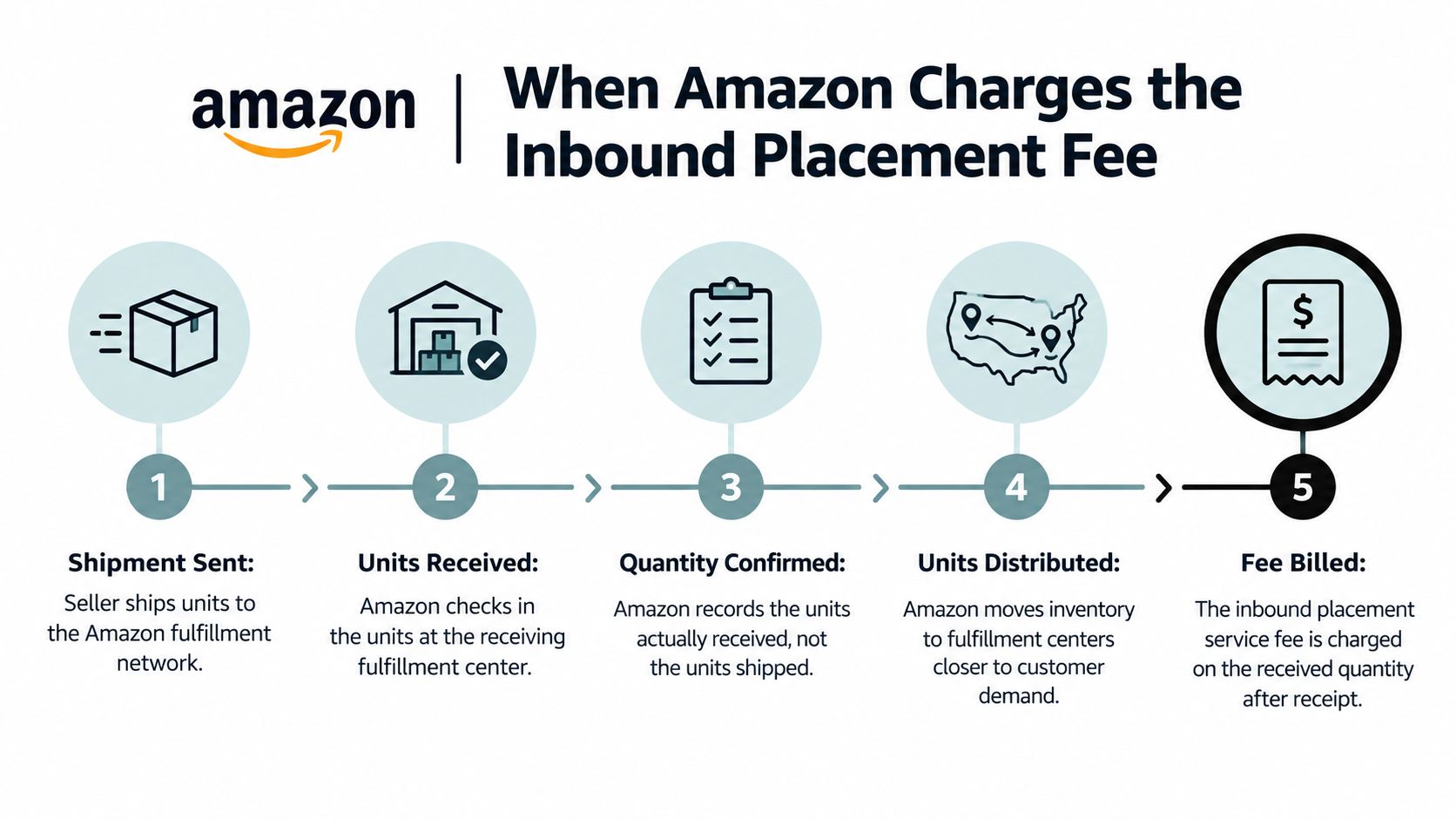
The inbound placement service fee is a post-receipt cost. Amazon's inbound placement service documentation states that Amazon charges it 45 days after receiving the shipment, using the quantity received.
Amazon charges for distributing units across fulfillment centers nearer to demand. A shipment-plan estimate helps an operator evaluate the inbound option, but it isn't the final received-quantity charge.
The physical and financial sequence is shown below.
What receiving differences change
A receiving shortage reduces the quantity used for the placement calculation. Applying the selected rate to all units shipped can therefore overstate the expected charge, even though the missing inventory may create a separate loss or reconciliation issue.
Different receiving dates also matter. Shipments within a broader replenishment plan can reach Amazon on different dates, so their placement charges shouldn't automatically be assigned a common posting date.
Partial receiving and subsequent quantity adjustments deserve an exception record. Operators shouldn't invent a single receipt date for incomplete records merely to make a spreadsheet balance.
A shipment sent is evidence of inventory movement. It isn't evidence that Amazon has recognized the same quantity as received.
Reconcile the receipt before allocating the fee
Compare Amazon's received quantities with the shipment plan and supplier packing list. Investigate whether a discrepancy reflects an incomplete receiving process, a packing error, or a quantity adjustment before using it as a settled cost input.
The reconciliation record should keep these fields separate:
- Planned units: The quantity in the inbound plan.
- Shipped units: The quantity supported by dispatch records.
- Received units: Amazon's recorded receipt quantity.
- Fee-assessed units: The quantity associated with the actual charge.
- Expected charge date: The receipt-based billing date, retained alongside the eventual posting date.
Placement cost per received unit is the useful comparison for Amazon's assessment. Cost per shipped unit may still help internal profitability analysis, but it answers a different question and shouldn't be used to explain a receiving-based bill.
Do Fewer Inbound Splits Lower Total FBA Cost?
Does a simpler inbound shipment produce a lower total cost, or merely fewer shipping tasks? The answer requires comparing freight, placement, storage, and aging exposure for the same SKU and replenishment quantity.
Fewer seller-managed destinations can reduce dispatch complexity. They don't establish how much stock will remain available, how quickly it will sell, or how long Amazon will hold it.
Amazon's U.S. fee update describes average 2026 minimal-splits placement increases of $0.05 per standard-size unit and $0.27 per large-bulky unit.
| Change | Operational implication |
|---|---|
| Standard-size minimal-splits placement increase | Recalculate the selected option rather than carrying forward an older estimate |
| Large-bulky minimal-splits placement increase | Check the product's revised bulky classification |
| New small-standard and large-standard shipping-weight bands between 3 and 20 lb | Obtain the applicable band rate from Amazon; rates aren't reproduced here |
| Separation into small-bulky and large-bulky tiers | Validate the classification before comparing inbound options |
An average increase isn't the exact change for every shipment. The applicable option, size classification, and shipping weight still determine the account-specific estimate.
Test the apparent saving against carrying exposure
For a hypothetical shipment of 2,000 standard-size units, applying the stated average increase produces $100 of additional placement cost. This illustrates the increase only, not the shipment's total placement bill.
Suppose the slow-moving portion later occupies 500 cubic feet in the $0.50 age band. That hypothetical assessment adds $250 per month in surcharge alone, before ordinary storage.
The comparison doesn't prove that a particular split option caused the aging. It shows why inbound savings and downstream carrying costs need to be evaluated together.
Decision test: Compare the complete replenishment scenario, not just the cheapest line on the shipment screen.
Evaluate each SKU separately
A useful comparison includes:
- Placement per received unit: Use the rate associated with the selected inbound option.
- Expected velocity: Test whether demand can absorb the replenishment quantity.
- Cubic-foot exposure: Large packaged volume makes surplus stock more expensive to hold.
- Replenishment frequency: Smaller, better-timed receipts may reduce exposure but can change freight economics.
- Aging probability: Identify the stock likely to enter a surcharge band before it sells.
Distributing stock across more locations doesn't guarantee faster sell-through. Consolidating the seller's inbound work doesn't guarantee lower carrying costs either.
Extra placement cost may be rational for fast movers and wasteful for low-velocity products. The cheapest inbound option isn't automatically the lowest total FBA cost.
How to Monitor FBA Fees Each Month
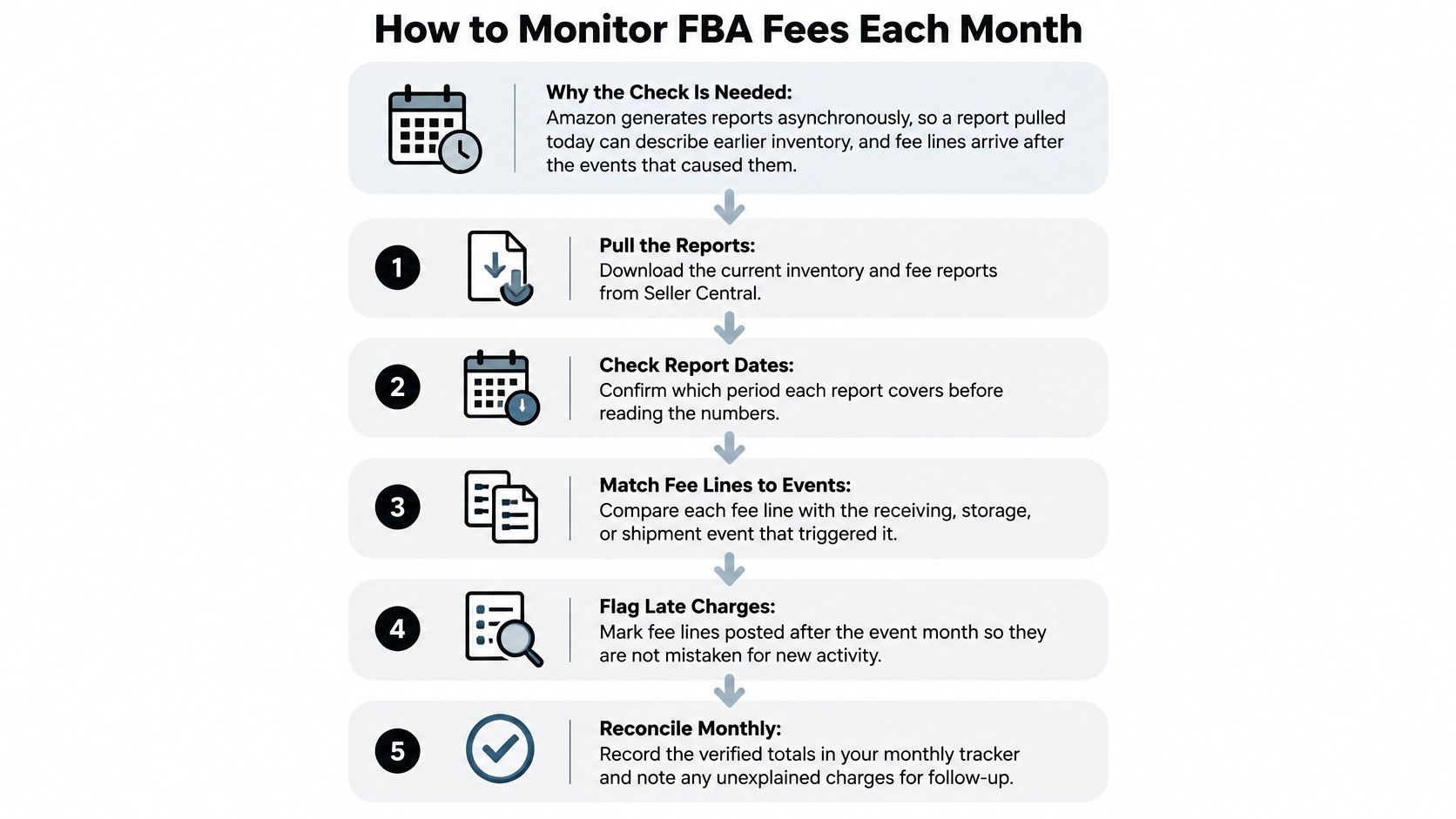
Amazon generates reports asynchronously. A report downloaded today can describe an earlier inventory position, while a fee posted today can relate to an earlier receipt or storage period.
A reliable review therefore needs distinct dates for the operational event, report coverage, report generation, and financial posting. Combining them into a single date column makes timing differences look like unexplained charges.
The monthly process should preserve those distinctions before anyone evaluates variances.
Build an event-based reconciliation
- Pull the closed-period reports. Download the storage fee and inventory age reports from Seller Central, together with the relevant financial transaction records. Record the coverage period and generation date so a later rerun can be distinguished from the original export.
- Separate volume and classification. Record cubic feet by size tier and identify whether the storage period falls under the applicable peak or off-peak schedule. Keep measurement changes visible rather than overwriting earlier dimensions without an explanation.
- Group inventory by age band. Preserve Amazon's reported age categories and calculate exposure using the applicable threshold and rate schedule. Don't substitute account-wide sales velocity for an inventory-age record.
- Match shipment quantities. Compare planned, shipped, and received units using shipment identifiers and SKU-level records where available. A matching shipment total can hide an over-receipt on one SKU and a shortage on another.
- Record the expected placement posting. Calculate the receipt-based charge date for each shipment and retain any receiving adjustments. If the receipt record is incomplete, mark the estimate as unresolved rather than treating it as confirmed.
- Compare financial lines with expected assessments. Match fee type, quantity, service period, rate basis, and posting date. Classify exceptions as quantity differences, rate differences, timing differences, or unmatched transactions.
- Preserve the aging snapshot cutoff. Use the inventory position relevant to Amazon's assessment, not a later inventory download. Keep subsequent sales or removals as later events rather than evidence that the earlier assessment was wrong.
A useful exception register includes the shipment or product identifier, expected amount, posted amount, difference, explanation, and review status. That record supports follow-up without turning every timing difference into a dispute.
Keep estimates separate from posted charges
Storage estimates, shipment-plan estimates, and actual transactions belong in different fields. When a posted charge arrives, the operator should reconcile or replace the estimate rather than add both amounts to product cost.
For scenario checks before replenishment, the PlatformDTC fee calculator from PlatformDTC can provide a separate calculation reference. A calculator result shouldn't be treated as proof of Amazon's received quantity or actual assessment.
The same distinction applies to settlement reporting. A settlement describes financial activity in its reporting window; it doesn't mean every underlying storage or receiving event occurred during that window.
A documented financial reconciliation process should retain both the service period and posting period. This lets finance explain the cash movement while operations examines the event that generated the fee.
Use connected records without losing their dates
Agent Central is a hosted Amazon MCP server that connects the AI already in use to Seller Central and Amazon Ads. One connection covers advertising, inventory, orders, catalog, ranking, finance, and fulfillment, with data joined across Amazon's separate reports and APIs.
Claude, ChatGPT, OpenClaw, Cursor, and other MCP clients can use structured records to compare inbound quantities, inventory positions, and financial activity. Amazon Ads metrics can add demand context, but attributed advertising sales aren't a substitute for inventory receipts or fee records.
Account data syncs on a schedule. Results are current as of the last sync, not real time, so reconciliation output should retain source periods and sync context.
Agent Central returns facts, metrics, classifications, and source-provided fields, not recommendations. The seller, agency, or user's agent decides whether to investigate a discrepancy or change a replenishment plan; supported writes use guardrails and audit logs rather than changing the account without notice.
For developer workflows, scoped API keys should limit access to the operations required, while OAuth and Amazon's authorization establish the relevant account connections. Read-only fee reconciliation should remain separate from write-enabled shipment, listing, or advertising workflows.
Rates and classifications can change. Any incomplete age-band mapping should remain an explicit exception until the applicable Amazon schedule has been confirmed.
To start, sign up at Agent Central, connect Seller Central and Amazon Ads through Amazon's authorization, then add the connection to the AI client using the Claude quickstart guide. Plans are priced by monthly Amazon order volume, with a 14-day free trial that needs no card, as described in the pricing documentation.
Agent Central gives MCP-enabled workflows structured access to Amazon inventory, inbound shipment, and finance records so operators can reconcile fees against the events that generated them. Visit agentcentral to connect those records to an existing AI client while keeping fee interpretation and operational decisions under the team's control.
Related Agent Central pages
- Amazon seller data for AI agents
How Agent Central normalizes Amazon seller data before exposing it to AI clients.
- Amazon Seller Central MCP server
Canonical hosted MCP overview for Seller Central, Ads, inventory, catalog, finance, and fulfillment data.
- Inventory tool reference
Inventory, orders, sales velocity, listing registry, days of cover, returns, and reimbursements.
- Fulfillment tool reference
MCF shipping previews, orders, order creation, tracking, and returns.
- Connect Seller Central to Claude
Step-by-step path from Amazon OAuth to a Claude connector or MCP config.
- ChatGPT with Amazon seller data
ChatGPT-specific setup path for Amazon seller data through hosted MCP.
Related reading
- FBA Removal Order Fees: Rates and How to Review Them
FBA removal order fees are charged per unit by size tier and shipping weight. See current U.S. rates, what drives the cost, and how to review charges.
- Amazon Seller Accounting: How to Reconcile Settlements
Amazon seller accounting guide: reconcile settlements, refunds, reimbursements and ad costs against bank deposits using Amazon's own sources.
- Amazon Inventory Ledger Report: Reconcile Stock
Explore the Amazon inventory ledger report to understand key fields, track inventory changes, and reconcile stock with confidence.
- Amazon Search Term Report: How to Read and Use It
Learn how to access the Amazon search term report, interpret its fields, find wasted spend, and turn settled search-term data into controlled actions.
Connect Amazon seller data to your AI client.
Agent Central gives Claude, ChatGPT, OpenClaw, Cursor, and other MCP clients structured access to Amazon Ads, Seller Central, inventory, orders, catalog, finance, and fulfillment data.