
How AI Agents Manage Amazon Seller Workflows
Learn how AI agents manage Amazon seller workflows to automate listings, optimize pricing, and streamline operations for better efficiency.

A seller asks Claude why inventory is tightening, expecting a quick answer. A useful AI agent must connect sales velocity, sellable units, inbound stock, orders, and marketplace context, then explain the result without pretending Amazon is a real-time database. The seller or team still decides what to do. The agent retrieves facts, performs calculations, and routes approved changes through guarded controls.
Table of Contents
- The Connected Workflow From Question To Guarded Action
- Hosted MCP Architecture and Data Preparation
- Four Concrete Workflow Recipes
- Safety Controls Preview and Audit Mechanics
- Authorization And Client Setup
- Best Practices For Teams And Developers
- When To Use Agent-Driven Workflows
The Connected Workflow From Question To Guarded Action
A practical example starts with a prompt such as, “Which SKUs could stock out before the next replenishment arrives?” The assistant interprets the question, obtains the relevant Amazon records through a hosted MCP server, calculates coverage, and presents the reasoning. It should not alter a listing, inventory quantity, or order plan merely because the calculation produced a concerning result.
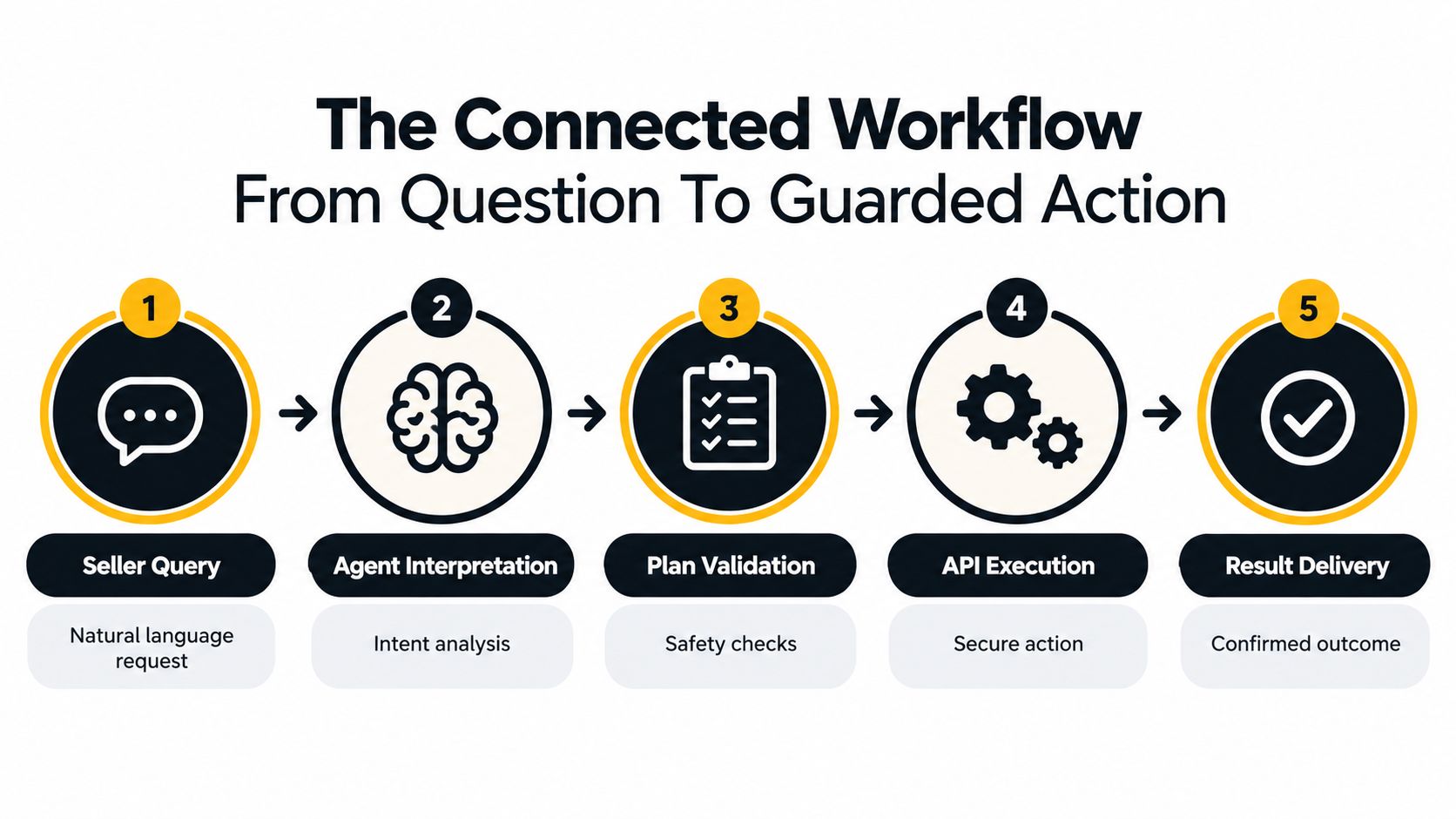
Five stages between the prompt and the account
- Seller query. The seller asks a natural-language question in Claude, ChatGPT, OpenClaw, Cursor, or another MCP client. The question can concern advertising, inventory, orders, listings, finance, ranking, or fulfillment.
- Assistant interpretation. The AI assistant identifies the marketplace, account, date range, SKU or ASIN scope, and required fields. A prompt about “inventory” might mean sellable stock, reserved units, inbound units, or all three, so the assistant has to resolve that distinction before calculating anything.
- Structured retrieval. The assistant calls tools exposed by the MCP server. The server returns structured Amazon data, including source-provided fields and timestamps, rather than forcing the assistant to move through Seller Central screens manually.
- Calculation and explanation. The assistant calculates a metric such as days of cover, spending without conversion, or shipped-versus-received variance. Agent Central supplies facts and guarded write access. It doesn't decide the commercial policy or recommend the seller's next move.
- Preview, approval, and outcome. If the seller chooses to change an account, the proposed mutation is previewed first. The seller or authorized operator approves it, the change is submitted, and the resulting action is recorded in an audit log. A successful request still needs verification because requested, accepted, applied, and confirmed states can differ.
Operational rule: A useful agent separates analysis from authority. The assistant can calculate and explain, but account changes need a visible scope, an approval decision, and an audit record.
This model is more reliable than treating an AI chat as a direct command line for Seller Central. The same principles apply to broader AI agent workflow automation, where retrieval, interpretation, validation, and execution should remain distinct.
Hosted MCP Architecture and Data Preparation
A hosted MCP server gives an AI client a controlled way to call structured functions over Amazon-connected data. The seller asks a question in the assistant, the assistant calls the server, and the server returns prepared records that the assistant can compare or calculate. That differs from handing the model an unrestricted browser session or asking it to wait for every Amazon report to finish.
Agent Central syncs account data on a schedule. It doesn't promise real-time refreshes, and the assistant should expose the age or source status of important records when freshness affects the decision. A new account starts with 30 days of history, which builds from there, while Amazon Ads history is retained while the account stays connected.
Prepared records versus Amazon report jobs
Amazon's reporting system is asynchronous. An application creates a report, waits while Amazon processes it, retrieves the document, and parses the result. Some reports also have regeneration limits, so a workflow that repeatedly requests the same report can create delays, throttling, or misleading assumptions about completeness.
Prepared synchronization changes the interaction pattern. The data is synced ahead of time, so repeated reads can return quickly instead of waiting on Amazon's report queue. That speed doesn't make the records live. It makes the freshness boundary explicit, which is safer than presenting an older snapshot as current.
Amazon's marketplace scale makes coordinated access a practical requirement. Amazon reported that independent sellers generated more than 60% of store sales in 2025, while U.S.-based independent sellers averaged over $375,000 in annual sales. Those figures are reported in Amazon's 2025 small business empowerment report. Seller operations therefore involve connected catalog, inventory, advertising, fulfillment, order, and finance workflows, not isolated questions.
Developers evaluating this pattern can use an overview of a MCP server for AI agents to understand how hosted protocol access differs from a custom point-to-point integration. The useful comparison isn't “MCP versus APIs.” MCP provides a consistent interface for the assistant, while the underlying connector still has to manage Amazon authorization, report readiness, pagination, rate limits, timestamps, and write verification.
For a deeper implementation view, see Agent Central's guide to MCP server integration. The key design choice is simple: use prepared data for fast analytical reads, preserve freshness metadata, and reserve live Amazon operations for actions that require explicit control.
Four Concrete Workflow Recipes
The strongest workflows begin with a narrow operational question and a defined output. They don't ask an agent to “manage the account.” They ask it to retrieve specific fields, perform a transparent calculation, and present a decision for approval.
| Workflow | Primary Data Inputs | Typical Decision Output |
|---|---|---|
| Weekly advertising review | Search terms, spend, orders, sales, campaign budgets, pacing period | Exclude, investigate, adjust, or leave unchanged after review |
| Restock check | Sellable, reserved, inbound, sales velocity, lead time, safety stock | Prioritize replenishment or maintain the current plan |
| Inbound shipment reconciliation | Shipped units, received units, shipment status, SKU quantities | Investigate a discrepancy or close the shipment |
| Listing problem check | Suppressed listings, listing issues, affected ASINs, source-provided issue fields | Correct content, resolve an issue, or escalate |
Weekly advertising review
The assistant retrieves search terms with spend and no attributed orders for the selected period. It groups them by campaign and ad group, compares spend with the operator's policy threshold, and checks budget pacing against the team's target TACOS or other internal measure.
The result is a fact pattern, not an automatic bid recommendation. The ads manager decides whether the term should be negated, moved, left under observation, or investigated for attribution delay. If a bid or budget change is selected, the assistant shows the proposed value before submission.
Restock check
The assistant reconciles sellable, reserved, inbound, and stranded quantities by SKU and marketplace. It calculates recent sales velocity over the chosen window, then estimates days of cover using the seller's documented assumptions.
Inbound stock must remain separate from sellable stock. A shipment that has been created or sent hasn't necessarily become available inventory. The seller decides whether to place a purchase order, change a listing state, or wait for receiving activity.
Inbound shipment reconciliation
The workflow compares the quantity marked as shipped with Amazon's received quantity for each SKU. It groups open discrepancies by shipment and highlights records that need documentation or follow-up.
A timeout must not trigger a second submission automatically. The agent should preserve the original request identifier, check the current shipment state, and show the operator whether the discrepancy is unresolved, accepted, or already reflected in Amazon.
Listing problem check
The assistant retrieves suppressed listings and listing issue fields, then groups problems by ASIN and issue type. It can distinguish a missing attribute from a broader contribution or compliance problem when Amazon provides those classifications.
The seller or catalog manager decides whether to edit content, supply an attribute, appeal a restriction, or leave the listing unchanged. Agent Central returns Amazon's fields and exposes guarded changes, but the user's workflow supplies the interpretation and approval policy.
Safety Controls Preview and Audit Mechanics
An agent that can write to an Amazon account needs stronger controls than an agent that only answers questions. A stale inventory snapshot, a duplicated feed after a timeout, or an overly broad campaign edit can create operational damage even when the assistant's language sounds confident.
Supported mutations should default to a preview. The preview states the account scope, object, current value, proposed value, and intended operation. The seller or authorized team member then approves the change, rather than approving a vague statement such as “inventory updated.”
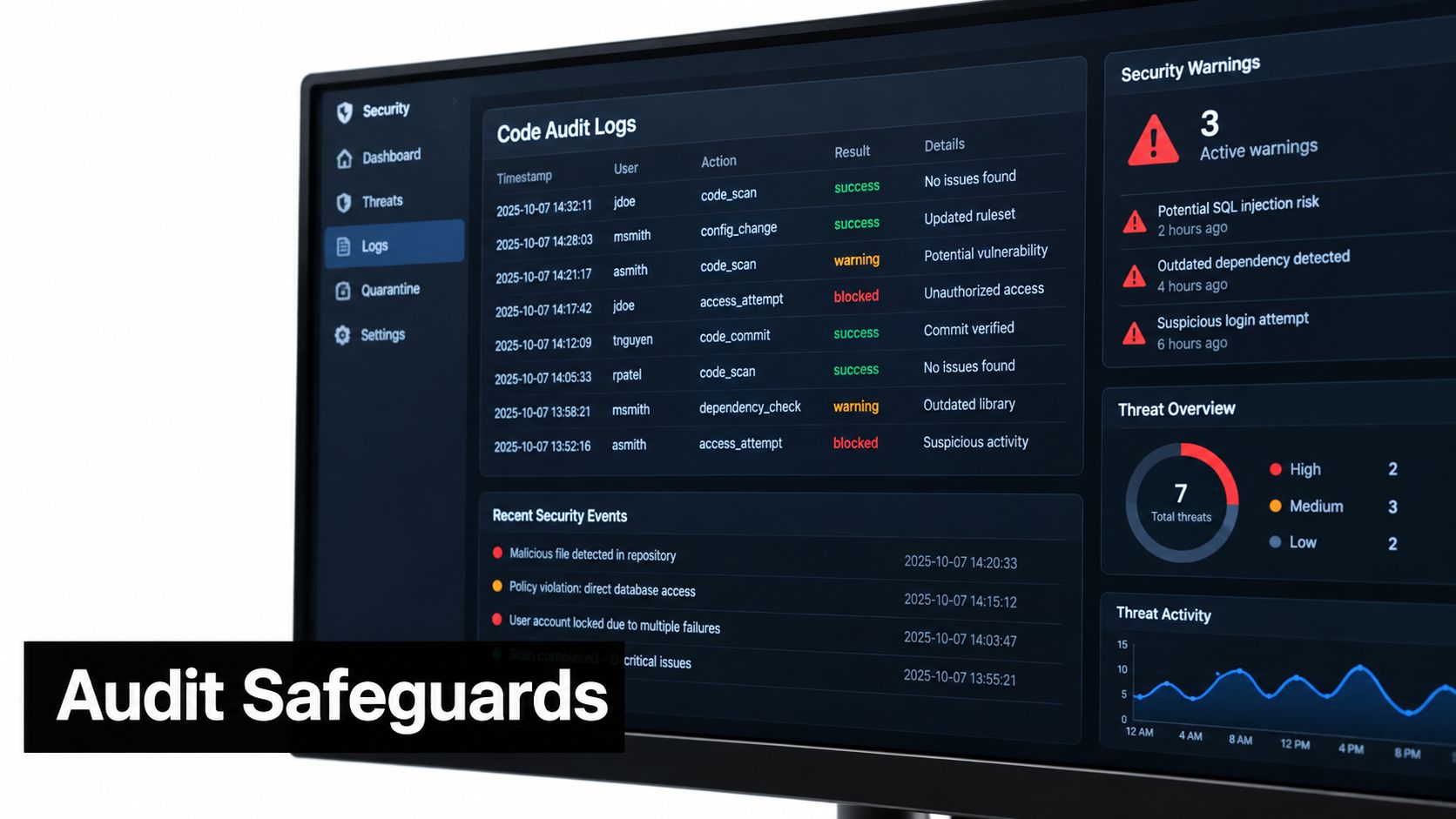
What the audit record should answer
An audit log has practical value only when an operator can reconstruct the event. It should show:
- Scope: Which seller account, marketplace, campaign, SKU, ASIN, or shipment was involved.
- Before and after values: What the account contained and what the approved mutation requested.
- Reasoning context: Which source fields, filters, and freshness timestamps supported the action.
- Approval: Who approved the preview and when.
- Outcome: Whether Amazon accepted, applied, or later verified the change.
- Duplicate protection: Whether the system recognized an earlier submission and prevented a repeat.
That last distinction matters for inventory. A cross-country study covering more than 290,000 grocery products found strong negative relationships between stockouts and sales performance. Products unavailable for 90 days showed average sales rankings 14% to 67% higher, indicating worse performance, as reported in the study on stockouts and sales performance. The result shouldn't be converted into a universal causal multiplier, but it does justify careful replenishment controls.
Scoped API keys and Amazon OAuth permissions limit what an agent can access. Separate seller accounts also need separate connections and data boundaries, especially for agencies. The practical governance guide is audit logging best practices, but the core principle is straightforward: automation should leave evidence that another operator can inspect.
Authorization And Client Setup
Connecting an AI assistant to Amazon requires more than Seller Central credentials. Amazon authorization, an approved application context, and an MCP-compatible client must work together. Agent Central provides the hosted connection layer. Create an account at agentcentral.to, then keep marketplace and seller-account selection explicit throughout setup.
Use this sequence:
- Create an Agent Central account and choose the workspace for the relevant seller operation.
- Connect Seller Central and Amazon Ads through Amazon's authorization flow.
- Add the connection to the AI client, such as Claude, ChatGPT, OpenClaw, Cursor, or another MCP-compatible client.
- Run a read-only question against a known seller account and marketplace.
- Request a preview before enabling a supported write workflow.
- Check the audit record after an approved change or test event.
The Agent Central quickstart for Claude covers client-specific connection details. Separate guides explain how to connect Amazon Seller Central to Claude and connect Amazon Seller Central to ChatGPT. If the authorization grant fails, confirm that the seller account region matches the marketplace selected in the client prompt. A mismatch can produce an empty data set instead of a clear error.
Amazon Ads permissions are explicit
Amazon Ads uses OAuth 2.0. Amazon documents advertising::campaign_management for Sponsored Products, Sponsored Brands, Sponsored Display, Amazon Attribution, and DSP APIs. The Data Provider API uses advertising::audiences, as described in the Amazon Ads authorization guidance.

Plans use monthly Amazon order volume and include a 14-day free trial with no card required. See the Agent Central pricing page for current details. Choose based on account activity and the workflows the team will run.
Best Practices For Teams And Developers
Reliable deployments treat the AI assistant as an execution interface, not as the business authority. The seller, agency, or operations team defines policies for bid changes, budget movement, inventory writes, listing edits, and fulfillment actions. The assistant retrieves records, calculates against those policies, and presents a controlled next step.
A custom integration also has to treat Amazon's SP-API as a rate-limited, asynchronous system. Amazon applies operation-level usage plans with sustained and burst limits, and the effective limit can vary by seller, application, and authorization context. For example, Amazon documents a default getOrders rate of 0.0167 requests per second with a burst of 20, while getOrder commonly allows 0.5 requests per second with a burst of 30, according to the SP-API usage plans and rate limits.
Engineering checkpoints that prevent avoidable errors
- Queue by operation and account: Don't run every endpoint at the same speed. Read the
x-amzn-RateLimit-Limitheader when present and honorRetry-Afteror exponential backoff. - Prefer incremental reads: Use change-since filters where supported instead of repeatedly pulling full history.
- Track asynchronous states: Record whether a report is requested, processing, ready, cancelled, accepted, applied, or verified.
- Make writes idempotent: Attach an idempotency key or equivalent request identity so a timeout doesn't become a duplicate mutation.
- Require freshness checks: Stop or downgrade an action when the underlying records are too old for the policy.
- Review audit logs: Agencies should inspect activity by account and marketplace, not just by individual user.
The trade-off is deliberate. A live query can feel more direct, but it may encounter throttling, pagination, regional authorization, or report delays at the exact moment an operator needs an answer. Prepared records provide speed, while timestamps and approval gates preserve honesty about uncertainty.
When To Use Agent-Driven Workflows
Agent-driven workflows fit repetitive questions with structured inputs and clear approval rules. A weekly search-term review, an inbound shipment variance check, a listing suppression report, or a restock calculation can benefit from consistent retrieval and explanation. These tasks still need human judgment, but the agent can remove the repeated data assembly.
Manual review remains preferable when the decision depends on sensitive regulatory interpretation, a major financial commitment, contractual obligations, or competitive context that Amazon fields cannot represent. A seller shouldn't let an assistant change a high-impact price or listing without reviewing the assumptions, especially when the source data is stale or attribution is incomplete.
The same boundary applies to custom development. Teams building agentic AI for enterprise workflows should define which operations are read-only, which require previews, and which need multiple approvals. The model can explain a discrepancy, but the operator decides whether the discrepancy justifies a supplier claim, a shipment investigation, or no action.
Agent Central returns facts, metrics, classifications, Amazon-provided fields, and guarded write tools with audit logs. The seller's agent or operations team decides what those facts mean and what should happen next. That separation is the practical answer to how AI agents manage Amazon seller workflows without turning account control into an opaque delegation.
Agent Central connects Claude, ChatGPT, OpenClaw, Cursor, and other MCP clients to structured Amazon Seller Central and Amazon Ads data, including advertising, inventory, orders, catalog, finance, ranking, and fulfillment records. Sellers and agencies can connect an account, test read workflows, preview supported changes, and inspect audit logs by visiting agentcentral.
Related Agent Central pages
- Amazon Seller Central MCP server
Canonical hosted MCP overview for Seller Central, Ads, inventory, catalog, finance, and fulfillment data.
- Connect Seller Central to Claude
Step-by-step path from Amazon OAuth to a Claude connector or MCP config.
- Amazon seller data for AI agents
How Agent Central normalizes Amazon seller data before exposing it to AI clients.
- Amazon seller MCP servers compared
How hosted MCP services compare with official Ads MCP, local repos, connector tools, and automation platforms.
- ChatGPT with Amazon seller data
ChatGPT-specific setup path for Amazon seller data through hosted MCP.
Related reading
- Inventory Management Automation for Amazon Sellers
Practical guide to inventory management automation for Amazon FBA and private-label sellers using AI agents, MCP, and pre-synced Seller Central data.
- Audit Trail Compliance for Amazon Sellers and MCP Agents
Audit trail compliance for Amazon MCP workflows: what agentcentral records, what stays client-side, and how sellers should set retention.
- Expense Management Automation for Amazon Sellers
Reconcile Amazon settlements, fees, and Ads data with structured reads while bank data, accounting policy, and journal entries stay in the accounting system.
- Query Response Time for MCP Agents
Measure MCP query response time for Amazon seller data, separate client and server latency, and keep report generation outside live agent turns.
Connect Amazon seller data to your AI client.
Agent Central gives Claude, ChatGPT, OpenClaw, Cursor, and other MCP clients structured access to Amazon Ads, Seller Central, inventory, orders, catalog, finance, and fulfillment data.