
Amazon Negative Keywords: A Practical Guide to Cleaning Ads
Master amazon negative keywords to cut wasted spend. Learn step-by-step how to find, match, apply, and maintain exclusions in Sponsored Ads for FBA sellers.

Spend leaks start when Sponsored Products pick up search terms that look active but never turn into orders. Amazon negative keywords stop that drift by blocking specific queries at the campaign or ad-group level, in automatic and manual campaigns. Used correctly, they protect relevance without shutting off discovery, and they turn search-term data into a controlled exclusion system.
Table of Contents
- Why negative keywords matter for Sponsored Ads
- Negative exact vs negative phrase and where to place them
- Finding negative keyword candidates in the Search Term Report
- Applying negatives with scope, ASIN exclusions, and timing
- Using Agent Central to review and apply negatives safely
- Proving the value of routine negative targeting
- Weekly negative keyword maintenance checklist
Why negative keywords matter for Sponsored Ads
A seller checks a Search Term Report and sees clicks from queries that fit neither the product nor the profit model. The ads are still serving, the budget is still moving, and the account is paying for curiosity instead of intent. Amazon negative keywords exist to stop that exact behavior by preventing Sponsored Products ads from appearing against shopping queries that do not fit a campaign's objective. Amazon's help page for Sponsored Products targeting covers the control and the scope clearly, including automatic and manual campaigns and both campaign-level and ad-group-level placement. Amazon's negative keyword controls

What they do in practice
Negative keywords are not a generic cleanup list. They are a targeting control that keeps irrelevant shopping queries from entering the auction in the first place. That matters in both automatic and manual Sponsored Products campaigns, because both campaign types can attract terms that look related on paper but never convert in practice.
The useful mental model is simple. Positive targeting says, "show here." Negative targeting says, "do not show here." That difference gives operators a way to protect impression budget for the terms that match product positioning, price band, material, use case, or brand fit.
Why the control belongs in the operating rhythm
A campaign that keeps buying irrelevant clicks is not just inefficient, it's harder to diagnose. Search-term evidence gets buried under noise, and the ad manager loses clarity about which terms are worth promoting into controlled targets. That is why negative keywords should be treated as a measurable campaign-management mechanism, not a one-time cleanup step.
For a broader Sponsored Products structure, this pairs well with the targeting choices described in Amazon Ads Sponsored Products guidance. Negative keywords connect query evidence, match-type scope, and controlled measurement, which makes them a practical control surface instead of a cosmetic adjustment.
Practical rule: if a query doesn't match the product and it keeps spending, it belongs in the exclusion workflow, not in a “maybe later” folder.
Negative exact vs negative phrase and where to place them
The choice between negative exact and negative phrase is where most accounts either stay precise or overblock valuable traffic. Negative exact blocks queries containing the exact phrase or a close variation. Negative phrase blocks queries containing the full phrase in order, which creates a wider exclusion net. Amazon's documentation also sets hard limits, negative phrase can contain no more than 4 words, negative exact can contain no more than 10 words, and either type is limited to 80 characters. Amazon's keyword targeting rules
Match type trade-offs that matter
Negative exact is the safer choice when the query is specific and the account still wants adjacent long-tail variations to stay eligible. Negative phrase is stronger when a broad modifier or phrase clearly signals irrelevance across multiple search forms. The risk is that a phrase exclusion can catch valuable variants that still deserve traffic in another campaign or ad group.
Operators who want a deeper comparison across platforms often benefit from reading master negative keywords for ROI. The mechanics are different in Amazon Ads, but the same discipline applies, use the narrowest exclusion that solves the problem.
| Match type and scope comparison | Blocks | Max words | Max characters | Campaign limit | Ad-group limit |
|---|---|---|---|---|---|
| Negative exact | The exact phrase or close variation | 10 | 80 | Up to 10,000 campaign negatives | Up to 10,000 ad-group negatives |
| Negative phrase | Any query containing the phrase in order | 4 | 80 | Up to 10,000 campaign negatives | Up to 10,000 ad-group negatives |
Where to place the exclusion
Placement matters as much as match type. Campaign-level negatives have a broader effect, which is useful for terms that are irrelevant everywhere in the campaign structure. Ad-group-level negatives are narrower, which matters when one product cluster should block a term but another product in the same campaign still converts on it.
Scope rule: if the term is irrelevant across the whole campaign, place it at campaign level. If it only fails for one product cluster, keep it at ad-group level.
For operators managing large catalogs, the limit numbers matter because exclusions are not abstract policy, they are inventory inside a real account. Amazon's caps mean the exclusion list needs structure, not random growth. That also means synchronizing negatives across campaign tiers should be tracked with the same care as bids and budgets.
Finding negative keyword candidates in the Search Term Report
The Search Term Report is where bad traffic becomes obvious enough to act on. Export the report for the date range you want to review, then classify each query by impressions, clicks, orders, spend, and ACOS. Amazon recommends evaluating a term after at least 20 clicks instead of blocking it immediately, and then letting negative-targeting changes run for two weeks or more before changing strategy. Amazon's Sponsored Products targeting guide
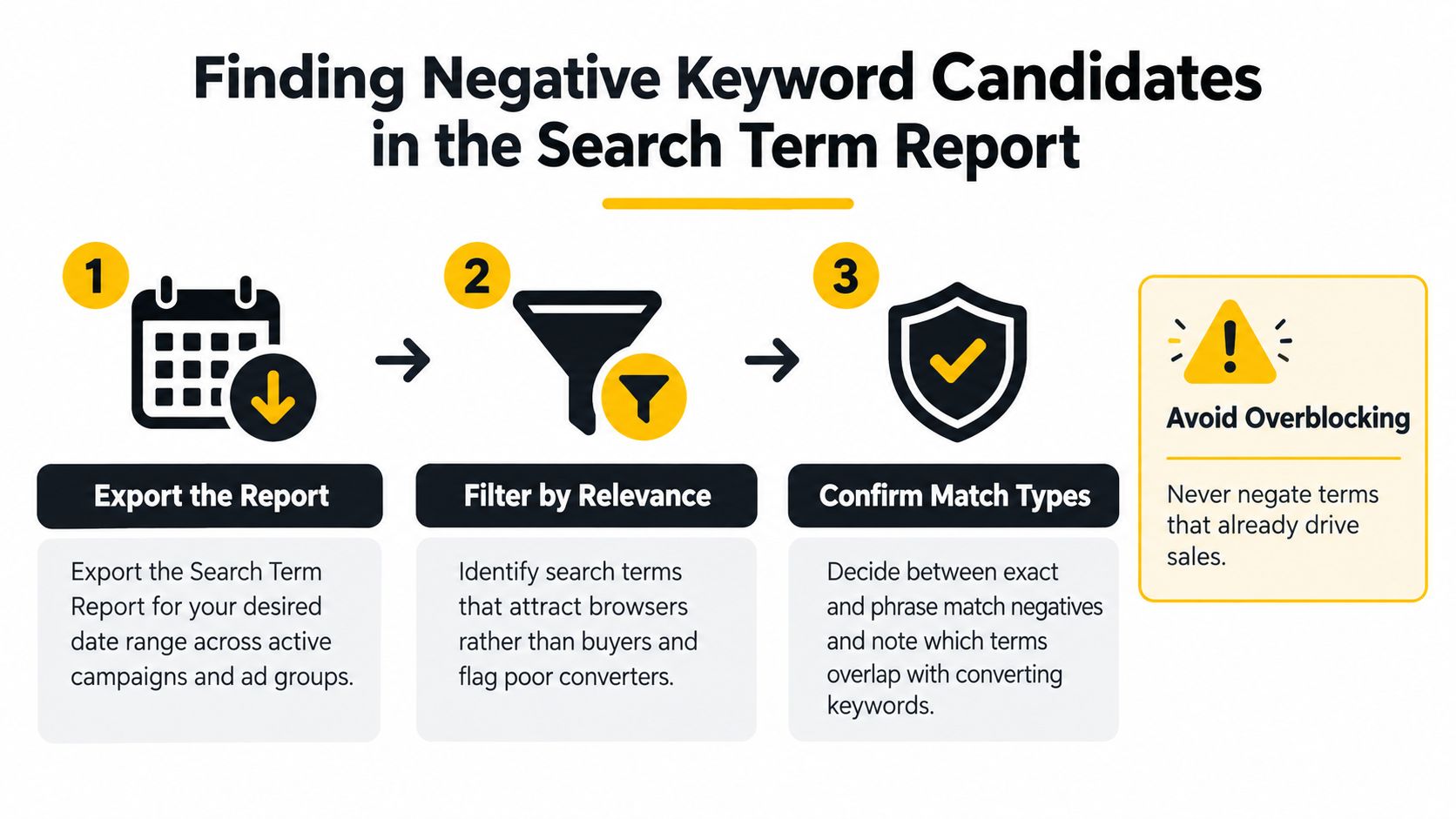
The two-stage workflow
The first stage is evidence gathering. Pull the Search Term Report across active campaigns and sort the queries by spend, clicks, and order output. Look for terms that pull traffic but never earn their keep, and separate those from terms that look weak only because the sample is too small.
The second stage is classification. Some queries are irrelevant. Some belong in a different campaign as controlled exact-match targets. Some should stay live because the ad is still learning. That distinction is the difference between disciplined optimization and premature blocking.
What to flag and what to protect
A useful filter is this: queries with clicks and spend but no orders over a sensible observation window deserve review, but not automatic exclusion. So do terms that are clearly off-intent, and terms that convert better in another campaign or product cluster. The goal is to move converting queries into controlled structures and move poor-fit queries into negatives.
A practical reporting walkthrough is also covered in Amazon Seller Central reports guidance, especially for teams that need to compare date ranges before changing targets. Another useful reference for report-based workflows is Headline Marketing Agency on Amazon PPC, which frames the report as a source of query evidence rather than a place to chase every weak term.
Avoid overblocking: recent days often understate orders because attribution is still settling, so the newest rows in a search-term export should never be treated like final truth.
Applying negatives with scope, ASIN exclusions, and timing
Negative keywords work best when the account manager knows exactly what is being excluded and why. Campaign-level negatives clean up irrelevant traffic that should never reach any ad group in that campaign. Ad-group-level negatives are better when one product line should be protected from a term but another product still deserves the click.
When keyword negatives are not enough
Amazon also supports negative product targeting, which is the ASIN equivalent of keyword exclusions. In manual structures, excluding a specific ASIN can make more sense than trying to describe that same problem with a keyword. That is especially useful when the traffic is tied to a competitor listing, a mismatched product size, or a catalog overlap that keywords only approximate.
A seasonal home brand can use this split cleanly. Broad, irrelevant gift queries can be excluded at campaign level, while a product line that should never face a specific competing ASIN can block that ASIN in the relevant ad group. A private-label electronics seller might do the opposite, keeping a broad term alive in one cluster while suppressing it in another where it converts badly.
Why timing changes the decision
The timing trap is simple, recent performance is still moving. Amazon's attribution keeps settling for up to 14 days, so the newest days can understate orders and make a term look weaker than it really is. Blocking too fast can remove demand that would have converted if the seller had waited for the reporting window to settle.
That is why the healthy rhythm is review, classify, wait, and then apply. The account gets cleaner without mistaking delayed attribution for failure. Negative targeting then becomes a controlled response to evidence, not a reaction to temporary noise.
Using Agent Central to review and apply negatives safely
Agent Central connects the AI already in use to Amazon Seller Central and Amazon Ads accounts, then returns facts, metrics, classifications, source-provided fields, and guarded write tools with audit logs so the user's agent or workflow can decide what to do. It is a hosted MCP server that gives Claude, ChatGPT, OpenClaw, Cursor, and other MCP clients structured access to seller and ads data, including search terms, campaigns, and the records needed to review exclusion candidates. Agent Central for Amazon Ads workflows
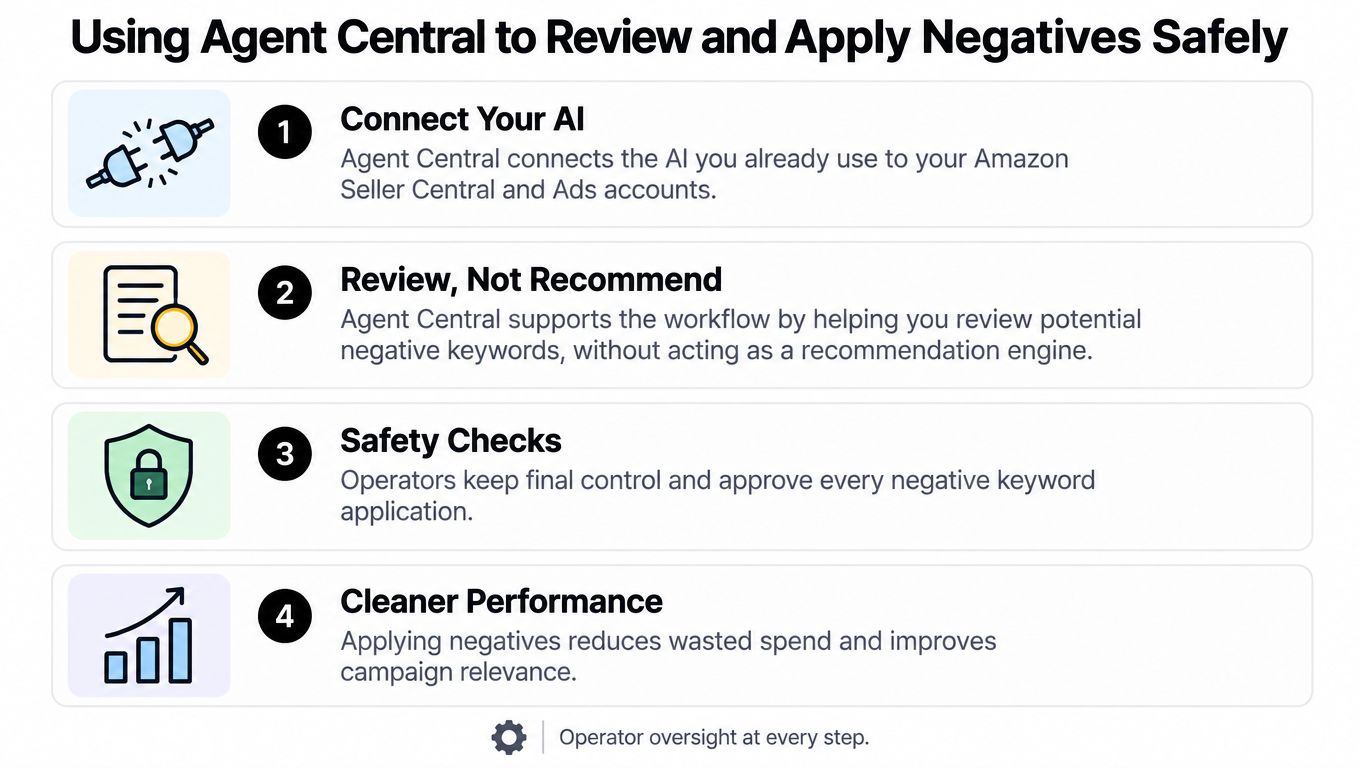
Review, then write
A practical workflow looks like this. Claude or ChatGPT pulls search terms across campaigns and date ranges, sorts candidates by the facts in the report, and shows a preview of the negative keywords before anything is written. The seller approves the preview, then the change is applied with logging.
That preview-before-write pattern matters because negative keywords are irreversible until they are removed, and the cost of a bad exclusion is lost traffic. Guardrails are the point. The workflow stays under operator control, and every change has a traceable record.
Setup without guesswork
Setup is straightforward. Sign up at agentcentral.to, connect Seller Central and Amazon Ads through Amazon's authorization, then add the connection to the AI client and complete the Claude quickstart. Pricing is tied to monthly Amazon order volume, with a 14-day free trial that needs no card, and the current plan details live in Agent Central pricing.
For teams already tuning ads, Amazon Ads optimization guidance is a useful complement because it keeps the operating model focused on scoped access, repeatable reads, and logged writes rather than black-box automation.
Operator oversight at every step is the point. The system should expose facts and controlled writes, not make the business decision for the seller.
Proving the value of routine negative targeting
Amazon's own performance analysis gives a clear reason to treat negatives as a recurring discipline instead of a one-time cleanup. In a France-based Home Environment category analysis, advertisers in the highest-performing cluster used negative keywords and negative ASINs 4 times more often than lower-performing advertisers, and campaigns in that cluster delivered an average of 12% of impressions using negative-keyword or negative-ASIN tactics versus 3% in the lowest-score cluster. Amazon's France Home Environment analysis
What the benchmark does and does not say
That is an association, not proof that negatives alone created the gap. Bids, budgets, listings, products, and conversion rates can also shape outcomes. Still, the pattern is strong enough to matter operationally, because it shows that the better-performing campaigns were not using negatives as occasional cleanup, they were using them as part of the targeting structure.
The useful interpretation is narrower and stronger. Negative targeting belongs in routine account management, and its adoption can be measured against overall campaign quality instead of treated as a side task.
How to use the benchmark
Sellers can compare their own exclusion discipline against account performance and ask a blunt question, does the account use negatives as a normal targeting layer, or only after waste has already accumulated? The answer often explains why some campaigns look busy but stay muddy.
A disciplined weekly review also aligns with broader PPC maintenance practices covered by Data Hunters Agency's PPC optimization notes. The tactic isn't unique to Amazon, but Amazon Ads makes the negative targeting structure measurable enough to manage like a system.
Weekly negative keyword maintenance checklist
The weekly routine is simple enough to run without drama. Export the Search Term Report, filter for the observation window, score candidates after 20 clicks, separate converting queries from irrelevant spend, and choose negative exact or negative phrase based on how wide the exclusion needs to be. Then log the change and review it again after the attribution window has had time to settle.
Keep the review strict
- Check evidence first: Make sure the term has enough traffic to mean something before it gets blocked.
- Separate intent from waste: A term that looks weak in one ad group may still convert in another.
- Choose the narrowest match type: Use negative exact when the term is specific, and negative phrase only when the whole phrase is the problem.
- Apply the right scope: Campaign level for broad irrelevance, ad-group level for product-specific cleanup.
- Log every change: Guarded writes with audit logs help preserve accountability when updates happen at scale.
Maintenance rule: negatives should be reviewed like bids and budgets, not filed away as a static list.
Agent Central fits when that routine needs repeatable reads and previewed writes across multiple campaigns, because the seller still approves the exclusion before it is applied. That keeps the workflow auditable without turning it into a black box.
Amazon negative keywords work best when they are treated as a governed system, not a cleanup reflex. Agent Central gives sellers and ad managers structured access to search-term facts, previewed negative-keyword writes, and audit logs so exclusions can be reviewed before they go live. If that is the workflow needed, visit agentcentral and connect the data before the next search-term review.
Related Agent Central pages
- Amazon Seller Central MCP server
Canonical hosted MCP overview for Seller Central, Ads, inventory, catalog, finance, and fulfillment data.
- Amazon seller data for AI agents
How Agent Central normalizes Amazon seller data before exposing it to AI clients.
- Ranking tool reference
Keyword rank positions, changes, and search-volume joined views.
- Amazon seller MCP servers compared
How hosted MCP services compare with official Ads MCP, local repos, connector tools, and automation platforms.
- Connect Seller Central to Claude
Step-by-step path from Amazon OAuth to a Claude connector or MCP config.
- ChatGPT with Amazon seller data
ChatGPT-specific setup path for Amazon seller data through hosted MCP.
Related reading
- Amazon Ads API Guide: Build vs Agent Central in 2026
Learn how the Amazon Ads API works, authentication, endpoints, and async reporting. See why Agent Central is the faster route for Amazon sellers and agencies.
- What Is Amazon PPC? How Sponsored Ads Work
Amazon PPC is a cost-per-click auction for Sponsored Products, Brands, and Display ads. See how targeting, budgets, reporting, and guarded workflows fit.
- Amazon Video Content Creation: The Operator's Playbook
Build a repeatable Amazon video workflow from seller data: choose ASINs, script from customer evidence, produce by placement, and measure the result.
- ACoS Meaning and Formula on Amazon (With Example)
ACoS means advertising cost of sales: ad spend ÷ ad sales × 100, so $20 spent for $100 in ad sales is a 20% ACoS. How it compares with ROAS and TACoS.
Connect Amazon seller data to your AI client.
Agent Central gives Claude, ChatGPT, OpenClaw, Cursor, and other MCP clients structured access to Amazon Ads, Seller Central, inventory, orders, catalog, finance, and fulfillment data.