
MCP Client Explained for Amazon Seller Teams
An MCP client connects Claude or ChatGPT to one MCP server. See how sellers use it for Amazon Ads and Seller Central facts.
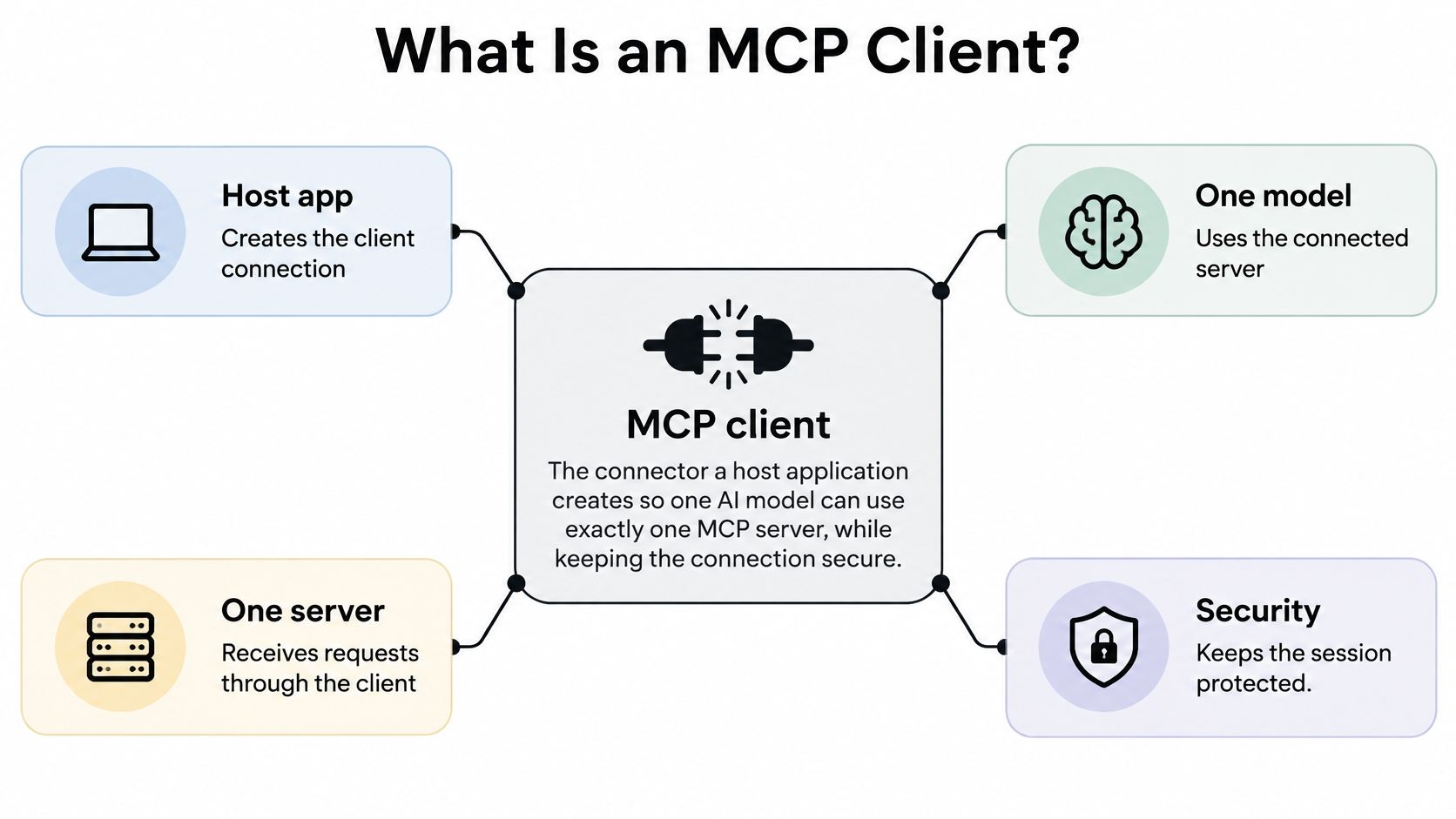
An MCP client is the connector inside a host application that maintains one session with one MCP server, discovers its tools and data, and invokes them for the model. It's not the chatbot the operator talks to, and it's not the Amazon seller account behind the server.
If Claude or ChatGPT can reach several seller accounts, which account is a proposed price or bid change about to hit? That question is answered at the client, not by the model. The client binds the host, the server, the account scope, and the permission boundary into one controllable connection.
Table of Contents
- What Is an MCP Client?
- How the Client Talks to One Server
- What the Client Can Ask a Server For
- How Does a Client Keep Permissions and Writes on One Account?
- Which Seller Questions Can an MCP Client Answer?
- How Do Sellers Connect an Existing AI Client?
What Is an MCP Client?
Say a seller asks, in Claude, which SKUs have under 21 days of cover while ad spend is still running against them, and what TACOS looks like for those ASINs. That's not a question one Seller Central screen answers. It needs FBA stock, inbound units, and sales velocity beside Amazon Ads spend and sales, returned together in structured fields the model can read.
The piece that carries that request isn't Claude itself. Claude is the host application, the product the operator talks to. Inside it, the host creates an MCP client for one server. That client holds the session, and the server supplies the Amazon facts.
Host, MCP Client, and MCP Server
| Piece | Role | What it does not do | Seller example |
|---|---|---|---|
| Host application | Creates and manages client instances and the chat | Does not itself store the server session | Claude, ChatGPT, Cursor, or OpenClaw |
| MCP client | Connects to exactly one server and keeps that security boundary | Is not the chat product and not the Amazon account | The connector inside the host that calls one MCP server |
| MCP server | Exposes tools, resources, prompts, and data | Does not decide bids, prices, or strategy | Agent Central for Seller Central and Amazon Ads facts |
Agent Central sits in the third row. It's a hosted MCP server, not the client. After Amazon's authorization, it gives connected clients structured facts from Amazon Ads, Seller Central, inventory, orders, catalog, ranking, finance, and fulfillment across the connected marketplaces.
The pattern is recent. Anthropic introduced the Model Context Protocol on November 25, 2024 as an open standard, per Anthropic's announcement of the Model Context Protocol, so one client pattern can discover tools and structured records instead of a custom plug-in for every export. Before that, each AI app needed its own bespoke connector for each service.
The client and the server return facts, metrics, classifications, and source-provided fields. They don't choose bids, prices, or next actions. The operator's agent or workflow decides.
That boundary also applies to listing work that sits outside MCP. Sellers preparing copy for Amazon's shopping assistant, for example, can treat Online Brand Growth's Rufus optimization guide as background on how product content gets read, while the MCP client handles account data and guarded actions. Keeping those jobs separate prevents a content question from turning into an account permission.
What matters next is mechanical. How does a client open a session and learn what a server offers? Which token scopes that session to one seller account? And what can the operator ask once it's connected?
How the Client Talks to One Server
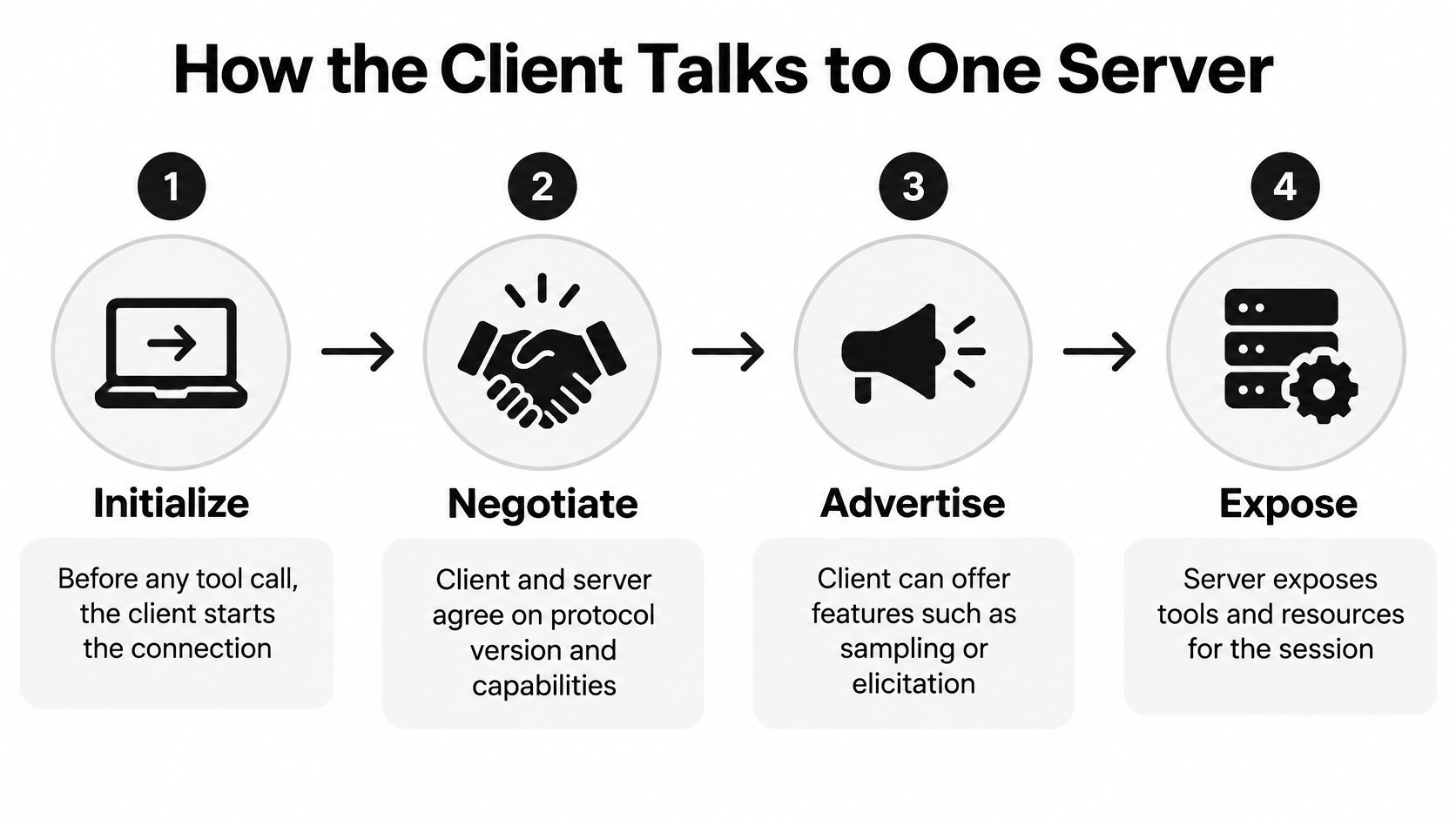
No tool call happens first. Before a model can ask for inventory or campaign data, the client and server complete initialization. They negotiate the protocol version and capabilities, so both sides know what the other supports before any Amazon record moves.
The client can advertise optional features such as sampling or elicitation. The server, in return, exposes tools, resources, prompt templates, and resource subscriptions. The MCP specification's architecture page defines the client as connecting to exactly one MCP server and maintaining the security boundary for that connection, with communication over bidirectional JSON-RPC where each request is self-contained rather than dependent on hidden server-side session state.
One Seller Question, Six Stages
Take a plain request in ChatGPT: show FBA stock and last period's ad spend for one ASIN. The path looks like this.
- Host creates the client: The host application creates a client instance for one chosen server.
- Client initializes: The client and server negotiate protocol version and capabilities.
- Client discovers: The client lists the tools and resources that server advertised.
- Model selects a read: The model picks an advertised read, such as inventory or campaign metrics, nothing else.
- Client sends the request: The client sends a self-contained JSON-RPC request with the arguments.
- Client returns fields: Structured fields come back to the chat for the model to present.
Discovery is the step operators skip when testing. A capability-aware client offers the model only the actions the connected server advertised. If a server never advertised a write, the model shouldn't be able to invent one. That check also matters because different hosts support different MCP subsets, and a tool that works in one client may not exist in another.
Transport Decides Where the Client Runs
Transport is the pipe under the JSON-RPC messages. A local stdio transport fits a connector launched on the operator's own machine, where the host starts the process directly. A remote hosted server uses HTTP transport, including Streamable HTTP or SSE, because the server lives elsewhere and the connection needs an authorization flow on top.
The distinction between a description of what an MCP server is and the client matters here. The server doesn't initiate the chat. It waits, advertises capabilities, and answers. The client owns the session lifecycle, error handling, and the decision about what reaches the model.
Longer work needs more than request and response. The client must also handle notifications, subscriptions, progress reporting, and server-to-client requests. A slow report build, for example, may send progress before it sends results. Treating MCP as a simple one-shot API breaks that pattern.
Where the Amazon Data Comes From
Amazon's own reports are asynchronous. A report gets requested, Amazon generates it, and the result is fetched when ready. That's a factual property of the reporting flow, and any client built directly on live report calls inherits the wait.
Agent Central takes a different route for repeat reads. It syncs account data on a schedule and serves prepared records, so a client asking the same inventory question repeatedly isn't triggering a fresh asynchronous report each time.
History has stated limits. A new account starts with 30 days of history that builds from there. Amazon Ads history is kept while the account stays connected. There's no real-time, daily, or instant refresh promise, and operators should plan reporting windows around what retained history covers.
What the Client Can Ask a Server For
A server offers four kinds of things, and sellers get confused when they're lumped together as "tools." Each kind puts a different job on the client.
Tools are callable operations with schemas. A read of orders is a tool call. So is a preview of a bid change. The schema defines the arguments, such as a SKU, an ASIN, a campaign identifier, or a date range, and the client validates the model's arguments against that schema before sending anything.
Resources are data the client can fetch. Where a tool performs an operation, a resource supplies structured content the client can pull into context. The client decides when to fetch it and how much of it the model sees.
Prompts are templates the server offers the host. They give the operator a prepared starting point, such as a weekly account review shape, without the server deciding what the review concludes. The model still works from the returned records.
Subscriptions and notifications let the client hear about changes instead of polling blindly. Rather than re-asking whether a resource changed, the client subscribes and receives a notification when it does. That suits long-running or report-style work where repeated polling wastes calls.
The Records Behind Seller Answers
Seller answers stand or fall on whether source fields pass through intact. Records a client may carry include FBA stock, inbound units, sales velocity, orders, suppressed listings, campaigns, search terms, budgets, TACOS, fees, settlement fields, and keyword rank changes. The model can only cite a field the client returned. If a field didn't come back, a good client surfaces it as missing instead of letting the model fill the gap.
Practical rule: A null stock field is missing data, not zero units. A client that presents it as zero can trigger a reorder or an ad pause on a number nobody returned.
That's also where one hosted server covering ads plus inventory, orders, catalog, finance, and fulfillment changes what a single client session can answer. A cross-domain question, such as spend against days of cover, doesn't need two connections stitched together in the prompt.
MCP Supported Is Not a Workload Test
Clients aren't identical. Claude, ChatGPT, Cursor, and a local bridge can each support different optional features, handle pagination differently, or treat timeouts differently. A logo saying "supports MCP" says nothing about behavior under a large order export or a stale prepared record.
Operators should run conformance checks before a workflow depends on a client. Security and access control, not the logo, are what block production use, and these checks expose that early.
Client Conformance Checks Before a Seller Workflow
| Check | Passing behavior | Failure to catch |
|---|---|---|
| Capability discovery | Client lists only the tools the server advertised | Model is offered an action the server never advertised |
| Schema validation | Arguments are checked against the tool schema before sending | Malformed SKU or campaign arguments reach the server |
| Pagination | Client requests every page of a large result set | Partial order or inventory data presented as complete |
| Timeouts and retries | Client honors timeouts and stays within stated rate limits | Hung calls or repeated writes after an HTTP 429 |
| Partial failure | Missing fields are flagged as missing | A null stock field shown as zero |
| Write confirmation | Writes wait for preview and explicit confirmation | A write executes on the model's first suggestion |
Other checks worth running include stale prepared records versus a fresh Amazon report, retry behavior after a timeout mid-write, and whether the client keeps one account's results out of another account's session. Each check is quick to run on a read. Each one is expensive to discover during a live campaign change.
How Does a Client Keep Permissions and Writes on One Account?
Adding more MCP servers doesn't make an agent safer. That's the unsafe assumption to drop first. Every added server widens the set of tools a model might reach, and the client decides which discovered tools the model can see and whether a risky call waits for confirmation. The client is the most powerful control point in the stack.
A token is not the seller account. A token proves a scoped permission to call something, and each Amazon surface scopes it differently. The credential table comes first, because most account mix-ups are really credential mix-ups.
Which Credential Controls Which Amazon Call
| Call type | Credential | What it scopes | What it does not cover |
|---|---|---|---|
| Remote MCP server | OAuth 2.1 access token bound to that resource server | Tools on that one MCP server | A token issued for a different MCP server |
| Ordinary SP-API | Login with Amazon access token | Standard Selling Partner operations | Restricted personal data |
| Restricted SP-API | Restricted Data Token in x-amz-access-token | One method, path, and set of data elements | Ordinary SP-API calls |
| Amazon Ads | Bearer token, ClientId, and Amazon-Advertising-API-Scope | One advertiser profile and marketplace | Other profiles or Seller Central domains |
| Listing item write | Account-application rate limit | patchListingsItem at 5 requests per second, burst 5 | Unlimited or identical treatment of every write |
The Remote MCP Token Stays on One Server
For remote MCP, authorization sits at the transport layer. The MCP Go SDK protocol documentation describes the client acting as an OAuth 2.1 client and the protected server as the OAuth 2.1 resource server, with an authorization server issuing access tokens on behalf of the resource owner. The client must bind each token to that server and never forward a token issued for one MCP server to another.
The seller mistake this prevents is cross-server leakage. Say an agency connects one host to an ads server and a separate inventory server. A token minted for the first must not ride along on calls to the second. Operators who want the underlying flow explained can read a plain explanation of OAuth authentication before wiring production accounts.
SP-API Splits Ordinary and Restricted Data
Ordinary SP-API calls use a Login with Amazon (LWA) access token. Restricted operations that return buyer, shipping, or other personal data need something narrower. Amazon's SP-API connection documentation states that those operations require a Restricted Data Token sent in the x-amz-access-token header instead, and that token can't substitute for an LWA token on ordinary calls.
The Restricted Data Token is scoped tightly. It identifies one HTTP method, one exact resource path, and named data elements. Amazon's seller data access documentation notes that a restricted resource may contain only a specific path rather than a generic one, and the application must hold the appropriate roles. So a token minted to read one restricted report document doesn't become a general key to buyer data.
Amazon Ads Needs a Profile, Not Just a Token
Amazon Ads calls need three things together: a bearer token, the Amazon-Advertising-API-ClientId header, and Amazon-Advertising-API-Scope set to the advertiser profile for that marketplace, as AWS documentation on the Amazon Ads API OAuth flow sets out. The token alone doesn't select the profile.
That header is where multi-account errors happen. An agency operator with the right token and the wrong profile scope reads the wrong advertiser's campaigns, or submits a budget change to a different marketplace. The client should surface the seller account, marketplace, and Ads profile before any write, not after.
Why a Read Connection Must Not Become a Write
Tool descriptions can't be fully trusted. The U.S. government-backed CSI analysis of MCP security notes that MCP components may access or process data without required access controls and that the protocol lacks support for exchanging role-based permissions when a connection is created, making task-level boundaries difficult to verify. Independent research covered in that analysis identified tool poisoning, rug pulls, shadowing, and indirect prompt injection as ways an agent can be steered into unintended actions.
Because the protocol doesn't negotiate role permissions at connection time, the client and server have to enforce them. Practical controls include:
- Preview by default: Every write shows the proposed change before submission.
- Duplicate-submission protection: A retried call doesn't apply the same bid or price change twice.
- Separate credentials per seller account: One account's keys never authorize another account's calls.
- Before and after logging: Each applied change records the prior value and the new value for audit.
Rate limits are part of write safety too. Limits apply per account-application pair and can appear in the x-amzn-RateLimit-Limit response header. A write tool that ignores them produces HTTP 429 responses and, worse, ambiguous states where nobody knows which submissions landed.
Revoking Agent Central's Amazon access may stop data syncs, MCP tool access, and Amazon API writes until the customer reconnects. That's the correct failure mode. A revoked authorization should halt the pipeline, not degrade it.
Before any write, the operator names the seller account, the marketplace, and the Ads profile out loud in the confirmation. If any of the three can't be stated, the write doesn't go.
Which Seller Questions Can an MCP Client Answer?
Four questions cover most of what sellers ask an AI client to do with account data. Each one is only as good as the records the client returns.

Seller Questions and the Records a Client Must Return
| Seller question | Records required | Call type |
|---|---|---|
| Which SKUs sit under 21 days of cover | FBA stock, inbound units, sales velocity | Read |
| How does this month compare with last year | Sales, ad spend, orders, units, TACOS by ASIN or campaign | Read |
| Where did ad spend go | Campaigns, search terms, placements, budgets, source bid or budget fields | Read |
| Should this bid, price, or quantity change | Preview, duplicate check, before and after audit values | Guarded write |
Days of cover is a pure read. The client returns FBA stock and inbound units, sales velocity supplies the denominator, and the model can list SKUs under the operator's threshold. The number is arithmetic on returned fields. Nothing gets reordered by the client.
Year-over-year comparison depends on retained history. Sales, ad spend, orders, units, and TACOS by ASIN or campaign can be compared only where history exists for both periods. A newly connected account doesn't have last year in its retained records, so an honest answer says the earlier period isn't available yet rather than estimating it.
Where ad spend went is a drill-down read. Campaigns, search terms, and placements account for the spend, and any bid or budget fields come back as source-provided values. They're facts about the account's current settings, not instructions to change them. The model reports what the source returned, and the Ads manager judges it.
A guarded change is the only write in the set. The workflow previews a bid, budget, campaign state, price, or inventory quantity change, checks for duplicate submission, and logs before and after values. The operator's agent or workflow decides whether to submit. Agent Central doesn't recommend the change and doesn't optimize the account.
Why Write Speed Is Capped by Operation
Writes also inherit Amazon's throttling. Amazon's SP-API usage plans and rate limits documentation lists patchListingsItem at a default of 5 requests per second per account-application pair with a 500-request-per-second application limit, while validation previews sit at 20 requests per second and certain product-data updates at 100 requests per second, with HTTP 429 when a threshold is exceeded. A write tool must respect the limit for its specific operation instead of treating every listing update the same.
That has a design consequence sellers can feel. A bulk price update across a large catalog isn't one action, it's a paced sequence with previews, confirmations, and per-item audit entries. A client that fires writes as fast as the model generates them will hit throttling and lose track of what landed.
Two caveats apply to all four questions. First, Amazon's reports are asynchronous and Agent Central syncs on a schedule, so answers come from prepared records rather than a fresh report per question. Second, fees, policies, and limits should be checked against Amazon's own documentation, since those are the pages that govern the account.
How Do Sellers Connect an Existing AI Client?
The decision is narrow. A hosted MCP server fits when the AI client a team already runs needs to read Seller Central and Amazon Ads through one connection, with scoped keys and logged writes, instead of separate exports per domain. Teams that only need an occasional manual report don't need an MCP client at all.
Setup follows three steps:
- Sign up: Create the account at agentcentral.to.
- Connect Amazon: Connect Seller Central and Amazon Ads through Amazon's authorization.
- Add the connection: Add that connection to the AI client.
For Claude, the Claude quickstart for Agent Central walks through the client side, and connecting takes under five minutes using the quickstart guide for the chosen AI client. Claude, ChatGPT, OpenClaw, Hermes, or another client can connect directly to the remote MCP URL using an Authorization header or a signed Connector URL. The local MCP bridge covers clients that need a local command instead of a remote MCP URL.
Each seller account's data stays separate, which is what makes the connection usable for agencies running several accounts through one host. The client still binds one session to one server and one account scope at a time.
Plans are priced by monthly Amazon order volume with a 14-day free trial that needs no card, and current terms are on the Agent Central pricing documentation. The client returns facts so the operator's agent or workflow can decide what to do.
Connect the MCP client already in daily use, whether that's Claude, ChatGPT, Cursor, or OpenClaw, to one hosted MCP server for Seller Central and Amazon Ads facts with scoped access and previewed, logged writes. Start at agentcentral, authorize the Amazon accounts, and put the first read-only question to the connected client before enabling any write.
Related Agent Central pages
- Amazon Seller Central MCP server
Canonical hosted MCP overview for Seller Central, Ads, inventory, catalog, finance, and fulfillment data.
- Connect Seller Central to Claude
Step-by-step path from Amazon OAuth to a Claude connector or MCP config.
- Amazon seller data for AI agents
How Agent Central normalizes Amazon seller data before exposing it to AI clients.
- ChatGPT with Amazon seller data
ChatGPT-specific setup path for Amazon seller data through hosted MCP.
- Amazon seller MCP servers compared
How hosted MCP services compare with official Ads MCP, local repos, connector tools, and automation platforms.
- Amazon Ads MCP server
Campaign, keyword, search term, budget, TACOS, and guarded ads-write tools.
Related reading
- How AI Agents Manage Amazon Seller Workflows
AI agents read Amazon seller data, calculate metrics and draft changes for approval. See the five-stage workflow, four recipes and the safety controls.
- Inventory Management Automation for Amazon Sellers
Practical guide to inventory management automation for Amazon FBA and private-label sellers using AI agents, MCP, and pre-synced Seller Central data.
- Reliability Metrics for Amazon AI Agents
Learn the reliability metrics that matter for Amazon seller AI agents, from uptime and MTTR to latency percentiles, with formulas and dashboards.
- Amazon Search Term Report: Fields and Review
Read Amazon Ads search-term fields, separate seller SP and SB attribution windows, and review queries before a supported negative-keyword change.
Connect Amazon seller data to your AI client.
Agent Central gives Claude, ChatGPT, OpenClaw, Cursor, and other MCP clients structured access to Amazon Ads, Seller Central, inventory, orders, catalog, finance, and fulfillment data.