
Amazon Multi Channel Fulfillment
Amazon multi channel fulfillment. Learn how Amazon Multi-Channel Fulfillment works, what it costs, when it beats FBA or FBM, and how to integrate MCF

Amazon Multi-Channel Fulfillment lets sellers ship non-Amazon orders from FBA inventory, with U.S. Standard delivery in 3 business days and Expedited in 2, while fulfillment fees start at $7.15 per item and vary by size tier, weight, units per order, and speed. That makes it useful for Shopify, wholesale, and replacement orders, but the cost and control points sit behind the headline rate.
A lot of teams hit the same wall. FBA is working for Amazon orders, the DTC channel is growing, and every new warehouse or 3PL quote creates more operational drag. MCF solves that by turning one Amazon inventory pool into a shared fulfillment network for more than one channel, which is exactly why it matters for operators who want simpler stock planning without giving up Amazon-managed pick, pack, and ship.
Table of Contents
- What Amazon Multi-Channel Fulfillment Does
- MCF Compared to FBA and FBM
- Delivery Speeds, Packaging, and How Returns Work
- How MCF Fees Are Calculated
- Setting Up MCF Through the Selling Partner API
- Wiring MCF to Claude or ChatGPT Through Agent Central
- When MCF Wins, When It Breaks, and What to Measure
What Amazon Multi-Channel Fulfillment Does
Amazon Multi-Channel Fulfillment, or MCF, ships orders from inventory stored in Amazon's fulfillment centers when the order did not come from Amazon's retail marketplace. That covers a Shopify store, wholesale replenishment, replacement shipments, and other off-Amazon channels. A useful primer on the broader fulfillment model is ServeApps fulfillment insights, but MCF's operator value is narrower. It gives you Amazon's logistics network for orders Amazon did not sell.
One inventory pool, many demand sources
The operational shift is straightforward. Instead of splitting stock between Amazon orders and every other channel, sellers can let one pool serve both. Amazon says MCF is relevant because inventory in its network can support multiple sales channels rather than separate warehouse stock for each one, which cuts down on forecasting and positioning the same units twice.
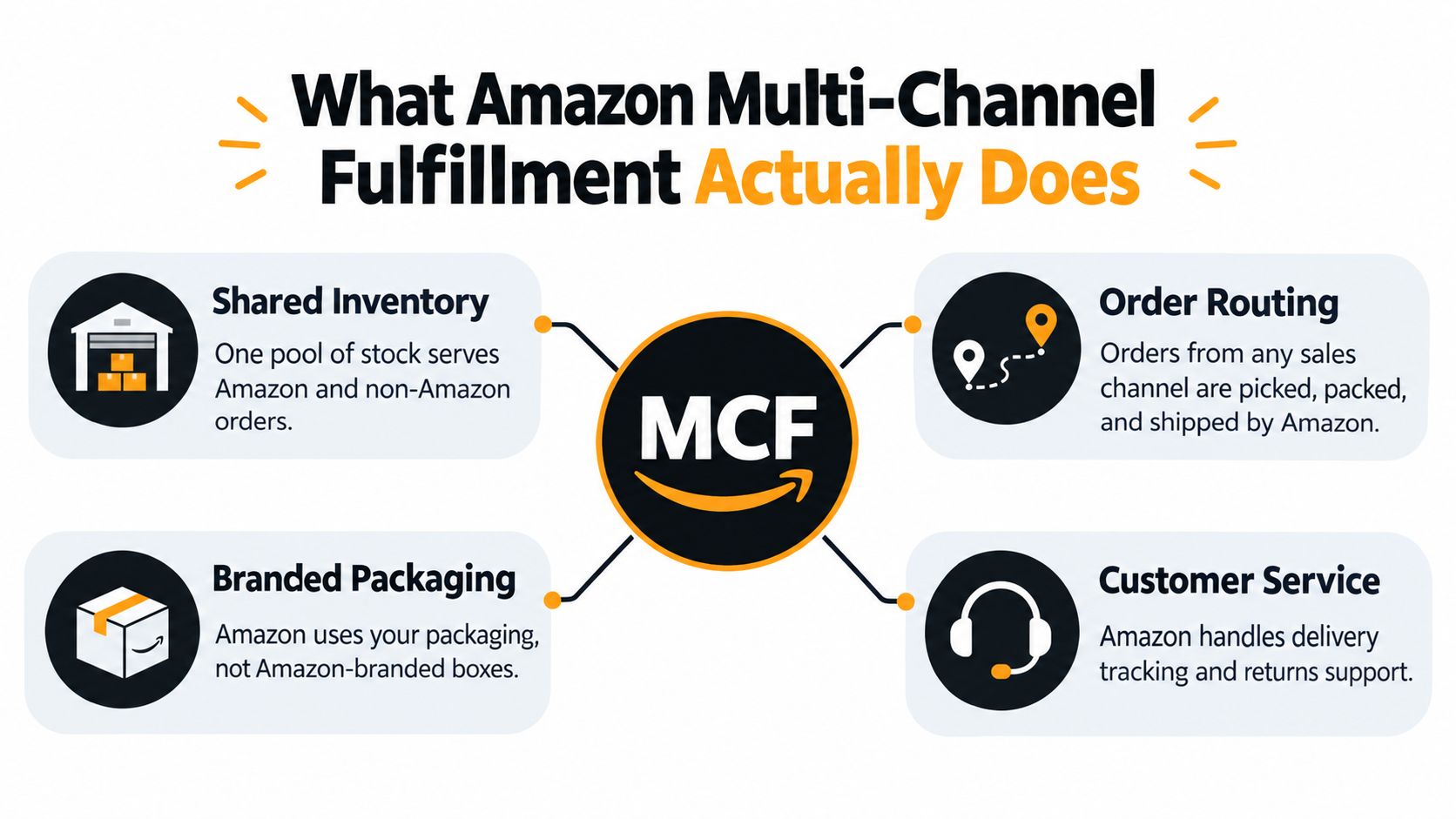
That is the model to keep in mind. MCF is Amazon's fulfillment network exposed as a service for orders Amazon did not sell, which is a narrower role than a second warehouse or a full 3PL. It still depends on where inventory sits, how Amazon routes the shipment, and whether the item can move through standard Amazon handling.
Why operators care
Amazon's own reporting shows that MCF is operating at real scale, not as a side feature. In its September 2024 press release, Amazon said the service was serving more than 200,000 U.S. merchants and that fulfilled orders were up 70% year over year during 2024 to that point (Amazon press release). Those are company-reported figures, but they show the service had moved well past edge-case use.
If one inventory position can support more than one demand source without creating stockout chaos, MCF can reduce warehouse fragmentation. If the catalog needs heavy customization, special handling, or strict branding control, the trade-off changes fast.
MCF Compared to FBA and FBM
FBA, FBM, and MCF often get lumped together because they all touch Amazon, but they solve different problems. FBA serves Amazon marketplace orders, FBM keeps fulfillment under the seller's control, and MCF uses Amazon's network for orders that originated somewhere else. That distinction matters because the party that picks, packs, ships, and manages the customer experience changes with the model.
Side-by-side at a glance
| Dimension | MCF | FBA | FBM |
|---|---|---|---|
| Primary channel | Non-Amazon orders | Amazon orders | Amazon orders |
| Inventory source | FBA inventory pool | FBA inventory pool | Seller-owned inventory |
| Who picks, packs, ships | Amazon | Amazon | Merchant or merchant's 3PL |
| Storage location | Amazon fulfillment centers | Amazon fulfillment centers | Merchant or 3PL warehouse |
| Customer-facing branding | Off-Amazon order flow, usually unbranded | Amazon-branded marketplace flow | Merchant-controlled |
| Best fit | Omnichannel fulfillment | Amazon sales scale | Full control over fulfillment |
The table makes the decision obvious. MCF does not replace FBA, and it does not remove the need for FBM in cases where the merchant wants carrier control or direct warehouse control. It extends FBA inventory into other channels.
What changes operationally
FBA is about Amazon marketplace execution. FBM is about merchant control and flexibility. MCF sits in the middle, because it keeps Amazon doing the physical work while letting the merchant route demand from elsewhere.
That middle position helps when a brand sells on Amazon and on its own site, or when a business handles replacement orders and wholesale shipments from the same SKU pool. It is less attractive when the seller wants full packaging control, custom inserts, or very specific carrier routing.
MCF is an extension of the Amazon stack, not a separate fulfillment philosophy. That's why it fits naturally into businesses that already live in Seller Central.
For a deeper comparison of the two Amazon-side models, see Amazon FBA vs FBM. The key takeaway is that MCF belongs in the same planning conversation, but it solves a different routing problem.
Delivery Speeds, Packaging, and How Returns Work
A customer places an MCF order expecting a clean promise, but the service only stays clean inside Amazon's operating limits. In the U.S., Standard ships in 3 business days and Expedited ships in 2 business days for standard-size, sortable items that are already stowed in an Amazon fulfillment center, with delivery measured click-to-delivery in the 48 contiguous states and Washington, D.C. (Amazon MCF FAQs). The speed promise depends on inventory state and destination, not just the order timestamp.
Where the speed promise stops
Oversized products, noncontiguous destinations, and inventory that has not been received and stowed sit outside that clean service-level picture. Sellers often quote the published delivery window as if it covered every SKU and every ZIP code, then customer service has to explain why the exception arrived instead of the promise.
Amazon also describes photo-on-delivery for eligible unattended orders in North America and the EU, which gives proof-of-delivery more weight than many teams expect. For brands that handle chargebacks, porch-theft claims, or marketplace disputes, that evidence trail can matter.
Packaging and returns
MCF supports unbranded packaging, including blank-box style shipping for off-Amazon orders, so merchants avoid Amazon-branded tape on DTC shipments. That matters for channels where the unboxing experience is part of the brand promise, or where the platform expects unbranded fulfillment.
Returns flow through Amazon's network as well. Amazon's current documentation describes return-processing fees that include return transportation, regrading, and restocking. In practical terms, the item comes back through Amazon's process and the merchant absorbs the cost of getting it back into sellable or unsellable status. For a useful external reference point on return policy handling, see Material Handling USA return information.
Decide the packaging and carrier policy before launch, because MCF defaults to unbranded boxes and can surcharge orders that block Amazon Logistics. Amazon also says blocking Amazon Logistics can add a 5% surcharge on MCF orders. That is the kind of detail that turns a clean delivery promise into a more expensive one, especially when a brand wants carrier control for a specific retail channel.
How MCF Fees Are Calculated
A headline fulfillment fee only tells part of the story. Amazon says U.S. MCF pricing is based on product size tier, shipping weight, units per order, and selected delivery speed, and delivery fees start at $7.15 per item (Amazon pricing page). Model MCF on landed cost per SKU, destination, and order pattern, not on the published per-item fee alone.
The cost stack operators miss
Storage is billed separately, starting at $0.78 per cubic foot of daily average volume in Amazon fulfillment centers (Amazon pricing page). Amazon also applies a 3.5% U.S. fuel and logistics-related surcharge, and shipments to Alaska, Hawaii, Guam, Puerto Rico, and the U.S. Virgin Islands can face additional surcharges of 100% for standard-size items and 200% for oversized items (Amazon MCF FAQs).
That is where margin gets squeezed. A SKU can look fine on the base fee and still miss target once storage, destination, and handling are counted. Battery-powered products add per-unit fees, and categories with frequent returns pick up more cost through return processing (Amazon seller help).
A practical cost model
A workable MCF margin sheet should map:
- SKU size and weight
- Units per order
- Delivery speed selected
- Storage exposure by cubic foot
- Destination surcharge risk
- Battery or special-handling add-ons
- Return-processing assumptions
Use that sheet to compare actual channel mix, not a single fee line. If your orders skew toward small, multi-item baskets, MCF can look better than a single-unit comparison suggests. If the mix leans toward distant destinations or items with higher return risk, the economics move the other way.
Amazon also says multi-item orders can qualify for tiered discounts up to 60% on fulfillment fees (Amazon pricing page). That discount can help bundled orders, but only when the SKU mix and destination mix support it.
For a broader view of Amazon logistics cost structure, Amazon fulfillment services cost gives useful context for comparing MCF with other fulfillment paths.
Setting Up MCF Through the Selling Partner API
A clean MCF setup starts with the Amazon Selling Partner API and the same API documentation that covers fulfillment order creation, tracking, cancellations, and returns. That gives operations a single path for inventory visibility and outbound execution, instead of scattered manual updates.
Preview before submit
Use getFulfillmentPreview first, then call createFulfillmentOrder only after stock, destination, and service-level checks pass. Amazon's own guidance says shipping methods and estimated delivery dates depend on the address, inventory position, and shipping criteria, so a preview step reduces avoidable failures (Amazon MCF API docs).
That step matters in production. If the destination changes, if stock is short, or if the service level does not fit the item, the order can fail late. An agent workflow should read the preview, validate it, and only then submit the order.
Inventory and fulfillment controls
Amazon's order model gives you several policy choices. `FILL_OR_KILL` means all-or-nothing availability, `FILL_ALL` waits for complete inventory, `FILL_ALL_AVAILABLE` allows partial fulfillment, and `HOLD` can reserve inventory for up to 14 days before shipment, all within the same API documentation.
Those controls matter when the workflow needs to be deterministic. A wholesale replenishment order may need every line shipped together, while a replacement order may accept a partial shipment. The right policy follows the business rule, not just the stock count.
Rate limits are part of the design
The SP-API does not let every operation share one quota. Amazon's Orders API rate limits are operation-specific, with getOrder at 0.5 requests per second and a burst of 30, getOrders at 0.0167 requests per second with a burst of 20, confirmShipment at 2 requests per second with a burst of 10, and updateShipmentStatus at 5 requests per second with a burst of 15 (Orders API rate limits).
Throttle bulk retrieval and shipment updates separately, because one shared queue gets throttled in production.
A separate workflow for MCF should respect those limits, retry safely, and log what changed. The internal guide on the Amazon Seller Central API covers the authentication and report side that this MCF workflow builds on.
Wiring MCF to Claude or ChatGPT Through Agent Central
A seller gets a live MCF request only after three things line up: the address is serviceable, the preview looks right, and the write is allowed to go through. Agent Central connects Claude, ChatGPT, and other MCP clients to Seller Central and Amazon Ads data through a hosted MCP server, so the agent works from structured Amazon facts instead of screen-scraping or waiting on asynchronous reports. In an MCF workflow, the agent can check availability, cost, and delivery estimates for an address, create an MCF order after a validation preview is approved, track existing orders, and request MCF returns, with every change logged.
Setup that keeps writes guarded
The setup path is straightforward for an ops team and strict enough for production use. Sign up at Agent Central, connect Seller Central and Amazon Ads through Amazon's authorization, then add the connection to the AI client and use the Claude quickstart at Agent Central Claude setup. The guardrail matters more than the wrapper. Previewed writes, duplicate protection, and the audit log are what make the workflow safe to run.
Agent Central returns facts, not recommendations. It does not decide whether a seller should ship, hold, or cancel, and it does not autonomously optimize the account. The user's agent or workflow makes the decision, then uses the guarded write tools and audit log to carry it out.
What the agent can do safely
That pattern works well for MCF because the workflow benefits from verification before action. A seller can have Claude check whether a destination is serviceable, preview cost and delivery, confirm the order data, and only then submit the order. The same pattern works for tracking and return requests, where before-and-after values need to stay visible for audit review.
Amazon's reporting constraints make this more useful than it first appears. Ads API reports are only available for 60 days and Amazon warns that report limiting may occur during busy periods (Amazon Ads reporting FAQ). For teams that want order, inventory, and ads facts in one working surface, syncing account data on a schedule and keeping a fresh operational view is the point.
For a practical reference on the agent side of the workflow, the practical LLM integration guide is a useful companion when you are wiring preview, validation, and write steps together.
Where the logging matters
The seller should be able to see what was previewed, what was confirmed, and what changed. That matters most when a shipment fails because the address, stock position, or service level changed after preview.
A fulfillment workflow is only agent-ready when it can show the preview and the write that followed.
When MCF Wins, When It Breaks, and What to Measure
MCF works best when you already hold FBA inventory and want to extend that stock into other channels without building a second warehouse plan. It also fits wholesale replenishment, replacement shipments, and DTC brands that want Amazon's network without hiring a separate 3PL. The strongest fit is a seller with steady FBA flow, because the same inventory can serve more than one demand source.
Where it fits cleanly
The cleanest use case is an omnichannel operator with a stable catalog and predictable order patterns. If the same SKUs sell on Amazon and on a Shopify storefront, MCF can reduce duplicate planning and keep fulfillment in one system. It stops being a niche workflow once a brand can route enough volume through existing stock to avoid scattered inventory.
Where the model breaks
The economics weaken fast when the product mix is wrong. Low-AOV items can lose too much margin to the per-item fee, multi-unit bundles can move into a more expensive size or weight tier, battery-powered SKUs can pick up extra fees, and remote-area orders can hit surcharge rules described earlier. A simple test is to compare the all-in MCF cost against gross margin before you commit a SKU. If the order value is close to the fulfillment cost, the channel is doing work without leaving enough room for profit.
Brand control is the other break point. If the box, insert, or delivery experience drives conversion, MCF can be the wrong choice even when the speed looks good on paper. The same is true for channels that need tighter carrier control, because Amazon Logistics is not always the carrier you want in the middle of the order path.
What to measure
The operating dashboard should track:
- Promised versus actual delivery by marketplace, SKU, destination, carrier, and cutoff window
- Cost per fulfilled order by channel
- MCF-attributed out-of-stock and turnover
- Exception rates between channel profitability assumptions and landed MCF cost
- Return-processing exposure by SKU and destination
Those metrics show where the system holds up and where it leaks margin. If delivery promises are being met but profit is slipping, the problem is usually fee modeling or destination mix. If margin is fine but service levels are drifting, the issue is usually inventory state, cutoff timing, or routing choices.
For sellers who want those checks inside Claude or ChatGPT, Agent Central's Amazon seller central MCP page shows how the workflow can be wired so the agent checks facts first, previews changes, and logs every write.
Related Agent Central pages
- Amazon Seller Central MCP server
Canonical hosted MCP overview for Seller Central, Ads, inventory, catalog, finance, and fulfillment data.
- Amazon seller data for AI agents
How Agent Central normalizes Amazon seller data before exposing it to AI clients.
- Fulfillment tool reference
MCF shipping previews, orders, order creation, tracking, and returns.
- Connect Seller Central to Claude
Step-by-step path from Amazon OAuth to a Claude connector or MCP config.
- ChatGPT with Amazon seller data
ChatGPT-specific setup path for Amazon seller data through hosted MCP.
- Inventory tool reference
Inventory, orders, sales velocity, listing registry, days of cover, returns, and reimbursements.
Related reading
- Amazon Brand Analytics: Reports and Metrics Guide
Learn how Amazon Brand Analytics reports reveal search terms, click share, and competitor data, and how to use these insights to grow sales in 2026.
- Amazon Negative Keywords: Match Types, Limits and Workflow
Amazon negative keywords block search terms you choose. Learn negative exact vs phrase, word limits, when to add them, and how to check the results.
- ChatGPT and Claude Prompts for Amazon Sellers
Copy-ready ChatGPT and Claude prompts for Amazon sellers, covering Ads, listings, inventory, reports, pricing, orders, and guarded workflows.
- Amazon Seller Assistant vs AI Agents
Compare Amazon Seller Assistant vs AI agents for operations. See how Agent Central connects Claude and ChatGPT to Seller Central and Ads data.
Connect Amazon seller data to your AI client.
Agent Central gives Claude, ChatGPT, OpenClaw, Cursor, and other MCP clients structured access to Amazon Ads, Seller Central, inventory, orders, catalog, finance, and fulfillment data.