
AI Tools to Automate FBM Fulfillment: A Practical Guide
Learn which AI tools to automate FBM fulfillment actually work today, what belongs to shipping software, and how MCP servers fit into the workflow.

Operations teams rarely need another AI promise; they need a clear division between what an agent can read, what shipping software must execute, and what a human still has to approve. For ai tools to automate FBM fulfillment, the useful pattern is narrow: pull orders, compare inventory, preview MCF options, draft quantity and price changes, and surface exceptions. The moment a workflow crosses into label purchase, carrier handoff, or shipment confirmation, the human or shipping stack has to stay in the loop.
Table of Contents
- What AI Can and Cannot Automate in FBM Today
- Drawing the Line Between Agents, Shipping Software, and People
- Data, APIs, and Authorization an FBM Agent Needs
- Reading Orders, Syncing Quantities, and Updating Prices
- Comparing MCF Cost and Speed and Routing Out-of-FBA Orders
- Tracking Returns, Carrier Evidence, and Exception Handling
- A Closed-Loop FBM Operating Model With Human Approval
What AI Can and Cannot Automate in FBM Today
AI can handle the reading, sorting, and drafting layer of ai tools to automate FBM fulfillment, but it should not be treated as the final executor. In a practical FBM stack, an agent can read unshipped orders, rank them by ship-by date, compare seller-managed inventory against a warehouse source of truth, preview Multi-Channel Fulfillment options, flag repricing windows, and triage returns. What it cannot safely own is the irreversible part of the workflow, like buying a carrier label, handing the parcel to a carrier, or confirming shipment on a buyer's behalf without a compliant system and human approval in the middle.
That split is the right starting point because FBM risk is concentrated in actions that create liability or lock in a promise. A model can summarize the order queue, but it does not absorb carrier terms, package handoff rules, or Amazon's shipment-confirmation constraints. For a practical framework on how to design that split, the guide on design and scale AI agents is useful because it focuses on agent boundaries instead of hype.
Practical rule: agents should read, summarize, and propose. Shipping software should transact. People should approve the batch.
A senior operator should think in terms of allowed action tiers. Read-only operations can run broadly, draft actions can queue in a review surface, and writes should stay behind a second approval. That keeps the workflow useful without letting the agent wander into carrier contracts, customer-facing promises, or account-risky writes.
Drawing the Line Between Agents, Shipping Software, and People
The cleanest FBM setup uses a three-column model. The agent layer handles decisions that depend on many data points, the shipping stack handles label and carrier execution, and the human owner handles anything that changes money, promises, or liability. The point isn't to automate everything, it's to move the low-risk coordination work out of the inbox and into a controlled review flow.
A useful way to compare the split is through the tasks themselves. The agent can read order intake, inventory, MCF pricing, and return signals. Shipping software should own label purchase, carrier handoff, weight and dimensional capture, and shipment confirmation, because those steps touch carrier contracts and operational liability. Human owners still need to approve refunds, override address issues, and handle escalations where the evidence is incomplete or contradictory.
| FBM Task | Agent Layer | Shipping Software | Human Owner |
|---|---|---|---|
| Pull unshipped orders and sort by ship-by date | Yes | No | Review exceptions |
| Sync seller-managed quantities | Yes, as a draft or preview | No | Approve batch updates |
| Preview MCF cost and speed options | Yes | No | Choose routing path |
| Buy carrier labels | No | Yes | Approve shipment set |
| Carrier handoff and shipment confirmation | No | Yes | Review late or disputed cases |
| Return triage | Yes | No | Approve refunds or restock actions |
| Price review and draft updates | Yes | No | Approve submitted changes |
Amazon's own restricted-operation model supports that boundary, because sensitive calls are scoped and controlled rather than exposed through one broad credential. A workflow that lets an agent place carrier labels directly is also the wrong abstraction for most carrier terms of service, since the label buyer is the party that carries the operational responsibility.
For teams comparing process models, the what are agentic AI workflows piece is a helpful contrast because it emphasizes orchestration over blind autonomy.
Data, APIs, and Authorization an FBM Agent Needs
An FBM agent should begin with facts, then prepare a proposed action. It needs order records, seller-managed inventory, MCF estimates, and price context before drafting a recommendation. Through SP-API, it can read open orders, listing and inventory state, fulfillment options, and shipping details. Pricing or Ads data should enter the workflow only when the seller needs to compare a price change with demand, spend, or margin.
Authorization must match that limited role. Scoped OAuth tokens should default to read-only access. Grant a time-boxed write scope only for a defined operation, such as creating an MCF order or submitting an approved inventory patch. Log each request and payload so the seller can review what the agent read, what it drafted, and what a human approved. The Agent Central Amazon SP-API guide outlines how seller data, guarded writes, and audit records can fit together.
Least privilege is the operating rule. If a workflow does not need customer data, carrier labels, or restricted shipment details, it should not be able to request them.
An MCP connector such as Agent Central can expose these permissions as named tools. A seller can then revoke one access path without rebuilding the entire integration. The agent can preview an order decision or routing option, while shipping software and a human owner retain control of label purchase, carrier handoff, and shipment confirmation.
Security controls matter more when Amazon Ads context supports repricing rationale. Review the Agntz data security posture management guide for a framework that maps least-privilege controls to AI tooling. Scope Ads read permission to one marketplace and one profile ID, so a repricing explanation cannot pull cross-account spend data. Keep those values in the audit record with the price draft and approval decision.
Reading Orders, Syncing Quantities, and Updating Prices
The cleanest daily FBM sequence starts with unshipped orders, not listings. Pull the open order set, sort it by ship-by date, and surface the orders that are closest to breaching handling commitments. Once the queue is ordered, compare each SKU against the warehouse source of truth, then draft any quantity correction or price update as a preview rather than a direct write.
That preview step matters because the same SKU can be healthy in one warehouse and constrained in another. An agent can show the diff, but a human should approve the batch after reviewing whether the change reflects a temporary pick delay, a receiving mismatch, or a real stockout. The internal data synchronization guide is relevant here because the workflow depends on reconciling multiple records before any seller-facing update goes live.
What the review surface should show
- Open orders by urgency: ship-by date, promised delivery, and any aging order markers.
- Inventory deltas: current available quantity, proposed quantity, and the reason for the change.
- Price diff: old value, new value, and the market context that triggered the draft.
- Approval state: who reviewed it, when it was approved, and what got written.
The read-only default is what keeps this safe. A dry-run mode should show the exact patch the agent plans to submit, then hold it until a human approves the batch. That approach scales better than letting people edit live records one by one, because the reviewer is checking logic and exceptions instead of typing the same update repeatedly.
Agent Central fits naturally in this flow because Claude, ChatGPT, or another MCP client can read FBM orders, line items, inventory, and returns, then draft seller-managed quantity and price updates with a preview and audit log. It gives the workflow a place to assemble the diff without pretending the model should submit everything unreviewed.
Comparing MCF Cost and Speed and Routing Out-of-FBA Orders
Multi-Channel Fulfillment is the right comparison point when the seller wants to decide whether an order should leave from FBA inventory instead of the merchant warehouse. The agent should pull cost and speed estimates, line them up against the merchant's own shipping rates, and show which path preserves margin while still meeting the delivery promise. That comparison only becomes useful when both paths are visible in the same review screen.
The draft should stay one step behind execution. The agent can prepare the MCF createFulfillmentOrder payload, but the approval should happen before submission, after the reviewer checks inventory reservation, service level, and per-order cost ceiling. If the merchant warehouse is tight on stock, the system should be able to reserve the FBA path without overselling the SKU in the seller-managed channel.
A good routing rule is simple. If the MCF estimate is within the approved cost band and the delivery speed is acceptable, the order can be approved for FBA fulfillment. If the merchant path is cheaper but slower, the human should decide whether the difference is acceptable for that buyer or that SKU class.
| Input | MCF path | Merchant-shipment path |
|---|---|---|
| Available FBA stock | Required for routing | Not required |
| Merchant warehouse stock | Secondary check | Primary check |
| Cost estimate | MCF API estimate | Carrier rate or shipping software quote |
| Speed estimate | MCF ETA | Merchant transit estimate |
| Approval threshold | Human confirms create order | Human confirms ship method |
| Oversell risk | Reserve before submission | Validate before commit |
A practical system should also block the MCF path when the quantity would pull inventory below the safety floor. That guardrail protects both the catalog and the promise date, which is usually where cheap routing turns into an expensive exception.
Tracking Returns, Carrier Evidence, and Exception Handling
Returns are where many FBM setups get messy because the data arrives in fragments. The agent should track return requests, reconcile them against carrier scans and delivery confirmations, and cache the last-known state so the workflow still behaves sensibly when Amazon's reporting cadence lags. That is the point where the agent becomes a coordinator, not a judge.
A strong returns workflow starts with event collection. The agent reads the return status, looks for shipment evidence, then pairs that with the customer order timeline and any carrier scan that can confirm what happened. When a package is late, the system should build an exception record that shows the order, the promised date, the scan history, and the exact point where the evidence stopped agreeing.
If the evidence is incomplete, the workflow should pause rather than guess.
That rule matters for address failures, lost labels, late handoffs, and customer complaints. The agent can classify the event and draft the next step, but a human has to decide whether the situation calls for a resend, a refund, a restock, or an appeal. The internal handling customer complaints guide is a good companion reference because the same evidence trail also supports support responses.
Amazon's reporting freshness limits also argue for batching. The workflow should not hammer the API for the same answer every few minutes when the underlying report can't fully reflect the newest event yet. Instead, a team should use a lagged event store, preserve the audit trail, and attach the return or delivery evidence to the exception record before anyone touches the customer outcome.
A useful runbook should include the reviewer, the evidence required, the SLA for each exception type, and the exact point where escalation moves from the agent queue to the operations lead.
A Closed-Loop FBM Operating Model With Human Approval
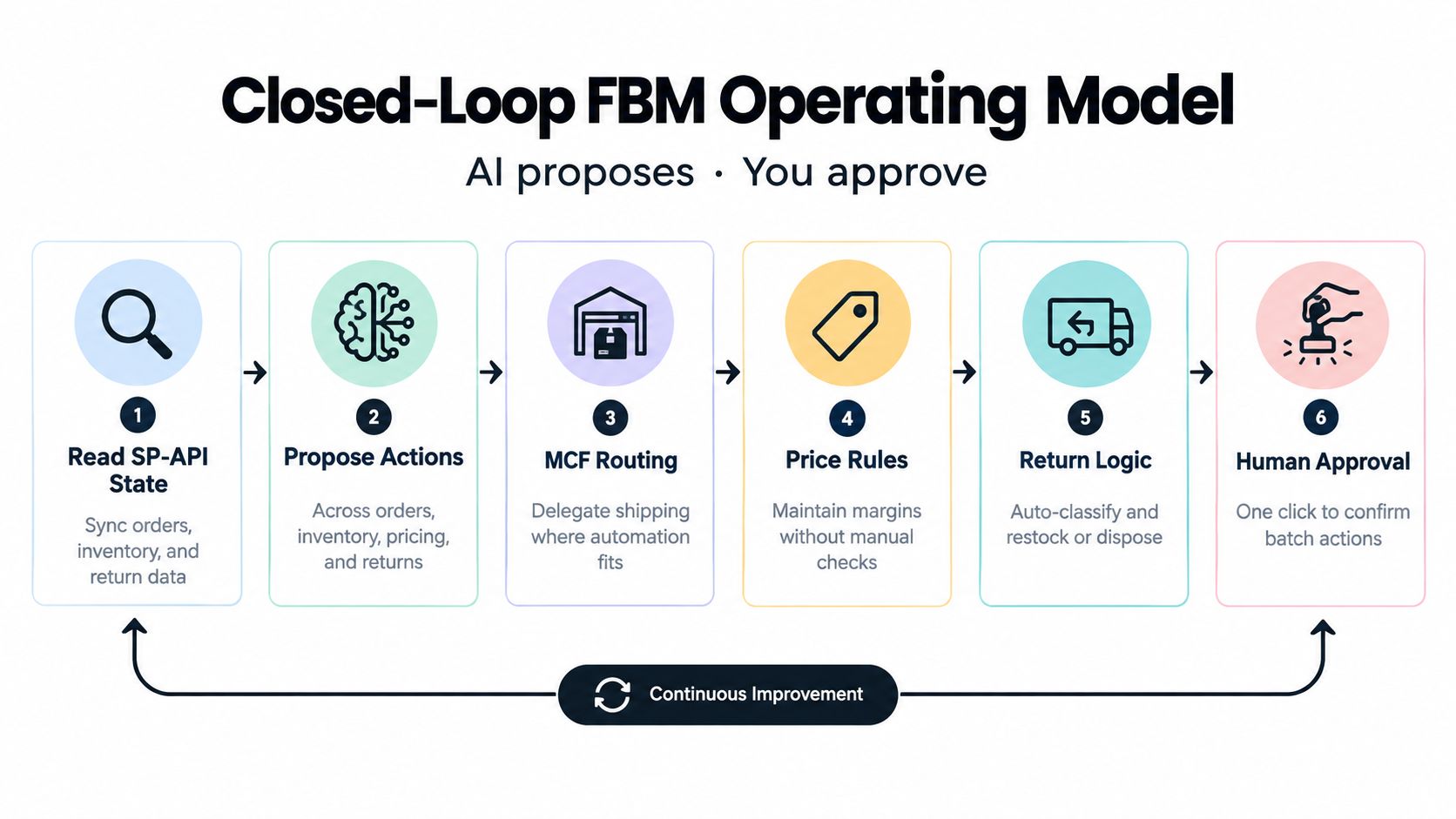
The best FBM setup is closed-loop, not autonomous. The agent reads SP-API state, drafts actions across orders, inventory, MCF routing, prices, and returns, then waits for a human before any write happens. That model is safer because the model is strongest at gathering and comparing facts, while the seller is still the only party that can accept the business risk of a live change.
The guardrails should be boring and strict. Use least-privilege scopes, role-based access, dry-run mode, idempotency keys, retry with backoff, and immutable audit logs for every prompt, tool call, approval, and submitted payload. When something goes wrong, the team should be able to show what the agent saw, what it proposed, who approved it, and what finally changed in the account.
A rollout sequence that works
- Start with one queue: unshipped-order triage is the cleanest first workflow because the data is obvious and the approval point is simple.
- Use read-only access first: let the agent prove it can sort, summarize, and flag exceptions before any write scope is enabled.
- Add a staging seller account: test draft patches and MCF payloads in a controlled environment before touching the live account.
- Set approval thresholds: define when a human must review every batch and when a batch can be auto-queued for review.
- Wire MCF routing rules: decide when FBA stock can be used and when the merchant warehouse stays primary.
- Expand carefully: move into inventory sync and repricing only after the exception rate stays stable.
Agent Central supports that closed loop by giving Claude, ChatGPT, OpenClaw, Cursor, and other MCP clients structured access to seller data, with supported writes previewed by default and logged with before-and-after values. It is a fit for operators who want the agent to prepare the work, not own the outcome.
If FBM fulfillment is already eating time across orders, inventory, MCF routing, and returns, Agent Central is built to give the agent a controlled place to read the data, draft the change, and wait for approval. Connect your Amazon Seller Central and Amazon Ads accounts, wire the workflow into your MCP client, and keep the write step visible and auditable. Start at agentcentral.
Related Agent Central pages
- Amazon Seller Central MCP server
Canonical hosted MCP overview for Seller Central, Ads, inventory, catalog, finance, and fulfillment data.
- Amazon seller data for AI agents
How Agent Central normalizes Amazon seller data before exposing it to AI clients.
- Connect Seller Central to Claude
Step-by-step path from Amazon OAuth to a Claude connector or MCP config.
- ChatGPT with Amazon seller data
ChatGPT-specific setup path for Amazon seller data through hosted MCP.
- Fulfillment tool reference
MCF shipping previews, orders, order creation, tracking, and returns.
- Amazon seller MCP servers compared
How hosted MCP services compare with official Ads MCP, local repos, connector tools, and automation platforms.
Related reading
- How to Track Keyword Rankings the Right Way
Learn how to track keyword rankings with a workflow that covers tool choice, location and device settings, history, alerts, and Amazon seller data via
- 8 Structured Data Examples for Amazon Agent Workflows
Explore structured data examples for Amazon Ads, SP-API, inventory, MCP payloads, and safer agent workflows with practical implementation guidance.
- Query Response Time for MCP Agents
Measure MCP query response time for Amazon seller data, separate client and server latency, and keep report generation outside live agent turns.
- What Is Data Synchronization and How It Works
What is data synchronization? Learn how sync patterns, conflict resolution, and idempotency work for Amazon seller operations and AI agents.
Connect Amazon seller data to your AI client.
Agent Central gives Claude, ChatGPT, OpenClaw, Cursor, and other MCP clients structured access to Amazon Ads, Seller Central, inventory, orders, catalog, finance, and fulfillment data.